


Photo by Kelly Sikkema on Unsplash
Processing the new sudo logging format
Neat Packaging
The Linux sudo command helps Linux administrators run specific programs in the context of another user, typically root. In this way, non-privileged users can run management programs on a system. The tool writes to a log to keep track of users who used sudo to run programs. The default format has been plain text, but from version 1.9.4, it can be configured to log in JSON format.
sudo Logging
By default, sudo uses syslog to send log messages, which means that, on a Linux system, the messages end up in the system journal. You can choose between JSON and sudo plain text as the log format. Text ensures that the messages are easy to read while keeping the amount of information that ends up in the log to a minimum (Figure 1).
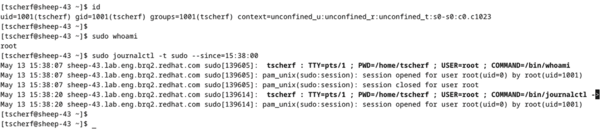 Figure 1: By default, sudo uses an easy-to-read plain text log format for all messages routed by syslog.
If you are looking for more information on a sudo log event, you can change the format of the log message to JSON, which makes several data fields available in the journal (Figure 2). You will find more detailed information on the individual fields of the log format by entering
man 5 sudoers
for the
...

Buy this article as PDF
(incl. VAT)
Buy ADMIN Magazine
Related content
-
Targeted defense against brute force attacks
 The sshguard tool does more than just repel attacks; it monitors login attempts and blocks future access.
 -
Managing Logs
 The open source Graylog platform enables centralized log management across system, application, and network boundaries by collecting logs centrally, analyzing them in real time, and detecting errors and security incidents at an early stage.
 -
Log Management

One of the more mundane, perhaps boring, but necessary administration tasks is checking system logs – the source of knowledge or intelligence of what is happening in the cluster.
-
Installing and operating the Graylog SIEM solution
 Graylog security information and event management combines real-time monitoring and immediate notification of rule violations with long-term archiving for analysis and reporting.
 -
The logging module in Python
 Logging frameworks are a good idea, even for DIY scripts, because they allow programmers to redirect program messages to logfiles. Python developers can turn to the logging module described here.
Subscribe to our ADMIN Newsletters
Subscribe to our Linux Newsletters
Find Linux and Open Source Jobs
Most Popular
Focus On Self-Hosting
• Reliable Network Storage with TrueNAS Community Edition
• Self-Hosted File Syncing with Seafile
• Wiring the Modern Stack with Node-RED
• Self-Hosted Collaboration with Forgejo
• Self-Hosted PaaS with Coolify
• Build and Host Docker Images
• Self-Hosted Pritunl VPN Server with MFA
Support Our Work
ADMIN content is made possible with support from readers like you. Please consider contributing when you've found an article to be beneficial.
