


« Previous 1 2 3 4 Next »
Managing FOSS applications on AIX
Tools at the Ready!
Installing DNF on AIX
If your AIX host has direct Internet access, the installation and setup of DNF is a breeze: You can use the dnf_aixtoolbox.sh script (from the AIX Toolbox PPC repository [4]). With this script, DNF is automatically configured to use the existing IBM AIX Toolbox repositories; that is, as part of the installation process, DNF is configured to access these repositories. Once DNF is installed, you do not need to make any changes to the configuration to use DNF with the IBM hosted repositories. The script downloads and installs the required rpm.rte version (if not already installed) and all the packages needed for DNF as a TAR bundle file.
The script has a couple of options, but my recommendation in most cases is to use the -d: flag, which installs and configures dnf if yum is not installed. Refer to the blog on the IBM Power community site for details on the available script flags [5].
As soon as DNF is installed, you should update root's .profile (or the .kshrc file, or both) to update the $PATH environment variable to include the location of the DNF (and other OSS) binaries in /opt/freeware/bin and /opt/freeware/sbin. The default DNF configuration file will point to the IBM hosted repositories. The repositories for AIX 7.3 are automatically configured in the dnf.conf file (Listing 1).
Listing 1
Default dnf.conf
[main]
cachedir=/var/cache/dnf
keepcache=1
debuglevel=2
logfile=/var/log/dnf.log
obsoletes=1
plugins=1
gpgcheck=1
installonly_limit=3
clean_requirements_on_remove=True
best=True
skip_if_unavailable=True
[AIX_Toolbox]
name=AIX generic repository
baseurl=https://anonymous:anonymous@public.dhe.ibm.com/aix/freeSoftware/aixtoolbox/RPMS/ppc/
enabled=1
gpgcheck=0
[AIX_Toolbox_noarch]
name=AIX noarch repository
baseurl=https://anonymous:anonymous@public.dhe.ibm.com/aix/freeSoftware/aixtoolbox/RPMS/noarch/
enabled=1
gpgcheck=0
[AIX_Toolbox_73]
name=AIX 7.3 specific repository
baseurl=https://anonymous:anonymous@public.dhe.ibm.com/aix/freeSoftware/aixtoolbox/RPMS/ppc-7.3/
enabled=1
gpgcheck=0
Once the root profile has been updated, su to root's updated environment and check that you can now list the available DNF repositories from the IBM AIX Toolbox (Listing 2).
Listing 2
Listing DNF Repos
# echo "export PATH=$PATH:/opt/freeware/bin:/opt/freeware/sbin" >> /.profile
# su -
# dnf repolist
repo id                            repo name
AIX_Toolbox                        AIX generic repository
AIX_Toolbox_73                     AIX 7.3 specific repository
AIX_Toolbox_noarch                 AIX noarch repository
To ensure all the packages are up to date, run:
# dnf update
...etc...
Complete!
So far, so good as you can see from the output, but many internal AIX systems do not have Internet access for security reasons, in which case you have to download the DNF TAR bundle (dnf_bundle_aix_73.tar) manually from the AIX Toolbox PPC repository [6].
If you install DNF from the TAR bundle, the DNF configuration file will still point to the repositories located and accessible on the IBM public Internet server public.dhe.ibm.com. Figure 2 shows that several AIX 7.x systems have DNF installed by the install script; as a result, they access their DNF repositories over the Internet.
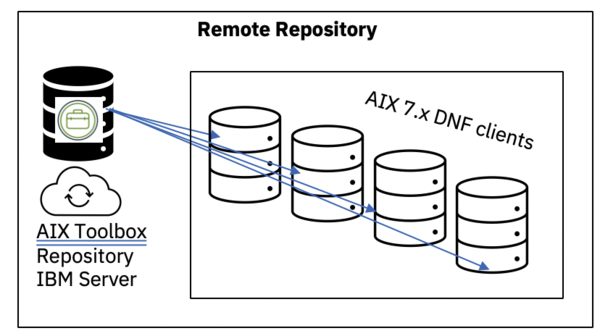 Figure 2: IBM hosted (remote) Internet DNF repository.
For an AIX host that doesn't have access to the Internet, this process is not very useful. A more practical solution is to provide access to the AIX Toolbox repositories from a local server.
Local Repositories
The AIX Toolbox site's directory structure can change; Figure 3 shows how it was organized at press time. The Toolbox can also be accessed from a web browser or with command-line tools like lynx or wget over HTTPS. However, the most common method of accessing the Toolbox is by DNF with local repositories.
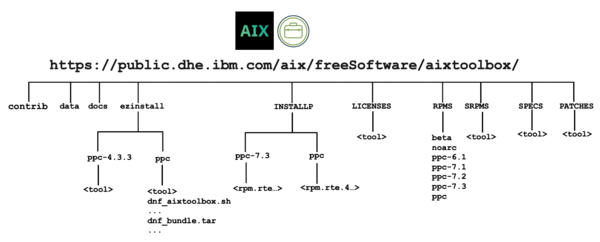 Figure 3: AIX Toolbox repository site structure.
Establishing local DNF repositories containing AIX Toolbox RPM packages is common practice in most organizations because of security policies that prevent direct Internet access to IBM repositories. For AIX hosts that don't have Internet access, you can configure a local AIX Toolbox repository server, then mirror the remote (Internet) repository to a local server, and configure AIX DNF clients to use the local repository server, instead of the Internet-hosted repositories.
To set up a local DNF repository, Internet access is required on one system, which will serve as the repository for other AIX systems. In this scenario, the system with Internet access (creating the local DNF repository) is referred to as the repo server. The other AIX systems that use this repository are known as DNF clients. The repo server must be an RPM-based system (AIX or an RPM-based Linux). A web server should be operational on the repo server, with the repository directory accessible to DNF clients over HTTP or HTTPS, which facilitates DNF connections and retrieval of RPM packages. Figure 4 shows a local repo server that has mirrored the Toolbox locally and DNF clients that access the local repo server over HTTP or HTTPS.
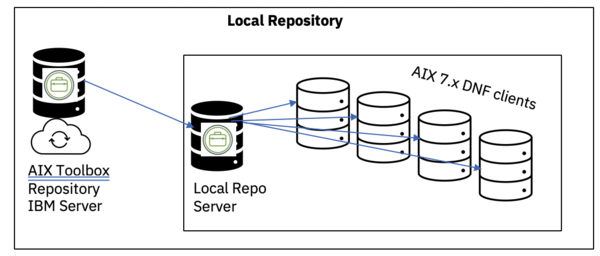 Figure 4: Locally hosted DNF repository.
In this scenario, the /opt/freeware/etc/dnf/dnf.conf file on the Internet-connected repo server must have entries for the public IBM repository servers; then, the repo server must sync (mirror) the entire AIX Toolbox repository with the reposync command, which mirrors the entire repository from the IBM servers to the local repo server.
The next step is to create the repository metadata because the reposync command simply mirrors all the files to the local server; it does not create the required repo metadata files. To do this on the newly synced local repos, you must run the createrepo command for each repository location that was synced. This method is not the focus of this article, so please refer to an article on the IBM Developer
site [7] that provides a detailed description of the steps.
Now that the local repo server is configured and the repos are available, the DNF clients can be configured by (first installing DNF, if it is not already installed and then) editing their dnf.conf files and adding entries for the local repo server. A snippet from a sample dnf.conf file is shown in Listing 3, where the local repo server named sisko has a web server listening on port 80 (HTTP).
Listing 3
dnf.conf for Local Repo Server
[My_AIX_Toolbox]
name=My AIX generic repository
baseurl=http://sisko:80//aixtoolbox/RPMS/ppc
enabled=1
gpgcheck=0
...etc...
However, what if your local repo server also doesn't have Internet access? What can you do in this situation?
Creating a Local Repository
Setting up a local repository for a system with no Internet access (of any kind, from any AIX server) is possible and typically allowed by an organization's security policy. Two options are available in this case; however, in my opinion, one approach is more viable than the other.
In the first option, all of the RPM packages can be downloaded manually from the AIX Toolbox website; then, the administrator could copy the packages to a local repo server and configure the repositories. This time-consuming and tedious task would need to be performed each time the AIX Toolbox remote repository was updated, which requires at least one Internet-connected system somewhere in the organization that is able to download the entire
AIX Toolbox. Often administrators will use their local PC or laptop to achieve this task (or even use the wget -m command from their Linux or Mac laptop). They then have to copy the files from their PC or laptop to the local AIX or Linux repo server (typically with scp or sftp for file transfer).
The second option, which I discuss in more detail here, is to download the Toolbox media ISO image (or TAR file) from IBM and then install the packages by either (1) mounting the ISO image or (2) extracting the packages from the TAR file. Of course, this method requires at least one Internet-connected system somewhere in the organization that is able to download the ISO image or TAR file from the IBM site and transfer the file to a local repo server. Again, sys admin's will typically use their local PC or laptop to achieve this task; then, they can copy the files from their workstation to the local AIX or Linux repo server (again, with scp or sftp for file transfer).
With available AIX Toolbox media images, you can set up a local DNF repository for AIX versions 7.1, 7.2, or 7.3. The Toolbox media provides a script to set up the local DNF repositories, install and configure DNF (if required), and add local repositories. The ISO (or TAR) images contain a complete (point in time) copy of the entire AIX Toolbox. The ISO image (alone) is typically anywhere from 8 to 10GB in size. The steps for creating local repositories from media are as follows:
First, download the AIX Toolbox media ISO (or TAR or TGZ file) from either the IBM Entitled Systems Support (ESS) site [8] or the IBM Passport Advantage website [9] (depending on which AIX product authorizations you have).
If your source is ESS, you need to select and download either the ISO or the tar.gz (TGZ) image from the 2259 feature of your AIX product entitlement. If you're downloading from the Passport Advantage website, you need to select and download the file associated with one of the current parts M04S8ML (.tar.gz) or M04SBML (.iso). From here, look for the most recent AIX eAssembly and download the file for one of two entries with labels that include AIX Toolbox for Linux Applications
.
I assume you are downloading the ISO image from ESS (Figure 5). Under Private Cloud Edn with AIX 7
, select the 2259: AIX Toolbox for Linux APPS
option and the ISO, AIX Toolbox for Linux Applications (12/2024)
package to download an ISO image named (at the time of writing) ESD-Toolbox_for_Linux_Apps_Common_7.2-7.3_122024_LCD4107740.iso; transfer this file from your PC to your AIX server, where you plan to host the local repository.
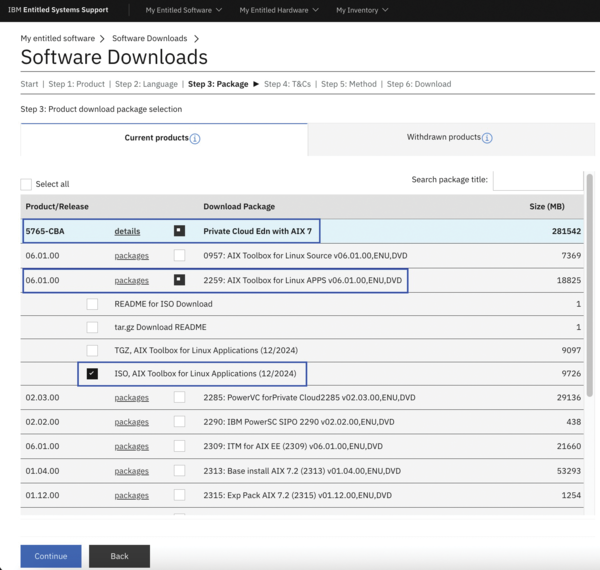 Figure 5: Download ISO, AIX Toolbox for Linux Applications (12/2024) from IBM ESS.
Once the ISO has been downloaded and transferred, the next step is to use the loopmount command to mount the ISO over a new directory (mountpoint) named /aixtoolbox:
# mkdir /aixtoolbox
# loopmount -i ESD-Toolbox_for_Linux_Apps_Common_7.2-7.3_122024_LCD4107740.iso -o "-V udfs -o ro" -m /aixtoolbox
The next step is to run the
dnf_aixtoolbox_local.sh
script, located in /aixtoolbox/ezinstall/ppc, to create local repositories from ISO media. The location of the mounted Toolbox images in Listing 4, /aixtoolbox, is the mountpoint for the ISO image.
The dnf_aixtoolbox_local.sh script does two things. First, it installs DNF if it is not already installed (note the dnf installed successfully
message in Listing 4); second, it creates local repositories and updates the dnf.conf file with the repository details. (If DNF was already installed, a backup of the existing dnf.conf file is copied to dnf.conf_local_bak in /opt/freeware/etc.) Reviewing the resulting dnf.conf file (Listing 5) shows that entries were created for all three (local) AIX repositories and that baseurl= was set to a local file repo (i.e., the names start with file:///). You'll also notice that the repository names all start with Local_, indicating that these are local repositories.
Listing 4
dnf_aixtoolbox_local.sh
# cd /aixtoolbox/ezinstall/ppc
# ./dnf_aixtoolbox_local.sh /aixtoolbox
Copying dnf_bundle_aix_73.tar to /tmp/dnf-20241003191846 .....
Extracting dnf_bundle_aix_73.tar ...
x ca-certificates-2023.2.60-0.aix7.1.ppc.rpm, 991206 bytes, 1936 tape blocks
...etc...
  31:python3-gpg-1.13.1-64_3          ################################# [100%]
dnf installed successfully.
Please run 'dnf update' to update packages to the latest level.
...etc...
Creating the dnf.conf file with required locale repositories.
The default /opt/freeware/etc/dnf/dnf.conf has been saved as /opt/freeware/etc/dnf/dnf.conf_local_bak
#
Listing 5
Config File for Local Repositories
#
...
[Local_AIX_Toolbox]
name=Local AIX generic repository
baseurl=file:///aixtoolbox/RPMS/ppc/
enabled=1
gpgcheck=0
[Local_AIX_Toolbox_noarch]
name=Local AIX noarch repository
baseurl=file:///aixtoolbox/RPMS/noarch/
enabled=1
gpgcheck=0
[Local_AIX_Toolbox_73]
name=Local AIX 7.3 specific repository
baseurl=file:///aixtoolbox/RPMS/ppc-7.3/
...
Now when you run the command to list the available repositories (Listing 6, with verbose output), you'll notice that each repository ID starts with Local_, signifying that these local repositories are located on this server.
Listing 6
Confirming Repositories Are Local
# dnf repolist -v | egrep "Repo-id|Repo-baseurl"
Repo-id            : Local_AIX_Toolbox
Repo-baseurl       : file:///aixtoolbox/RPMS/ppc/
Repo-id            : Local_AIX_Toolbox_73
Repo-baseurl       : file:///aixtoolbox/RPMS/ppc-7.3/
Repo-id            : Local_AIX_Toolbox_noarch
Repo-baseurl       : file:///aixtoolbox/RPMS/noarch/
Running dnf update updates packages to the latest version. Once the local repository server is configured from ISO media, you can now install and configure a web server and point your DNF clients to this system as a local repo server.
« Previous 1 2 3 4 Next »

Buy this article as PDF
(incl. VAT)
Buy ADMIN Magazine
Related content
-
New features in MariaDB 10.3
 What lacked maturity in MariaDB 10.2 has now been sorted out in version 10.3. We look at the benefits you can reap now.
 -
MariaDB vs. MySQL
MariaDB is a cousin of MySQL – but not an identical twin.
-
Linux distributions for containers
 When operating multiple containers in an environment, you need to use special Linux distributions as a base, such as CoreOS or Red Hat Atomic. We show you how to add applications to and create a custom Atomic software repository for the base system.
 -
Exploring the differences between MariaDB and MySQL
 MariaDB is a cousin of MySQL – but not an identical twin
 -
PowerDNS Authoritative server high availability with MariaDB Galera
 Combining the PowerDNS Authoritative server daemon with MariaDB's multiprimary Galera cluster allows a simple yet robust solution for your DNS needs.
Subscribe to our ADMIN Newsletters
Subscribe to our Linux Newsletters
Find Linux and Open Source Jobs
Most Popular
Support Our Work
ADMIN content is made possible with support from readers like you. Please consider contributing when you've found an article to be beneficial.
