
Wamsler, Fotolia
Client management and configuration
Control Center
Centralized client management is possible in the enterprise with the use of group policy functionality included in Windows. However, administrators will soon find themselves encountering restrictions in configuration and deployment. Desktop Authority http://1 offers several options for automating computer and user profile provisioning on top of group policy management (Figure 1). Additionally, Desktop Authority includes remote management and hardware and software inventory functionality, along with the USB port security module and the password self-service for fast resetting of passwords by users.
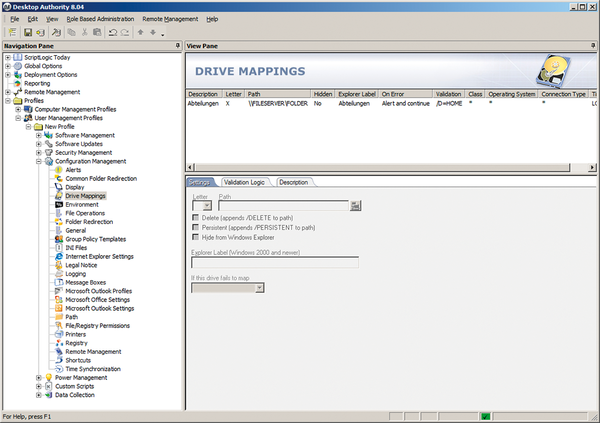 Figure 1: The Desktop Authority Manager window in a typical Windows layout with the navigation tree on the left and the details in the main panel.
Installation and Setup
To install Desktop Authority, you will need an Active Directory structure: The integration and assignment of various profiles uses the Netlogon share on the domain controllers.
Desktop Authority will install on Windows Server 2003 (R2) and Windows Server 2008 (R2). The configuration and inventory data for the reporting functions are store in a Microsoft
...

Buy this article as PDF
(incl. VAT)
Buy ADMIN Magazine
Related content
-
Workspace ONE for endpoint management
 VMware Workspace ONE provides a secure and user-friendly digital workplace. We look at the features, components, and architecture of Workspace ONE, as well as application management and simplification of the integration of end devices through user self-enrollment.
 -
Setting up secure RDP connections
 Know when to make RDP available on the Internet for remote access to Windows Server and how to configure connections securely when you do.
 -
PC over IP
 Anyone who has tried to to run graphics-intensive applications using an application-sharing protocol like RDP knows how miserably these technologies fail. But the PCoIP protocol and special hardware means that even heavy-duty workstations can operate remotely.
 -
Manage Windows images with the Windows ADK
 The Windows Assessment and Deployment Kit is a universal verification and management suite for deployments, with tools for analyzing system performance and simplifying the deployment of Windows images.
 -
The pros and cons of a virtual desktop infrastructure
 For years, the replacement of physical PCs with virtual PCs has been touted as a mass movement, but so far, the revolution has not taken place. We explore the background.