
© Alessandro Russo, 123RF.com
Changes in Exchange Server 2013
New Clothes
During the installation of Exchange Server 2013 [1], you will notice that the new server offers far fewer options. Microsoft has dumped the Hub Transport and Unified Messaging server roles. The functions of these two roles are handled by the Mailbox server and the Client Access server in the new version.
Email transport in Exchange Server 2013 is handled by three services: the Front End Transport Service (FET), the Hub Transport Service (HT), and the Mailbox Transport Service (MT), which now belong to the Mailbox server role. The transport services are also responsible for implementing the improved transport rules (Figure 1). The latter go by the name of Data Loss Prevention (DLP) and are designed to prevent sensitive data from leaving the corporate network. Also, Exchange Server 2013 integrates an antivirus scanner. The servers scan all incoming and outgoing email for viruses. Companies that rely on third-party antivirus scanners can disable this feature, of course.
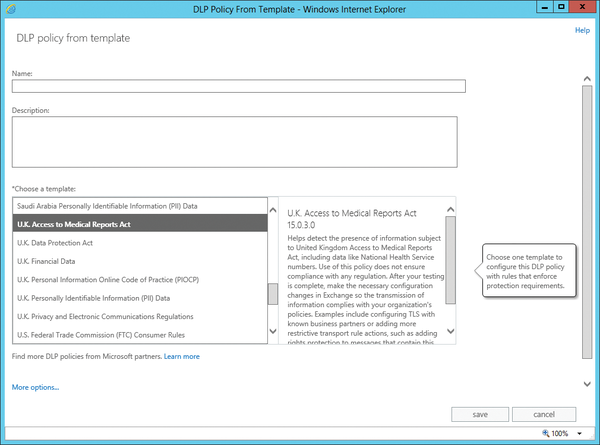 Figure 1: The new transport rules help harden Exchange Server 2013.
Although Exchange Server 2013 can generally be installed in existing organizations with Exchange Server 2007/2010, you will need SP3 for Exchange Server 2010 and a hot fix for Exchange Server 2007. Older versions such as Exchange Server 2000/2003
...

Buy ADMIN Magazine
Related content
-
New Exchange standard
 Service Pack 1 for Exchange 2013 introduced a new protocol, which has become the default in Exchange 2016: MAPI over HTTP.
 -
Microsoft Exchange 2010: The Highlights
 For years, Exchange has been the standard in-house server solution for all messaging tasks on Windows. This article introduces the highlights of the new Exchange version 2010.
 -
Exchange Online migration with the Hybrid Agent
 Exchange's Hybrid Agent takes the complexity out of migrating from a local Exchange environment to Exchange Online.
 -
IceWarp: MS Exchange Mail Server for Linux
Admins who use Microsoft servers don’t have to rely on Exchange for email with alternatives like the IceWarp mail server.
-
Exchange Server through 2025
 The next generation of Exchange 2019 was announced for the second half of 2021, but the release plan was revoked in 2022, and the next Exchange was postponed until 2025. We take an in-depth look at the current timetable.