
Lead Image © Tyler Olson, 123RF.com
FreeRADIUS for WiFi hotspots
Large Radius
Do you know someone who keeps the WiFi password on a piece of paper under their keyboard? Or somewhere equally as insecure? Sloppy password practices are a nightmare for any admin; controlling access to the company network is impossible with a shared password, even if you have a manageable number of employees.
How do you implement security on a WiFi network without a shared password? One solution is IEEE 802.1X, a standard mechanism for network authentication. For enterprise WiFi hotspots, this login procedure usually goes by the name of WPA Enterprise (Figure 1).
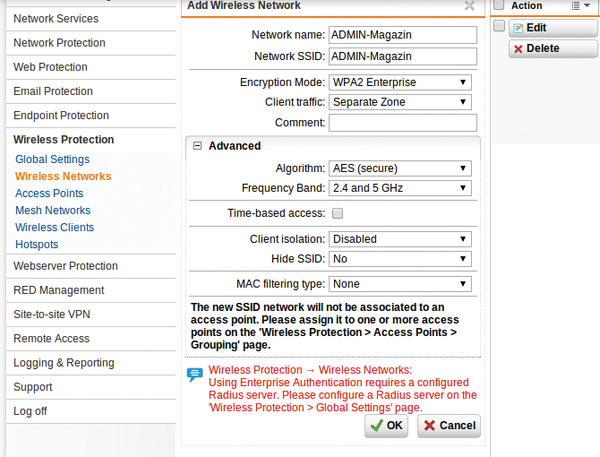 Figure 1: Some hotspots support a user-specific configuration with WPA Enterprise.
In most cases, the user database is not managed by the hotspot itself. Instead, the hotspot queries a RADIUS server on the same network (Figure 2): The central user administration actually takes place on the RADIUS server. If you take on a new employee, you enter their account on the RADIUS server, WiFi access included.
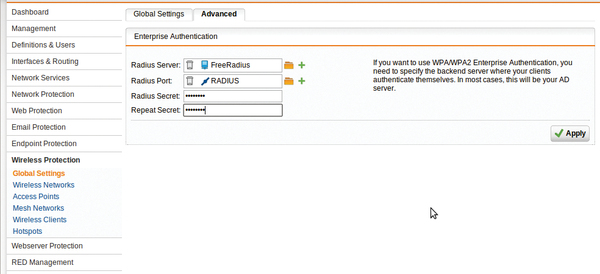
...

Buy ADMIN Magazine
Related content
-
FreeRADIUS for WiFi Hotspots

Tired of contending with shared passwords for wireless networks? Use WPA Enterprise and a FreeRADIUS server to set up a user password solution for wireless users.
-
Open source remote access to Windows
 FreeNX and the WiKID Strong Authentication System combine to create open source remote access that delivers the speed of NX with the security of SSH tunnels and Linux.
 -
Microsoft Network Policy Server
 Redmond's RADIUS implementation connects systems and provides secure authorization and logging.