
Lead Image © yemelyanov, 123RF.com
Call web pages in the terminal with Browsh
Block Graphics
A graphical user interface is not always available (e.g., when working with secure shell (SSH) on a remote server), and in some areas, data merely drips from the Internet. If you want to save bandwidth or work at the command line, you will appreciate a pure text browser. Browsh takes this one step further and even converts images and videos into characters. For this to work, the browser relies on a well-known friend in the background: Firefox.
Shell Fan
Many Linux users prefer the command line to a graphical user interface. If you are a die-hard shell fan and want to look up something on the Internet, web browsers like the classic Lynx that only deliver plain text on a page can help – and save bandwidth in the process. However, you lose the layout and images.
A modern text browser composes a web page completely from text characters [1], keeping the layout to a large extent. The software even tries to display graphics and animation consisting of individual color blocks (Figure 1). In many cases, you can at least guess the appearance of the graphic.
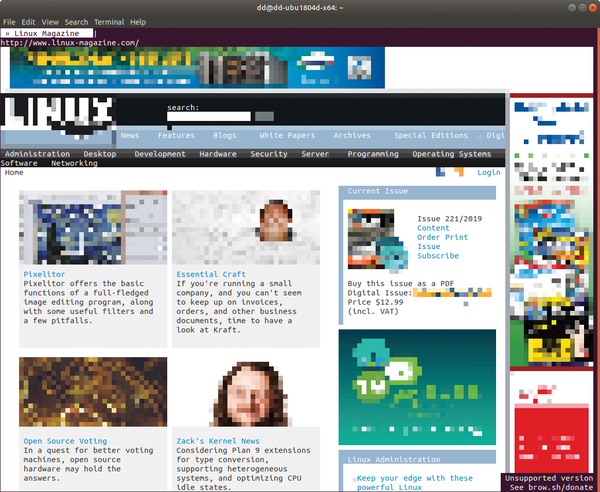 Figure 1: Browsh transforms a web page, like this one from Linux Magazine,
...

Buy this article as PDF
(incl. VAT)
Buy ADMIN Magazine
Related content
-
Virtualize Browsers, Apps, and Desktops
 Neko virtualizes browsers, applications, and desktops on Linux, supporting local or network-based access. We describe the technical platform and show you how to get started.
 -
Application security testing with ZAP in a Docker container
 Pitting the OWASP Zed Attack Proxy against an insecure web app in a Docker container illustrates how you can tick a lot of security checkboxes.
 -
Managing access credentials
 Most Internet services require password-protected individual accounts. A password manager can help you keep track of all your access credentials.
 -
Remote desktop based on HTML5
 HTML5 offers a range of new features, such as audio and video support, without needing plugins like Flash or Java. This opens up completely new options in terms of content delivery via the web – and also for mobile access to applications on the LAN.
 -
Linux alternatives to Windows software
 Free software alternatives to common commercial Windows programs often are little understood. We show which applications on the Linux desktop give an especially good account of themselves.