
© Dvarg, 123RF.com
Introduction to LVM
APieceof the Pie
If a partition in a legacy partitioning system starts to run out of space, administrators have two options: They can mount another medium at a new mountpoint and accept the fact that they need to modify their paths or work with alias constructions, or they can replace the disk(s) with a larger model and restore a backup of the complete system to the new disk. This last approach means that the system is unavailable for an extended period of time, and the new disks could turn out to be too small at some point in the future.
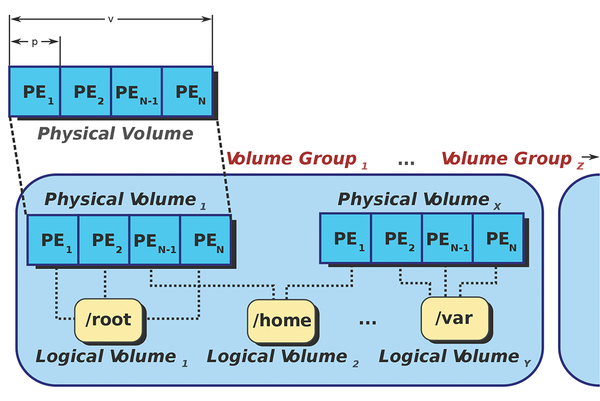
The Logical Volume Manager (LVM) gives administrators an escape route by acting as an intermediate logical layer between the physical medium or partitions and the filesystem. Before I demonstrate the principle based on a hands-on example, I will look at the most important terms in the world of LVM [1] [2].
Physical volumes (PVs) are block devices (i.e., whole disk or partitions). To allow an LVM to use a PV, the LVM must be initialized using a command that I will show shortly. Doing this writes an LVM label and some metadata to the PV.
The PV is divided up into units of the same size (4MB by default) known as physical extents (PEs). A PE is the smallest allocatable data volume. Figure 1 illustrates the principle.
...

Buy this article as PDF
(incl. VAT)
Buy ADMIN Magazine
Related content
-
Managing Storage with LVM

Managing Linux storage servers with the Linux Logical Volume Manager.
-
Manage logical volumes with GUI tools
 Linux uses the Logical Volume Manager to manage large hard drives and mass storage clusters efficiently. We look at various graphical tools that help serve up logical volumes and volume groups.
 -
Software RAID in Windows, macOS, and Linux
 If RAID hardware is missing on your server, Windows, Linux, and macOS offer various options for building software RAID.
 -
Disaster Recovery with Built-In Tools on Windows Server 2025
 Windows Server 2025 has built-in tools for setting up resilient backups. We look at how to reset roles selectively for Active Directory, Hyper-V, and Certificate Services and how to automate processes with PowerShell, wbadmin, and event triggers.
 -
Professional backup solutions compared
 Seven leading and popular backup solutions line up to face the Linux Technical Review test team, whose members have checked nearly 100 individual features in a comparative test.