© Photographer, 123RF.com
Tools for troubleshooting the network
LAN Under Investigation
Time spent on complex troubleshooting is usually sorely needed elsewhere. Therefore, tools that allow more efficient troubleshooting are always welcome. Network testers promise this efficiency on the LAN, but do they live up to their promises? I looked at two contenders in this field: LanXPLORER [1] and OneTouch AT [2].
LanXPLORER
The basic tests provided by this handy little device by IDEAL Industries (Figure 1) include wire testing. In the setup, you can select different wiring schemas from CAT5e through UTP, CAT 7, STP, and Coax RJ59. One end of the cable is connected with the LanXPLORER and the other to a specific mating component. With this device, you can determine the length of the cable, whether it is broken or improperly connected, and whether there is a short-circuit or cross-talk (Figure 2).
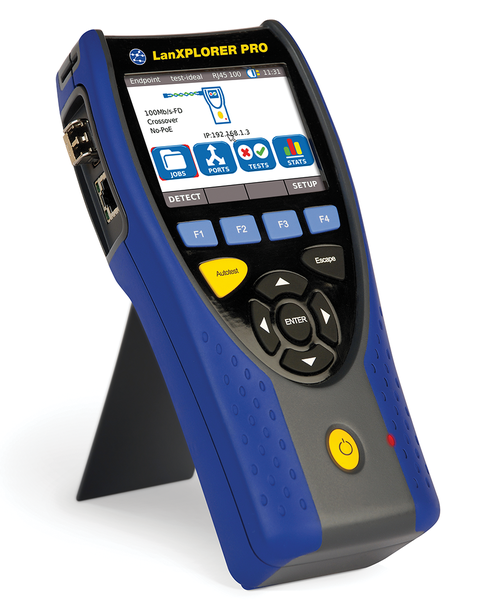 Figure 1: The handy LanXPLORER weighs only 650g and lets you test the basic functions of a local network wherever you are.
 Figure 2: The cable is miswired. LanXPLORER has determined the length and checked the wiring.
It makes sense to run this check before any others. A built-in tone generator in conjunction with an inductive receiver also lets you discover the remote end of a cable if the assignment is otherwise unclear.
Active Tests
Next, LanXPLORER is ready for a number of active network tests. If you use Power over Ethernet (PoE), you can verify this function. The tester can ping a remote node (10 targets can be preset) to log the packet loss and delay and perform a traceroute, reporting run times to each hop. Additionally, you can gather information for all the hosts, servers, and printers on a subnet.
The result of this type of portscan, which also identifies the most important services, can be saved as a netmap (Figure 3). In subsequent test runs, you can compare the results with a previously saved map; devices added or removed are listed in each category.
 Figure 3: Netmap overview. Saved views can be compared with the latest findings.
Some of these tests (e.g., wiring tests, PoE load tests, pings, traceroutes, and the netmap comparison) or a selection of tests, can be grouped as an autotest and launched at the press of a button. However, the choice of automatic tests is not entirely arbitrary.
On request, LanXPLORER will generate simple statistics, such as top 10 lists for the network protocols used, the most common errors, or the most active transmitter. It also shows you the parameters for the currently active links (e.g., speed, auto-negotiation, and duplex type).
Although variants of the device can listen in to normal twisted-pair cables, the Plus and Pro models also offer this functionality for the WiFi network or, with the appropriate interface, for optical fibers. However, only the Pro model, which was tested here, can be looped into a communication path, thanks to a second network interface. In this inline mode, it also offers simple VoIP statistics and PC diagnostics. These tests in turn comprise protocol statistics and a packages counter and can identify the parameters transmitted to the endpoint by DHCP.
Limitations
The options offered by the functional tests and the device's ability to analyze performance problems are fairly limited. LanXPLORER cannot inspect or log packets, and apart from rudimentary output of DHCP parameters, you cannot check services as a general rule. Additional measuring devices are needed to detect the transmission speed. Filters are limited to specific fixed selections.
If you need to troubleshoot network problems in depth, a laptop and an extra cable tester will be more helpful. This mix of equipment, however, is more unwieldy, heavier, more complex, and less robust than a specialized network tester.
In contrast, LanXPLORER combines all of the basic tests in a single device that weighs little more than a pound and fits in a jacket pocket. The controls are very simple and intuitive thanks to the touchscreen display. Thus, the most common problems, particularly hardware failures, can thus be detected reliably.

Buy this article as PDF
(incl. VAT)
Buy ADMIN Magazine
Related content
-
Nine home clouds compared
 Dropbox was the first of a number of cloud service providers. However, only services that promise full control over your own data can give users a feeling of security. We provide an overview of nine cloud projects and two BitTorrent tools.
- Using Nmap to Troubleshoot Your Network
- Automate Network Testing with iperf3
-
Successful protocol analysis in modern network structures
 Virtual networks and server structures require additional mechanisms to ensure visibility of data streams. We show how to monitor and analyze network functions, even when virtualization is involved.
-
TKperf – Customized performance testing for SSDs and HDDs
 SSD manufacturers try to impress customers with performance data. If you want to know more, why not try your own performance measurements with a standardized test suite that the free TKperf tool implements.