
Lead Image © Milos Kojadinovic, 123RF.com
Secure Active Directory with the rapid modernization plan
Shields Up!
Microsoft defined the logical separation of user accounts with different authorizations at different levels in the Enhanced Security Admin Environment (ESAE) recommendation. Often referred to as "Red Forest," it is still used in many companies today. Privileged company-wide administrator accounts are managed in their own forest and therefore isolated from the local administrator accounts on servers, workstations, and other devices. If attackers gains access to a local administrator account, their scope of action is limited to the validity of this one account; above all, they cannot get up to any mischief in the entire Active Directory (AD) enterprise.
The continuation of this policy in the rapid modernization plan (RaMP) [1] supports admins in implementing the most important steps of Microsoft's privileged access strategy as a replacement for ESAE. This plan and the associated documents offer admins a step-by-step guide for securing access to enterprise resources. Of course, the most important prerequisite is that you are using Microsoft's Entra ID, formerly known as Azure Active Directory.
Separate Admin Accounts
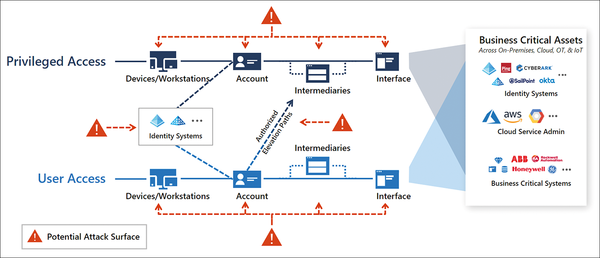
As in ESAE, the various accounts for administrative function are strictly segregated. Figure 1 shows the strategy for breaking accounts by privileged and non-privileged, along with reducing the attack surface.
...

Buy this article as PDF
(incl. VAT)
Buy ADMIN Magazine
Related content
-
Backup and Restore in Entra ID
 Data backup is often overlooked in Microsoft Entra ID. User accounts, groups, and Conditional Access policies need targeted protection. We tell you which objects are backed up automatically, where you need to take action, and how you can effectively combine backups and documentation.
 -
Find Entra ID vulnerabilities with AzureADRecon
 The AzureADRecon tool lets you analyze Entra ID environments, generate reports, and identify potential risks at an early stage by providing detailed insights into users, roles, and service principals. We show you how to set up, automate, and use the tool for security checks.
 -
Recovering from a cyberattack in a hybrid environment
 Restoring identity is an important part of disaster recovery, since it lays the foundation for restoring normality and regular operations. We look into contingency measures for hybrid directory services with Entra ID, the Graph API, and its PowerShell implementation.
 -
Manage user accounts with MS Entra lifecycle workflows
 Microsoft Entra unites key identity technologies, resulting in a centralized management tool for Azure Active Directory. We look at how MS Entra works in conjunction with a local Active Directory.
 -
Secure status and event monitoring of tier 0 systems
 We show you how monitoring your sensitive IT systems can be a more secure experience.