
Photo by Marija Zaric on Unsplash
Hotpatching in Windows Server 2025
Trouble-Free
Hotpatching directly modifies the code of processes running in RAM, eliminating the need for a restart. The key advantage is reduction of downtime, as servers remain operational and security updates are made without delay. Not all updates support this technology, though, and hotpatching will probably be limited to regular patch day updates in the future. Because not all updates support hotpatching, rebooting is still necessary, which certainly puts the benefits into perspective. In this article, you'll also learn about more limitations.
Microsoft Azure Required
On Windows Server 2022, you need the Datacenter: Azure Edition license, which must be running in Azure or Azure Stack hyperconverged infrastructure (HCI), to use hotpatching. Although hotpatching will also be available in local data centers in the Standard and Datacenter editions in the future, you still need an Azure connection.
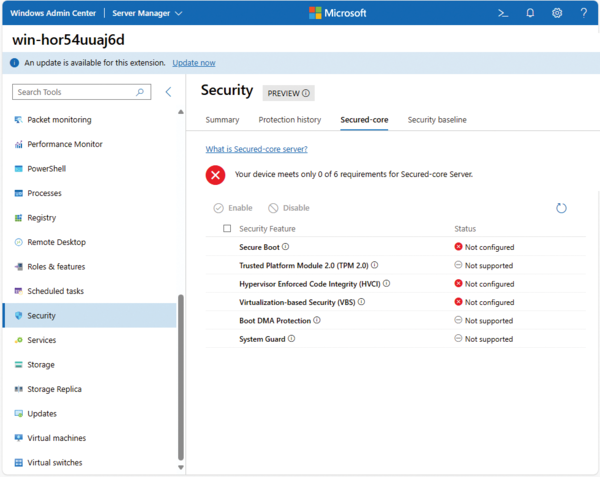
To use hotpatching, you must first enable virtualization-based security (VBS) on Windows Server 2025 in the Security | Secured-core section of the Windows Admin Center (Figure 1). VBS uses Hyper-V virtualization technology to move security-critical processes to an isolated environment. VBS isolates particularly sensitive data and processes from the regular operating system environment, which greatly limits the possibilities for attack.
...

Buy this article as PDF
(incl. VAT)
Buy ADMIN Magazine
Related content
-
Security features in Windows Server 2022
 The release of Windows Server 2022 adds some new security features to its server operating system that might not be earth-shattering; however, you will find Secured-core, DNS over HTTPs, TLS 1.3, and Azure Stack HCI genuinely useful in your constant fight to harden server operations.
 -
Manage updates and configuration with Azure Automation
 Microsoft Azure Automation provides a cloud-based service for handling automation tasks, managing updates for operating systems, and configuring Azure and non-Azure environments. We focus on VM update management and restarting VMs.
 -
Server update with Azure Update Management
 Microsoft Azure Update Management automatically patches servers in on-premises data centers, virtual servers on Azure and other cloud services, and even Linux servers.
 -
Keeping Azure VMs up to date
 The operating system of an Azure virtual machine can be kept up to date by a number of methods; we provide an overview and look in detail at Azure Automation Update Management, the Azure Update Management Center, automation options, and other related topics.
 -
Azure Arc agent on local machines
 Manage your on-premises servers with Windows Admin Center in Azure.