« Previous 1 2
Develop a simple scanning application with the NAPS2 SDK
Digital Docs
Running the Application
To start the application [6], click the Run Code button (typically a Play icon in the top right corner; Figure 3). Alternatively, you can run the project with the command
dotnet run
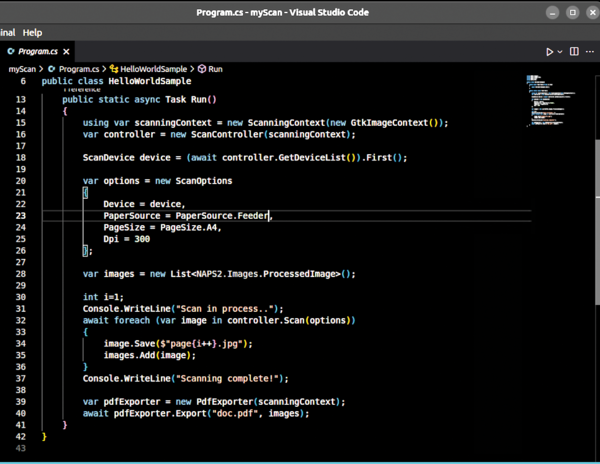 Figure 3: Portion of the VSCode.
after ensuring you are in the folder where the .csproj file is located.
Assuming you are scanning a three-page document, the output will be similar to that shown in Figure 4. At the end of the process, you will find three JPEG files and doc.pdf in the project folder, representing the conversion of the scanned pages into a single PDF.
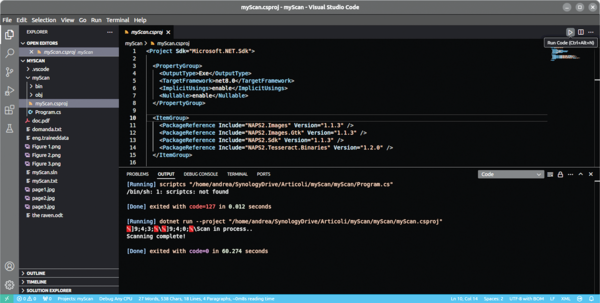 Figure 4: List of imported NuGet packages.
Conclusion
Although not a production sample, this code demonstrates how to build a document-scanning and PDF export utility. It efficiently integrates scanning, image processing, and file export into a seamless workflow, providing a foundation on which you can expand for more complex applications, such as adding OCR or scanner sharing.
Infos
- NAPS2: https://naps2.com/
- VSCode: https://code.visualstudio.com/download
- VSCode terminal install: https://code.visualstudio.com/docs/setup/linux
- Install .NET on Linux: https://learn.microsoft.com/en-us/dotnet/core/install/linux
- NAPS2.Sdk: https://www.naps2.com/sdk/doc/api
- Code in this article: https://linuxnewmedia.thegood.cloud/s/9nFQcFb2p8oRMEJ
« Previous 1 2

Buy this article as PDF
(incl. VAT)
Buy ADMIN Magazine


US / Canada
UK / Australia
Related content
-
Vulnerability scans for containers
 Containers are finding their way into business-critical environments, which is reason enough to think about how to examine the deployed container images for weak points.
 -
Trivy security scanner
 The Trivy open source tool provides information on container and software security.
 -
Full-spectrum security scanner
 We take a close look at the Trivy scanners for vulnerabilities, misconfigurations, and secrets with Ubuntu-centric guidance on performance tuning, security configurations, and scalability across Linux distributions.
 -
Vulnerability assessment best practices for enterprises
 A vulnerability assessment is an important step toward protecting an organization's critical IT assets.
 -
Inventory and manage your IT systems
 Open-AudIT inventories, manages, and monitors IT assets, whether hardware, software, network device, or virtual machine. We explain how to install the software and work through the initial configuration.