



Lead Image © Nataliia Natykach, 123RF.com
Managing FOSS applications on AIX
Tools at the Ready!
IBM has taken an active role in free and open source software (FOSS), in particular for Linux running on their Power servers. All modern day Power servers are now capable of running many different Linux distributions natively. Great, but what about the classic AIX operating system that still runs on so much IBM hardware?
Over the last couple of decades, IBM has taken steps to build open support into AIX [1]. The AIX Toolbox for Open Source Software [2] is an IBM site that serves as the primary source of GNU and open source tool packages ported to the AIX environment. The focus of this article is to look at the most efficient method of managing FOSS on AIX with the DNF package manager.
AIX Toolbox
Today more than 400 open source packages are available for download at the IBM hosted repository (Figure 1). The packages are kept current, with an update provided annually for most packages.
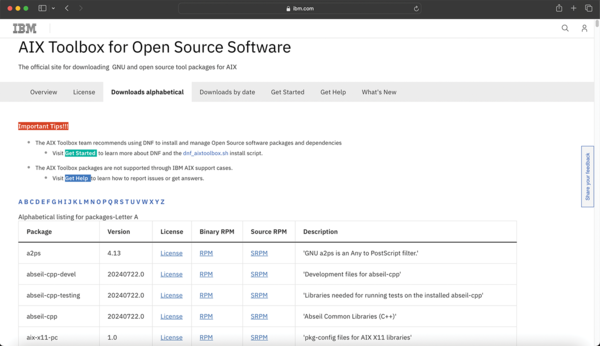 Figure 1: The IBM AIX Toolbox website for open source software.
Any security vulnerabilities are addressed, and fixes are provided in a timely fashion. The AIX Toolbox contains many popular and useful development packages, such as languages, compilers, and debuggers. Many
...

Buy this article as PDF
(incl. VAT)
Buy ADMIN Magazine
Related content
-
New features in MariaDB 10.3
 What lacked maturity in MariaDB 10.2 has now been sorted out in version 10.3. We look at the benefits you can reap now.
 -
MariaDB vs. MySQL
MariaDB is a cousin of MySQL – but not an identical twin.
-
Linux distributions for containers
 When operating multiple containers in an environment, you need to use special Linux distributions as a base, such as CoreOS or Red Hat Atomic. We show you how to add applications to and create a custom Atomic software repository for the base system.
 -
Exploring the differences between MariaDB and MySQL
 MariaDB is a cousin of MySQL – but not an identical twin
 -
PowerDNS Authoritative server high availability with MariaDB Galera
 Combining the PowerDNS Authoritative server daemon with MariaDB's multiprimary Galera cluster allows a simple yet robust solution for your DNS needs.
Subscribe to our ADMIN Newsletters
Subscribe to our Linux Newsletters
Find Linux and Open Source Jobs
Most Popular
Focus On Self-Hosting
• Wiring the Modern Stack with Node-RED
• Self-Hosted Collaboration with Forgejo
• Self-Hosted PaaS with Coolify
• Build and Host Docker Images
• Self-Hosted Pritunl VPN Server with MFA
• Self-Hosted Chat Servers
Support Our Work
ADMIN content is made possible with support from readers like you. Please consider contributing when you've found an article to be beneficial.
