
Lead Image © cepixx, 123RF.com
Safeguard and scale containers
Herding Containers
Since the release of Docker [1] three years ago, containers have not only been a perennial favorite in the Linux universe, but native ports for Windows and OS X also garner great interest. Where developers were initially only interested in testing their applications in containers as microservices [2], market players now have initial production experience with the use of containers in large setups – beyond Google and other major portals.
In this article, I look at how containers behave in large herds, what advantages arise from this, and what you need to watch out for.
Herd Animals
Admins clearly need to orchestrate the operation of Docker containers in bulk, and Kubernetes [3] (Figure 1) is a two-year-old system that does just that. As part of Google Infrastructure for Everyone Else (GIFEE), Kubernetes is written in Go and available under the Apache 2.0 license; the stable version when this issue was written was 1.3.
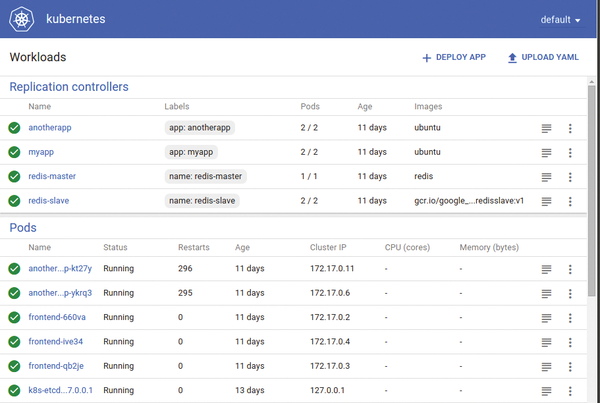 Figure 1: Kubernetes comes with a unique web interface for managing pods, nodes, and containers.
The source code is available on GitHub
...

Buy this article as PDF
(incl. VAT)
Buy ADMIN Magazine
Related content
-
Correctly integrating containers
 If you run microservices in containers, they are forced to communicate with each other – and with the outside world. We explain how to network pods and nodes in Kubernetes.
 -
Container orchestration with Kubernetes from Google
 Google created a special Linux distribution called Kubernetes to simplify life with Docker.
 -
Rancher Kubernetes management platform
 Rancher has set up shop as an agile alternative to Red Hat OpenShift as an efficient way to manage Kubernetes clusters. In terms of the architecture, a Rancher setup differs significantly from classic Kubernetes.
 -
Rancher manages lean Kubernetes workloads
 The Rancher lightweight alternative to Red Hat's OpenShift gives admins a helping hand when entering the world of Kubernetes, but with major differences in architecture.
 -
Alternative container runtimes thanks to the Open Container Initiative
 Most users tend to think of Docker when they hear the word "containers," but for some time now it has been possible to operate containers with other runtimes. We take a closer look at Docker and the CRI-O project.