« Previous 1 2 3 Next »
Remote desktop based on HTML5
Click to the Future
Connecting to the Desktop
Make sure the machine you entered in user-mapping.xml is reachable with the corresponding protocol; then, access the address http://IP
address:8080/guacamole
in your web browser. After successful authentication with the specified username and password, you should be able to log in to the desktop on the target system, as displayed in your browser (Figure 4). You can then log in with your Windows credentials.
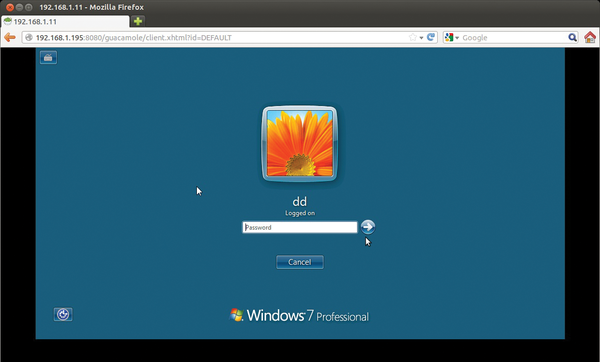 Figure 4: Thanks to HTML5, users no longer need plugins for graphical access to desktops in the browser.
Guacamole provides a simple clipboard for exchanging text data between the remote machine and the local system, as well as an on-screen keyboard – if you drag the mouse cursor in the direction of the browser's address bar (Figure 5). If needed, you can send a Ctrl+Alt+Del to the remote machine or terminate the remote session with Guacamole.
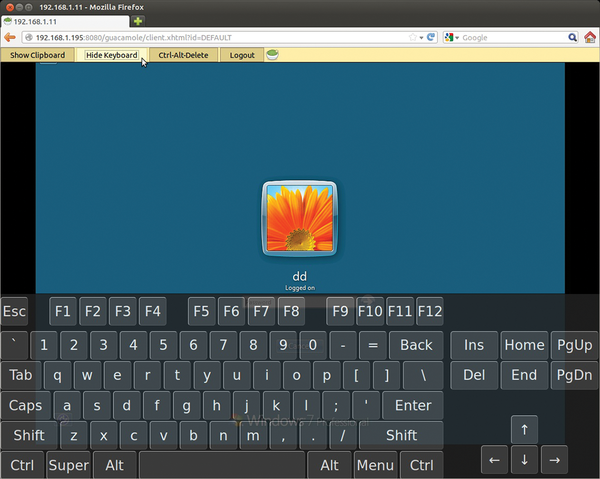 Figure 5: In addition to its own (text) clipboard, Guacamole offers an on-screen keyboard, with which you can enter text with a mouse.
Small Uncertainties
The default Guacamole setup works, but it is anything but secure because access to the login page is unencrypted. Thus, you are urgently advised to install Tomcat with SSL support. For a how-to, check out the detailed Tomcat documentation online [4]. Another unfortunate feature is that the password for opening the connection to the RDP server and – if you use a VNC connection also the VNC password – are stored in the clear in the user-mapping.xml configuration file and can be read by the logged in user. Thus, you will want to change the owner and permissions for the user-mapping.xml file as follows:
sudo chown tomcat6.tomcat6 \
  user-mapping.xml
sudo chmod 640 user-mapping.xml
Alternatively, Guacamole also offers the possibility of creating hashed passwords only in the config file. Listing 2 shows the corresponding section of user-mapping.xml for user tom and the MD5-hashed password secret.
Listing 2
Password with MD5
01 <authorize
02         username="tom"
03         password="b2016af253087887ccb510d7543ed514"
04         encoding="md5">
05     <protocol>vnc</protocol>
06     <param name="hostname">localhost</param>
07     <param name="port">5900</param>
08     <param name="password">123456</param>
09 </authorize>
You can quickly view the password hash at the command line with the md5sum utility:
# echo -n <PASSWORD> | md5sum -t
319f4d26e3c536b5dd871bb2c52e3178  -
Next, add this hash value instead of the password to the configuration. Of course, the hashed password should be longer than eight characters and should be chosen to be as secure as possible with non-standard characters; simple passwords can be broken by brute-force crackers like mdcrack within a few minutes.
Sophos UTM 9.0
If you are worried about the overhead of setting up secure connections with Guacamole, you can, of course, also use commercial software. For example, the current version of the Sophos UTM 9.0 Firewall (formerly Astaro Security Gateway) provides an HTML5 portal that you can use to access services on the LAN without a client installation (also see the box "More HTML5 Remote Desktops").
More HTML5 Remote Desktops
For the sake of completeness, I will just mention two more interesting projects at this point; both provide remote desktops via HTML5 technology.
Besides RDP and VNC, Sophos supports connections to Telnet and SSH servers, as well as HTTP and HTTPS connections. That said, HTML5 remote access only plays a subordinate role in Sophos UTM. Again, you cannot use RDP to map drives on the clients. For fully transparent remote network access, Sophos UTM provides IPsec, SSL, PPTP, and L2TP VPN servers as alternatives. The HTML5 portal with KVM-only (keyboard, video, mouse) transmission is better suited to occasional remote management sessions with external service providers for which you do not want to design full-fledged VPN access.
« Previous 1 2 3 Next »

Buy this article as PDF
(incl. VAT)