
© conceptw, 123RF.com
The PHP FastCGI process manager, PHP-FPM
Substitute
If you open the PHP documentation at the Installation chapter, you are likely to come across the mod_php Apache module first. It integrates the PHP interpreter with the Apache web server, thus allowing the server to execute PHP applications. The Lighttpd and IIS documentation describes a PHP interpreter that uses the FastCGI interface (see the "CGI Accelerator" box). Further into the docs, until you will find the FastCGI Process Manager, which is an alternative PHP interpreter that eliminates a few serious disadvantages of mod_php and of the traditional FastCGI interpreter.
CGI Accelerator
Web servers are pretty dumb when left to their own devices. All they can do is serve up files and thus deliver static content. To create a web page dynamically, they need the help of another web server program – such as the PHP interpreter. The PHP interpreter then runs one or more (PHP) scripts that, ultimately, build the page. The method web servers use to call the interpreter and return the completed page was specified in a 1993 standard, the Common Gateway Interface, or CGI for short. As soon as the web server receives a request, it sets a few environmental variables and then starts the interpreter. The interpreter in turn evaluates the environmental variables from, and returns the generated web page to, the web server via standard output (Figure 1).
 Figure 1: Following the CGI standard, the web server starts the interpreter as a normal command-line program.
This approach means that the web server needs to start the interpreter for each request, consuming CPU cycles and memory. Often, loading the interpreter takes longer than executing the script. To improve response times and reduce the impact on the server, the FastCGI interface [1] was created in the mid-1990s. The interpreter is now launched exactly once and then runs in the background. The web server then hands the requests to the interpreter via a TCP port or a Unix domain socket. Because this exchange uses known networking standards, the interpreter can even run on a computer that is completely different from the web server. The entire environment is thus much easier to scale.
Short Process
The mod_php module is quickly set up and enabled, but this means running the interpreter with the web server's account. Changing the configuration also necessitates a restart of the entire web server, thus causing downtime for the website. Mod_php also scales pretty badly, which you will notice if the number of hits slowly increases in the course of time. All these disadvantages were a pain for Andrei Nigmatulin, so he developed a patch for the FastCGI interpreter that added a few missing security features at the same time. He dubbed the enhanced interpreter FastCGI Process Manager, or PHP-FPM [2].
PHP-FPM starts several PHP interpreter processes that run permanently in the background, waiting for work, picking up incoming requests from the web server, and distributing them to the PHP interpreters (Figure 2).
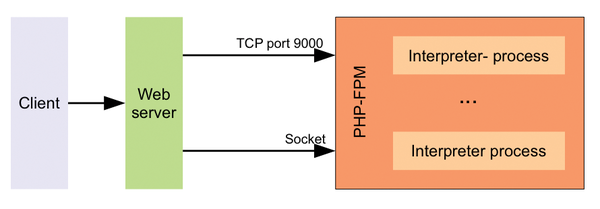 Figure 2: The web server uses either a TCP port or a Unix socket to pass the request to PHP-FPM, which in turn hands it over to a PHP interpreter process.
To conserve server resources, PHP-FPM terminates any interpreter processes that are not needed and kills any PHP interpreter processes that take too long to complete. Additionally, you can change the configuration on the fly without the need to restart an interpreter process or even the whole web server. PHP-FPM also offers advanced logging functions; for example, it can log any scripts that exceed a certain run time, along with details of the underlying PHP function, to help in troubleshooting during development and to reveal attacks.
The PHP interpreter processes can be grouped in pools, and each pool can be a separate PHP configuration. You can even lock its processes in a chroot jail. Additionally, the administrator can specify an account under which the pool processes run. Incoming requests can then be passed to one of the pools in a targeted way. For example, you could tailor a pool for the blog, another for the forum, and a third for the official website. Because each pool responds to requests for its own TCP address, you can outsource the associated pool to a more powerful computer as the load on the forum increases – this process only involves a few simple changes in the configuration files.
PHP-FPM can even cope with add-on modules, such as eAccelerator or APC, that buffer the compiled source code (opcode). This support for add-on modules saves recompiling for the next request, which in turn accelerates the process of building the page. However, an interpreter process can (accidentally) overwrite or destroy the opcode cache. PHP-FPM therefore monitors the cache and restarts the process automatically if something seems to be going haywire.
Launch Ramp
PHP-FPM has been part of the official PHP package since PHP 5.4.0 and is therefore also included by most current Linux distributions and available through their package managers. The package usually goes by the name of php5-fpm.
One of the few exceptions is Debian 6 (squeeze); however, you can add PHP-FPM via the Dotdeb repository by adding the following line to your /etc/apt/sources.list:
deb http://packages.dotdeb.org stable all
Now you can install the required package:
apt-get update
apt-get install php5-fpm
Because you can freely assign the TCP ports used by the pools, you can run PHP-FPM parallel to other FastCGI interpreters.
PHP-FPM is tailored for Linux, which explains why it is missing from the Windows PHP package. (The php-cgi.exe in the package is simply the legacy FastCGI interpreter.) Windows administrators can either build and operate PHP-FPM manually in a Cygwin environment, which is fairly convoluted, or run PHP-FPM separately from the web server on its own Linux machine.
Running PHP-FPM on its own Linux machine is far easier, especially because you can run the Linux system with PHP-FPM on a virtual machine. This article focuses on commissioning PHP-FPM on Linux.
All of the configuration files for PHP-FPM and its PHP interpreter processes reside in the /etc/php5/fpm directory (unless your own distribution stipulates some other directory). PHP-FPM is configured in the php-fpm.conf configuration file. In the simplest case, a single line,
include=/etc/php5/fpm/pool.d/*.conf
points to all other configuration files. Incidentally, comments always begin with a semicolon and continue to the end of the line, so instead of php-fpm.conf, you will often find a sample file. On openSUSE, its name is php-fpm.conf.default. All you need to do is rename this appropriately; changes are not normally necessary.
Building a Pool
PHP-FPM groups the PHP interpreter processes into pools; at least one pool must exist. Each pool has exactly one configuration file with a .conf extension in the /etc/php5/pool.d subdirectory. Because PHP-FPM simply parses all the .conf files in this directory one after another, you can choose the filenames freely. In other words, to temporarily disable a pool, you just need to rename the extension of the associated configuration file.
If you use your distribution's package manager to install PHP-FPM, you will typically discover that a file for a simple pool already exists in the configuration directory; on Debian, for example, this is www.conf. You should not delete this file, but back it up: The detailed comments it contains explain all the possible settings, so it acts as a reference. In contrast, the information on the PHP-FPM website [2] and in the PHP documentation [3] is outdated or incomplete. If you cannot find an example file, download the official PHP source code package and take a look at the php-fpm.conf.in file in the sapi/fpm directory.
Listing 1 shows an example of a minimal configuration file: Initially, the pool named in the square brackets is apool. The interpreter processes groups then processes all requests passed into PHP-FPM on TCP port 9000 by the web server. The next line, listen.allowed_clients, ensures that only programs running on the same computer as PHP-FPM can talk to port 9000 (localhost, IP address 127.0.0.1) to keep external attackers from flooding PHP-FPM with requests or abusing the PHP interpreter. If you want to allow requests from other IP addresses, simply provide a comma-separated list on one line.
Listing 1
A Simple Pool
[apool]
; Pool accessible on TCP port:
listen = 127.0.0.1:9000
; Access only allowed from:
listen.allowed_clients = 127.0.0.1
; Processes run under user and group:
user = www-data
group = www-data
; Create processes as needed:
pm = dynamic
; Maximum number of processes:
pm.max_children = 96
; Start with this number of processes:
pm.start_servers = 16
; Stock of interpreters without a task:
pm.min_spare_servers = 10
pm.max_spare_servers = 70
All PHP interpreter processes from apool run with the rights of the www-data user from the www-data group, as defined in Listing 1 – I am using the web server account for simplicity's sake. In a production environment, you would create a new user for each pool just to be safe.
To avoid wasting resources, you want PHP-FPM to start and stop interpreter processes as needed (dynamic). As defined by pm.max_children, this pool is not allowed to run more than 96 PHP interpreter processes at the same time. Because each interpreter process handles one request, the pool in Listing 1 can consequently handle 96 requests at the same time. pm.start_servers defines the number of child processes PHP-FPM enables directly when launched – Listing 1 sets this to 16. Note that this is the number of child threads; along with the initial process run by the administrator, this takes the total to 17. A maximum of 70 idle PHP interpreter processes is allowed (pm.max_spare_servers). To be prepared for mass requests, Listing 1 always leaves 10 processes on call (pm.min_spare_servers).

Buy this article as PDF
(incl. VAT)
Buy ADMIN Magazine
Related content
-
Setting up HTTP/2 on the Apache HTTP Server with PHP compatibility
 If you are running PHP applications, setting up HTTP/2 on the Apache HTTP Server can be a bit confusing because of some incompatibilities between the Apache HTTP/2 module and the Prefork multiprocessing module.
-
Secure authentication with FIDO2
 The FIDO and FIDO2 standard supports passwordless authentication. We discuss the requirements for the use of FIDO2 and show a sample implementation for a web service.
-
Harden your Apache web server
 Cyberattacks don't stop at the time-honored Apache HTTP server, but a smart configuration, timely updates, and carefully considered security strategies can keep it from going under.
-
Setting up the lightweight Lighttpd web server
 The long-established Lighttpd web server is lean and fast and can be set up quickly thanks to its simple configuration.
-
Security first with the Hiawatha web server
 The small but secure Hiawatha web server provides an appealing alternative to the complex Apache and other alternatives.