« Previous 1 2 3 4 Next »
The PHP FastCGI process manager, PHP-FPM
Substitute
Minute Taker
PHP-FPM can record the requests processed by a pool for diagnostic purposes. To make it do this, add the following the line to the appropriate pool configuration file (e.g., the simple pool configuration file in Listing 1):
access.log = /var/log/$pool.access.log
The logfile name follows the equals sign. PHP-FPM replaces the $pool placeholder with the name of the pool. By default, the protocol stores the IP address, username, (server) time, request method, requested address (URI), and the returned status code. However, PHP-FPM can also log the much more interesting execution time, CPU load, and query string.
Thus, you will want to collect all of this interesting information with an additional line,
access.format = \
   "%R - %u %t \"%m %r%Q%q\" \
   %s %f %{mili}d %{kilo}M %C%%"
As its cryptic structure suggests, you can define the protocol structure as in Apache; the letters are placeholders for the corresponding information. The comments in the example file that comes with the distribution reveal which placeholder stores what information.
Whereas the default access log records all the requests (Figure 6); the slow log records requests for which the PHP interpreter took too long. PHP-FPM keeps a slow log for a pool if you add the following line to the associated configuration file,
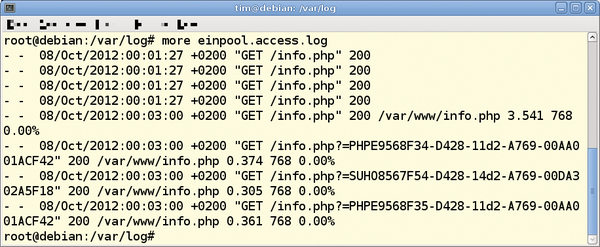 Figure 6: This access log shows standard information at the top and details of the requests below.
slowlog = /var/log/$pool.log.slow
where $pool stands for the pool name. The line
request_slowlog_timeout = 30s
defines how long processing a request must take to be regarded as too slow. In this case, PHP-FPM will add the request to the slow log if the PHP interpreter has not returned a response after more than half a minute (Figure 7). As an alternative to s for seconds, you can also state the time in minutes (abbreviation m ), hours (h), and days (d).
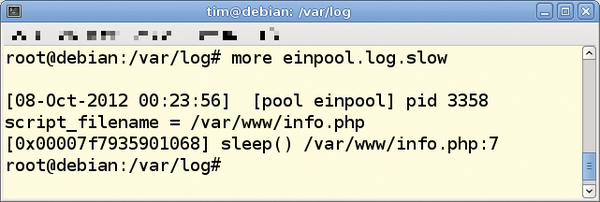 Figure 7: As this slow log reveals, a sleep() statement in info.php is preventing expeditious processing of the request.
PHP-FPM records internal problems and errors in /var/log/php5-fpm.log by default. The php5-fpm.log file is also where you will find information on faulty configuration files.
Jail
If you are interested in web server security, you can banish all interpreter processes in a pool to a chroot jail; just put the line
chroot = /my/jail
in the pool configuration file. The equals sign is followed by the absolute path to be used as the new root directory for the processes – in this example /my/jail.
To query the current pool health via a special URL, add the following line to the pool configuration (from Listing 1):
pm.status_path = /status
Among other things, http://www.example.com/status
tells you whether the processes in the pools are currently running and the number of requests to which these processes have responded. By default, PHP-FPM returns this information as plain text. However, you can wrap the information in HTML or XML by simply adding ?html or ?xml to the URL. With the following command:
ping.path = /ping
you can check whether the pool is running in http://www.example.com/ping
. In this case, PHP-FPM responds with a simple pong. A word of caution: This is precisely the kind of information leak that attackers look for; thus, you will want to disable this function in production use, or at least restrict access by the web server.
Emergency Stop
If an interpreter process takes too long to complete a PHP script, PHP-FPM automatically terminates it. You can define the number of seconds for this in the /etc/php5/fpm/php-fpm.conf configuration file by adding the line:
process_control_timeout = 10s
In this case, if a process does not respond for 10 seconds, PHP-FPM terminates it automatically. Again, you can use the abbreviations m for minutes, h for hours, and d for days.
« Previous 1 2 3 4 Next »

Buy this article as PDF
(incl. VAT)
Buy ADMIN Magazine
Related content
-
Setting up HTTP/2 on the Apache HTTP Server with PHP compatibility
 If you are running PHP applications, setting up HTTP/2 on the Apache HTTP Server can be a bit confusing because of some incompatibilities between the Apache HTTP/2 module and the Prefork multiprocessing module.
-
Secure authentication with FIDO2
 The FIDO and FIDO2 standard supports passwordless authentication. We discuss the requirements for the use of FIDO2 and show a sample implementation for a web service.
-
Harden your Apache web server
 Cyberattacks don't stop at the time-honored Apache HTTP server, but a smart configuration, timely updates, and carefully considered security strategies can keep it from going under.
-
Setting up the lightweight Lighttpd web server
 The long-established Lighttpd web server is lean and fast and can be set up quickly thanks to its simple configuration.
-
Security first with the Hiawatha web server
 The small but secure Hiawatha web server provides an appealing alternative to the complex Apache and other alternatives.