« Previous 1 2 3 4 Next »
The PHP FastCGI process manager, PHP-FPM
Substitute
One for All
The interpreter processes launched by PHP-FPM take their settings from the /etc/php5/fpm/php.ini file. Their content reflects the well-known php.ini file; however, it now applies for all processes in all pools. For example, if you increase the memory_limit to 64M, each PHP interpreter process can then allocate 64MB to its PHP script. If only the pool from Listing 1 exists, a maximum of 96 processes can be running at the same time; in the worst case, this would mean having 96x64MB = 6GB of RAM.
If you want the processes in a given pool to use different settings, you store them in the pool configuration file (like that in Listing 1); however, the syntax is a little unusual. The name of the PHP setting is set in the square brackets of php_admin_value[]:
php_admin_value[memory_limit] = 32M
This line sets memory_limit to 32MB. Boolean values (such as settings that switch something on or off) can be overwritten in a similar way using php_admin_flag[]; an example for log_errors is:
php_admin_flag[log_errors] = on
After completing the configuration, the following call starts PHP-FPM:
/etc/init.d/php5-fpm start
The interpreter processes now run in the background, listening for requests. You can check this with:
netstat -tapn
The output should show PHP-FPM, as in Figure 3. ps -A should also reveal the specified number of PHP interpreter processes by the name of php-fpm (Figure 4). The next step is to introduce the web server to PHP-FPM.
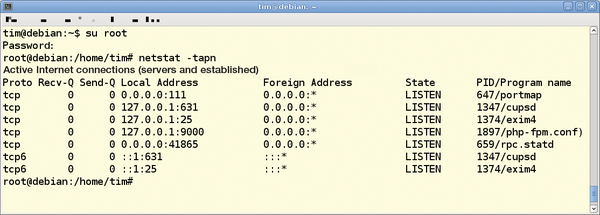 Figure 3: PHP-FPM listening on TCP port 9000.
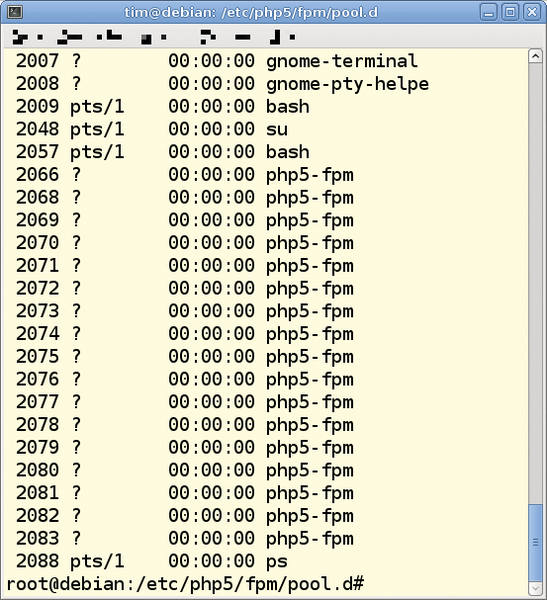 Figure 4: As specified in Listing 1, 17 PHP interpreter processes are running.
Apache has to pass on the incoming requests to PHP-FPM. The Apache mod_fastcgi module handles the task of passing on incoming requests. Windows administrators can retrieve a prebuilt DLL file from the FastCGI site [4]. On Linux, check out your package manager: in Debian 6, the module is found in the libapache2-mod-fastcgi package (from the non-free repository). Be careful not to download the almost identically named mod_fcgid module. This adds FastCGI to Apache 2, but with its own process manager; it cannot pass incoming requests on to an existing interpreter such as PHP-FPM, which makes it useless in this case.
If you use Debian 6 and have not yet installed Apache 2, you can type the following command to install the necessary packages:
apt-get install apache2-mpm-worker \
   libapache2-mod-fastcgi
Next, the a2enmod fastcgi command enables the module. The mod_php5 module can be disabled – if it is installed at all – with a2dismod php5.
Now you only have to add the rows from Listing 2 in the httpd.conf Apache configuration file. On Debian 6, it is advisable to save these instructions in a separate file (e.g., named php5-fcgi.conf) in the /etc/apache2/conf.d directory. The FastCgiExternalServer line is crucial; it tells Apache to pass on requests for TCP port 9000. If mod_php was previously enabled, you need to delete its configuration or comment it out. Now, type /etc/init.d/apache2 to restart the web server. For test purposes, drop the simple PHP file info.php with
<?php phpinfo(); ?>
into the document root; on Debian 6, this is the /var/www directory. Now, when you access this file in your browser, it should return PHP-FPM as the interpreter, as shown in Figure 5.
Listing 2
Apache 2 PHP-FPM Configuration
<IfModule mod_fastcgi.c>
  AddHandler php5-fcgi .php
  Action php5-fcgi /php5-fcgi
  Alias /php5-fcgi /usr/lib/cgi-bin/php5-fcgi
  FastCgiExternalServer /usr/lib/cgi-bin/php5-fcgi -host 127.0.0.1:9000 -pass-header Authorization
</IfModule>
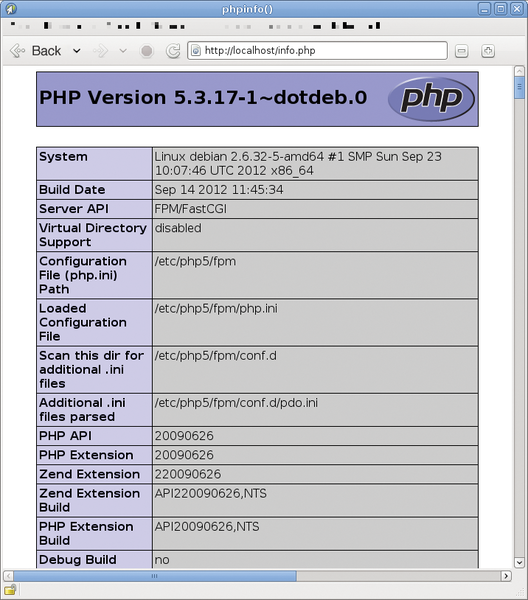 Figure 5: phpinfo() reveals that PHP-FPM responded to the request.
Sockets
In Listing 1, the web server uses TCP port 9000 to pass incoming requests to PHP-FPM. If the web server and PHP-FPM are running on the same machine, it makes sense to use Unix sockets as an alternative. Unix sockets reduce the TCP overhead. To allow PHP-FPM to listen on the Unix /tmp/php5-fpm.socket, you need to replace the listen line in the pool configuration file from Listing 1 with
listen = /tmp/php5-fpm.socket
Next, replace lists.allowed_clients with the following three lines:
listen.owner = www-data
listen.group = www-data
listen.mode = 0660
These lines define the owner (lists.owner), the group (lists.group), and the permissions (lists.mode) for the socket. To restart PHP-FPM, issue the command:
/etc/init.d/php5-fpm restart
You should now have a /tmp/php5-fpm.sock file that belongs to the www-data user with permissions of 0660.
In the Apache 2 configuration, replace the line that starts FastCgiExternalServer with:
FastCgiExternalServer \
   /usr/lib/cgi-bin/php5-fcgi \
   -socket /tmp/php5-fpm.sock \
   -pass-header Authorization
and restart the Apache server.
Elegant Restart
With mod_php, to apply changes to the PHP configuration, you must restart the Apache server. Any active users experience a disconnect and see an error message. PHP-FPM does not require a restart: You can modify the configuration on the fly. This is especially useful if you want to increase the number of interpreters in the pool or add more pools. For new incoming requests, PHP-FPM then starts new processes with the updated configuration. The processes for existing requests complete their work before PHP-FPM terminates them. For a graceful restart of this kind, enter:
/etc/init.d/php5-fpm reload
As mentioned,
/etc/init.d/php5-fpm restart
triggers a conventional restart of PHP-FPM.
« Previous 1 2 3 4 Next »

Buy this article as PDF
(incl. VAT)
Buy ADMIN Magazine
Related content
-
Setting up HTTP/2 on the Apache HTTP Server with PHP compatibility
 If you are running PHP applications, setting up HTTP/2 on the Apache HTTP Server can be a bit confusing because of some incompatibilities between the Apache HTTP/2 module and the Prefork multiprocessing module.
-
Secure authentication with FIDO2
 The FIDO and FIDO2 standard supports passwordless authentication. We discuss the requirements for the use of FIDO2 and show a sample implementation for a web service.
-
Harden your Apache web server
 Cyberattacks don't stop at the time-honored Apache HTTP server, but a smart configuration, timely updates, and carefully considered security strategies can keep it from going under.
-
Setting up the lightweight Lighttpd web server
 The long-established Lighttpd web server is lean and fast and can be set up quickly thanks to its simple configuration.
-
Security first with the Hiawatha web server
 The small but secure Hiawatha web server provides an appealing alternative to the complex Apache and other alternatives.