



© Sellingpix, 123RF.com
Remotely controllingvirtual machines with virsh
Engine Room toBridge
The libvirt project has set the objective of creating a standardized management center for a variety of virtualization solutions and hypervisors [1]. Many administrators in production environments only know it as the colorful virt-manager front end, which manages virtual machines on Qemu/KVM. However, virt-manager isn't even part of the libvirt project, which only provides a handful of command-line programs, one of which is the overlooked but essential virsh.
Building Blocks
Like any other libvirt tool, virsh relies on the libvirt library, which in turn provides the interface to the libvirtd daemon. The daemon runs on the machine hosting the virtual machines, also known as a node, and controls the hypervisor operations (Figure 1), making libvirtd basically indispensable to administrators.
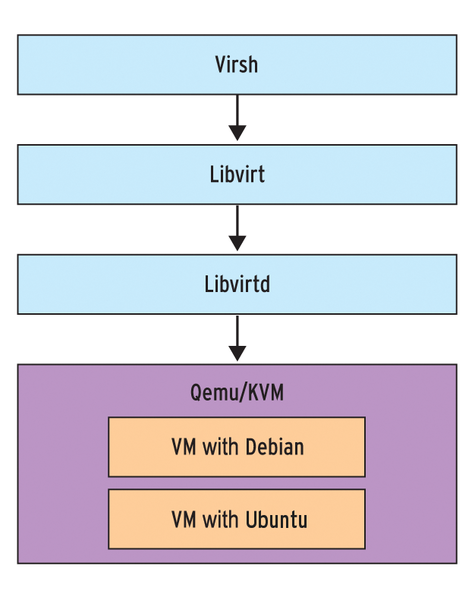 Figure 1: Virsh passes the commands on to the other libvirt package components.
After installing libvirt, you can immediately start using virsh – at least normally you can. Many distributions, two of them being Debian and Ubuntu, have offloaded the libvirt tools into a separate package. In this case, you need to install
...

Buy this article as PDF
(incl. VAT)
Buy ADMIN Magazine
Related content
-
Virsh Libvert Tool
With the command-line tool virsh, a part of the libvirt library, you can query virtual machines to discover their state of health, launch or shut down virtual machines, and perform other tasks – all of which can be conveniently scripted.
-
Live snapshots with Virtual Machine Manager
 In the scope of developing Fedora 20, the live snapshot function, which has long been supported by libvirt, was integrated with the graphical front end. If you prefer to avoid command-line acrobatics à la Virsh, you can now freeze your virtual KVM and Xen machines in VMM at the press of a button.
 -
Secure Your KVM Virtual Machines
 A common misconception posits that software cannot cause mischief if you lock the system away in a virtual machine, because even if an intruder compromises the web server on the virtual machine, it will only damage the guest. If you believe this, you are in for a heap of hurt.
 -
Managing virtual machines
 With just a couple of command-line tools and DIY scripts, you can easily clone and manage your virtual machines. Dynamic DNS updates ensure that your virtual servers are immediately accessible on the network.
 -
Building Virtual Images with BoxGrinder and VMBuilder
Creating a virtual machine manually is straightforward but too time consuming if you regularly need to set up many virtual machines. The BoxGrinder and VMBuilder programs let you automate this process.
Subscribe to our ADMIN Newsletters
Subscribe to our Linux Newsletters
Find Linux and Open Source Jobs
Most Popular
Focus On Self-Hosting
• Reliable Network Storage with TrueNAS Community Edition
• Self-Hosted File Syncing with Seafile
• Wiring the Modern Stack with Node-RED
• Self-Hosted Collaboration with Forgejo
• Self-Hosted PaaS with Coolify
• Build and Host Docker Images
• Self-Hosted Pritunl VPN Server with MFA
Support Our Work
ADMIN content is made possible with support from readers like you. Please consider contributing when you've found an article to be beneficial.
