


« Previous 1 2 3
Creating and evaluating kernel crash dumps
Crash Test
Easier Virtual Approach
Admins on virtualized Linux guests can relax. VMware, Xen, and KVM let you write a kernel dump without specially having to prepare the guest. The kernel dump contains information on the currently active RAM, that is, in the simplest case a 1:1 copy of the entire RAM.
The hypervisor systems I just mentioned can access the guest's memory and let you write this to a file. In the case of Xen and KVM, the memory dump is compatible with the crash dump evaluation tools on Linux. The VMware memory dump needs to be processed – but more on that later. The native Linux hypervisor systems give administrators even more options. It is possible to create a dump on the fly.
Normally, Xen and KVM stop the guest while writing the dump and then let it continue to run. The commands for this are
xm dump-core <domain output file>
or
virsh dump <domain output file>
(see Figure 3). If you add the --live option, Xen and KVM minimize the interruption. This avoids booting the crash kernel and also setting up the kexec/kdump configuration on the Linux guest.
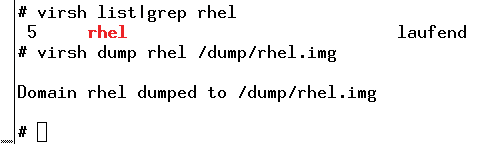 Figure 3: Kernel dump of a KVM guest on the fly.
Converting VMware Images to Crash Dumps
VMware also can write memory dumps of its guests. The first method involves suspending and creates a vmss format file, but when you create a checkpoint as a VMware admin, you can write a memory dump, which then takes the form of a vmsn file. However, both variants require some post-processing before the default kernel debugging tools can handle them.
VMware provides the vmss2core command for this, but only with the workstation product in versions for Windows and Linux [9]. ESX admins do not have this option.
Basically, vmss2core will also work outside of a full-fledged VMware workstation installation. Users who are prepared to experiment can simply copy the tool to a computer of their choice and convert the image there. The
vmss2core -N6 <file>.vmss
command generates the kernel dump (Listing 3). During testing, this conversion failed on both RHEL5 and RHEL6, but it worked as anticipated with SLES.
Listing 3
VMware Images to Kernel Dumps
# vmss2core -N6 rhel.vmss
The vmss2core version 591240 Copyright (C) 1998-2012 VMware, Inc. All rights reserved.
Started core writing.
Writing note section header.
Writing 1 memory section headers.
Writing notes.
... 10 MBs written.
... 20 MBs written.
...
... 1020 MBs written.
Finished writing core.
#
# ls vmss.core
vmss.core
#
Writing the kernel dump via the hypervisor has the advantage of not needing a kexec/kdump configuration on the guest. Additionally, the file is stored outside of the guest and does not occupy any local space. Thus, things look much easier.
However, there is one specific scenario that the hypervisor-only setup cannot cover: the kernel dump after a crash with an automated reboot. If you need this, there's no way to work around a kexec/kdump configuration. The approach is exactly as described previously.
Conclusions
Generating a kernel dump is definitely not rocket science and can be done easily with a couple of actions. If your Linux systems are virtualized, the process is even easier. Thus, you have no excuse not to create a kernel dump for troubleshooting. Experienced users can even run the crash tool themselves to perform an initial evaluation.
Infos
- LKCD on crash dumps: http://lkcd.sourceforge.net/
- Set Up Linux Kernel Crash Dump on SLES: http://www.novell.com/coolsolutions/feature/14813.html
- Diskdump: a new crash dump system: https://lwn.net/Articles/87684/
- Linux Kernel Crash Book: http://www.dedoimedo.com/computers/crash-book.html
- Kdump: http://lse.sourceforge.net/kdump/
- Crash tools: http://people.redhat.com/anderson/
- Bug 716994 – Provide native systemd unit file: http://bugzilla.redhat.com/show_bug.cgi?id=716994
- Bug 396132 – crasher module – why suse specific? http://bugzilla.novell.com/show_bug.cgi?id=396132
- VMware vmss2core: http://www.vmware.com/pdf/snapshot2core_technote.pdf
« Previous 1 2 3

Buy this article as PDF
(incl. VAT)
Buy ADMIN Magazine
Subscribe to our ADMIN Newsletters
Subscribe to our Linux Newsletters
Find Linux and Open Source Jobs
Most Popular
Focus On Self-Hosting
• Running Your Own Matrix Server with Synapse
• Reliable Network Storage with TrueNAS Community Edition
• Self-Hosted File Syncing with Seafile
• Wiring the Modern Stack with Node-RED
• Self-Hosted Collaboration with Forgejo
• Self-Hosted PaaS with Coolify
• Build and Host Docker Images
• Self-Hosted Pritunl VPN Server with MFA
Support Our Work
ADMIN content is made possible with support from readers like you. Please consider contributing when you've found an article to be beneficial.