


« Previous 1 2 3
Free Security Compliance Manager hardens server systems
Defending the Baseline
Settings
Active Directory is not necessary for securing Windows Server with SCM; the settings also can be programmed in local policies. SCM provides the LocalGPO command-line tool for this purpose. The tool from the Microsoft Security Compliance Manager program group lets you import settings locally from SCM into a policy on the server. The tool provides various options for the import process. LocalGPO is especially intended for servers that do not have a domain assignment. The first step is to install the tool on the server; you then import the settings at the command line.
After installation, launch LocalGPO Command-line in the LocalGPO program group. To import the settings from a SCM baseline onto the local server, you must first create the baseline, as previously described. Next, export this as a GPO backup to a directory. Copy the directory to the server on which you want to implement the policies. Then, type the command
cscript LocalGPO.wsf /path:<path to GPO backup>
(Figure 3). When transferring the new settings, LocalGPO saves the settings in the local policy. You can restore the policy at any time. To restore the original settings on the server, use the command:
cscript LocalGPO.wsf /Restore
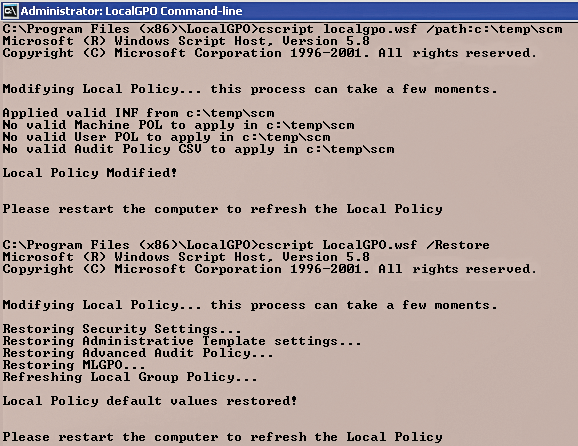 Figure 3: Importing settings as a script with LocalGPO.
LocalGPO also lets you back up local security policy settings in a GPO backup, and you can use this for a restore by reimporting it to the server. Additionally, you can import the backup on other local servers, and it is possible to create a new Active Directory Group Policy on the basis of a backup and to import the policy. To do this, use the command:
cscript LocalGPO.wsf /path: <path> /Export
You can import this backup with LocalGPO, or you can use the Group Policy Management Console. Moreover, you can export the local security policy on a server to a GPOPack , which lets you import the security settings on another server without having to install LocalGPO on the target system. To do this, use the command:
cscript LocalGPO.wsf /path: "<path>" /Export /GPOPack
For more details on this subject, visit the website [5].
Infos
- Security Compliance Manager: http://go.microsoft.com/fwlink/?LinkId=182512
- .NET 4.0: http://go.microsoft.com/fwlink/?LinkId=208784
- SQL Server Express Edition: http://www.microsoft.com/sqlserver/en/us/editions/2012-editions/express.aspx
- Baselines: http://social.technet.microsoft.com/wiki/contents/articles/1865.microsoft-security-compliance-manager-scm-baseline-download-help-en-us.aspx
- SCM v2 Beta, LocalGPO Rocks: http://blogs.technet.com/b/secguide/archive/2011/07/05/scm-v2-beta-localgpo-rocks.aspx
« Previous 1 2 3

Buy this article as PDF
(incl. VAT)
Buy ADMIN Magazine
Related content
-
Optimizing domain controller security
 Configure your domain controller security settings correctly with Policy Analyzer and current Microsoft baselines for a leak-tight Active Directory.
-
Monitoring changes in Active Directory with built-in tools
 Monitoring with built-in Windows tools can prevent the worst from happening after an attempted attack.
-
Group policies on Windows Server 2022
 We discuss how to manage and secure clients with group policy object templates and look at some recommendations from various governmental and non-governmental security advocates.
-
Protect Hyper-V with on-board resources
 With the right settings and small tools, security in virtual environments can be increased significantly by tweaking the on-board tools.
-
Microsoft Network Policy Server
 Redmond's RADIUS implementation connects systems and provides secure authorization and logging.
Subscribe to our ADMIN Newsletters
Subscribe to our Linux Newsletters
Find Linux and Open Source Jobs
Most Popular
Focus On Self-Hosting
• Running Your Own Matrix Server with Synapse
• Reliable Network Storage with TrueNAS Community Edition
• Self-Hosted File Syncing with Seafile
• Wiring the Modern Stack with Node-RED
• Self-Hosted Collaboration with Forgejo
• Self-Hosted PaaS with Coolify
• Build and Host Docker Images
• Self-Hosted Pritunl VPN Server with MFA
Support Our Work
ADMIN content is made possible with support from readers like you. Please consider contributing when you've found an article to be beneficial.