


Read this article on our new ADMIN website
https://www.admin-it.io/empowering-kubernetes-capabilities-with-lightweight-k8s-distros/
Empowering Kubernetes capabilities with lightweight K8s distros
Small Wonders
Snap Package Installation
MicroK8s [3] takes a slightly different approach. Although it's also a lightweight Kubernetes distribution, it is packaged and distributed as a snap package. If you're using Ubuntu, the process is straightforward, because snap is native to Ubuntu. However, if you're on other Linux distros, you will need to make sure snap is installed first. To install MicroK8s, run:
sudo snap install microk8s --classic
The snap package bundles everything you need into one package, much like a container for the software. Snap is designed to work across various Linux distributions and ensures that everything, including dependencies, is contained in the package itself.
The key difference is that snap packages are sandboxed from the rest of your system, meaning they operate in isolation. This arrangement gives MicroK8s a bit more control over its environment, but it also means slightly more overhead compared with just downloading a binary, as for k0s or K3s. Additionally, snap packages need snapd (the snap package manager) installed and running in the background.
k0s
Figure 1 shows how the k0s lightweight Kubernetes distribution packages its core components to keep things simple and efficient. This all-in-one approach to Kubernetes has everything you need for a fully functional Kubernetes cluster, neatly bundled into the single k0s.bin binary, without unnecessary overhead.
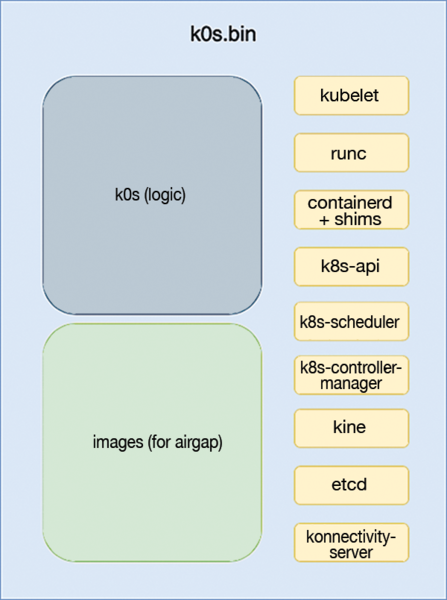 Figure 1: Unpacking the k0s architecture. © Mirantis Inc. k0s project [4]
At its heart is the k0s (logic)
area, which is where all the Kubernetes magic happens. Inside this block are the usual suspects, including kubelet, containerd, and all the key Kubernetes components like the API server, scheduler, and controller manager. These are the brains behind your cluster responsible for managing workloads, orchestrating containers, and ensuring everything runs smoothly.
However, k0s doesn't stop there. It also includes components like runc, which is essential for running containers, and Kine, a lightweight data store that acts as a replacement for etcd in smaller setups. Security enthusiasts get FIPS 140-2 accreditation, which means it meets certain cryptographic standards – a big deal for highly regulated environments.
The second section in Figure 1, labeled images (for airgap) , ensures that k0s can be deployed in air-gapped environments. Airgaps are development setups in which a cluster is completely isolated from external networks, including the Internet, which is normally in Kubernetes nodes because of security measures. This arrangement makes it super versatile for use cases that need tight security or are deploying in environments with limited connectivity.
What makes k0s stand out is its simplicity. All of these crucial components are prepackaged into one binary, so you're not juggling multiple pieces of software. It's like having a Kubernetes cluster in a tidy little box, ready to go wherever you need it.
Because the cluster can't pull images from public Docker registries, a private container registry is maintained to store and provide necessary container images; thus, the operating system and k0s can be upgraded separately, such that if any security updates exist, you can just download them on the k0s binary, and everything is updated independently.
Lifecycle Management
Managing a multinode Kubernetes cluster doesn't have to be a headache, especially with tools like k0s controller and k0sctl. These handy tools make your life a lot easier by handling everything from installation and updates to backups, restores, and even cluster resets – all with just a few commands. It's a full toolkit for managing your entire k0s cluster without breaking a sweat.
Even better, you can deploy individual machines into your k0s cluster without manually setting up each node individually. Thanks to k0smotron, a Cluster API provider for k0s, this process is fully automated. With these tools, you can easily scale your environment by adding machines dynamically, without the need to configure each node from scratch. Just point and click, and your cluster grows or shrinks as needed.
This level of automation makes k0s super scalable and incredibly easy to manage, whether you're running it on premises or in the cloud. No more juggling complex scripts or configurations: k0smotron does the heavy lifting for you.
You can also run your workloads on control nodes unless taint and tolerations are applied to prevent certain conditions that pose a resource consumption hit between the critical control plane components and regular workloads that could affect cluster efficiency and stability.

Read this article on our new ADMIN website
https://www.admin-it.io/empowering-kubernetes-capabilities-with-lightweight-k8s-distros/
Buy this article as PDF
(incl. VAT)
Buy ADMIN Magazine
Related content
- Canonical Releases Autonomous Clustering with MicroK8s
-
Simple, small-scale Kubernetes distributions for the edge
 We look at three scaled-down, compact Kubernetes distributions for operation on edge devices or in small branch office environments.
 -
Zero-Ops Kubernetes with MicroK8s
 A zero-ops installation of Kubernetes with MicroK8s operates on almost no compute capacity and roughly 700MB of RAM.
 -
Strengths and Weaknesses of Docker Swarm and Kubernetes
 Docker Swarm and Kubernetes both orchestrate container clusters, manage workloads, improve reliability, and automate the operation of distributed applications, but they are based on different architectures. We compare the two platforms, highlighting their benefits and downsides.
 -
News for Admins
In the news: Red Hat Enterprise Linux 8.3 Available, It's Official – Linux 5.10 is the Next LTS Kernel, System76 Unleashes World's Smallest Quad-GPU Workstation, Canonical Releases Autonomous Clustering with MicroK8s.
Subscribe to our ADMIN Newsletters
Subscribe to our Linux Newsletters
Find Linux and Open Source Jobs
Most Popular
Focus On Self-Hosting
• Reliable Network Storage with TrueNAS Community Edition
• Self-Hosted File Syncing with Seafile
• Wiring the Modern Stack with Node-RED
• Self-Hosted Collaboration with Forgejo
• Self-Hosted PaaS with Coolify
• Build and Host Docker Images
• Self-Hosted Pritunl VPN Server with MFA
Support Our Work
ADMIN content is made possible with support from readers like you. Please consider contributing when you've found an article to be beneficial.
