


Read this article on our new ADMIN website
https://www.admin-it.io/empowering-kubernetes-capabilities-with-lightweight-k8s-distros/
Empowering Kubernetes capabilities with lightweight K8s distros
Small Wonders
k0s Approach
k0s follows a design in which only the management (control plane) components are running on control planes and no workloads are scheduled on these nodes by default. Figure 2 shows how k0s ensures a clear separation of roles, leading to a more stable and predictable control plane. This method guarantees the workload wouldn't be accidently scheduled on control nodes and that the API server, controller manager, and other components always have resources they need without sharing. The figure also illustrates how keeping workloads away from nodes where cluster management and configuration operations take place reduces potential attack vectors.
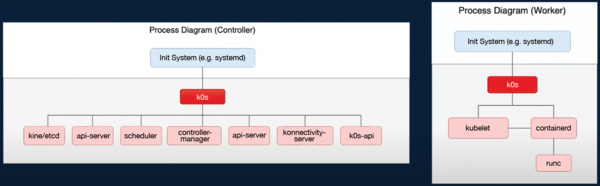 Figure 2: Process diagrams for k0s: The left diagram illustrates the process architecture of the k0s controller, and the right diagram shows the k0s worker node architecture. © Mirantis Inc. k0s project [4]
k0s-in-a-Pod
One of the coolest features of k0s is its ability to run inside a Kubernetes cluster, known as k0s-in-a-pod. In this scenario, you run a lightweight k0s distribution as a set of pods inside another Kubernetes environment, effectively creating Kubernetes-in-Kubernetes. In this way, you can spin up entire Kubernetes clusters within your existing cluster. These virtual clusters are fully functional, with their own API server, controller manager, scheduler, and so on, running independently but sharing resources with the host cluster.
Creating isolated Kubernetes clusters for different teams or projects without provisioning new hardware is a game-changer for multitenant environments. It's also perfect for testing or CI/CD pipelines, letting you spin up temporary clusters on the fly and tear them down just as easily. Because k0s is lightweight, it doesn't bog down your resources.
With the use of tools like k0smotron (the Cluster API provider for k0s), you can automate the deployment and management of these virtual k0s clusters, turning complex multicluster management into a seamless process. Whether you're scaling infrastructure or testing new setups, k0s-in-a-pod makes Kubernetes even more flexible and easy to manage. Once your k0s cluster is deployed inside Kubernetes, you can interact with it just like any other Kubernetes cluster. You can get the kubeconfig file to access this virtual cluster with:
kubectl get secret my-virtual-cluster -n k0smotron -o jsonpath="{.data.kubeconfig}" | base64 --decode > k0s-kubeconfig.yamlThen, use the kubeconfig file in this way
kubectl --kubeconfig=k0s-kubeconfig.yaml get nodes
to interact with your virtual k0s cluster.
No External etcd
k0s does not use an external etcd by default; instead, it uses SQLite for storing the cluster state, which makes the control plane much easier to operate and lighter weight for smaller clusters or edge environments.
For larger clusters you can still opt to use etcd, but SQLite inclusion means easier management for smaller use cases in which full-blown etcd clusters might be overkill. The advantages include:
1. Fewer operational requirements, which means no need to manage a separate etcd cluster unless necessary.
2. Lightweight SQLite, which doesn't require the same level of maintenance as does etcd, simplifying the setup and making it appealing for edge computing environments.
3. Advantages in edge computing environments because of it's lightweight K8s operation, particularly for IoT devices and other resource-constrained setups.
Traditional Kubernetes clusters used to have a significant resource overhead with a control plane running several components independently. k0s minimizes overhead by tightly packing everything in a compact form, making it more efficient for edge computing.

Read this article on our new ADMIN website
https://www.admin-it.io/empowering-kubernetes-capabilities-with-lightweight-k8s-distros/
Buy this article as PDF
(incl. VAT)
Buy ADMIN Magazine
Related content
- Canonical Releases Autonomous Clustering with MicroK8s
-
Simple, small-scale Kubernetes distributions for the edge
 We look at three scaled-down, compact Kubernetes distributions for operation on edge devices or in small branch office environments.
 -
Zero-Ops Kubernetes with MicroK8s
 A zero-ops installation of Kubernetes with MicroK8s operates on almost no compute capacity and roughly 700MB of RAM.
 -
Strengths and Weaknesses of Docker Swarm and Kubernetes
 Docker Swarm and Kubernetes both orchestrate container clusters, manage workloads, improve reliability, and automate the operation of distributed applications, but they are based on different architectures. We compare the two platforms, highlighting their benefits and downsides.
 -
News for Admins
In the news: Red Hat Enterprise Linux 8.3 Available, It's Official – Linux 5.10 is the Next LTS Kernel, System76 Unleashes World's Smallest Quad-GPU Workstation, Canonical Releases Autonomous Clustering with MicroK8s.
Subscribe to our ADMIN Newsletters
Subscribe to our Linux Newsletters
Find Linux and Open Source Jobs
Most Popular
Focus On Self-Hosting
• Reliable Network Storage with TrueNAS Community Edition
• Self-Hosted File Syncing with Seafile
• Wiring the Modern Stack with Node-RED
• Self-Hosted Collaboration with Forgejo
• Self-Hosted PaaS with Coolify
• Build and Host Docker Images
• Self-Hosted Pritunl VPN Server with MFA
Support Our Work
ADMIN content is made possible with support from readers like you. Please consider contributing when you've found an article to be beneficial.
