



Lead Image © Danila Krylov, 123RF.com
Read this article on our new ADMIN website
https://www.admin-it.io/harden-your-linux-servers-to-stop-malware/
Harden your Linux servers to stop malware
Keep It Clean!
Malware programmers can target significantly more potential victims by developing and distributing their products for Windows, so consumer protection organizations often do not mention antivirus products for Linux. This oversight does not mean the free operating system is secure. Although viruses, worms, and Trojans are less common on Linux than on Windows, they still pose a threat.
For this reason, I look at some projects here that provide basic protection against malware for your Linux server with very little overhead. If your server is a file or mail server, the protection is even indirectly extended to connected (Windows) clients. If you already have basic protection on your Linux boxes, you can also check them for vulnerabilities with a security scanner. For environments in which high security is the order of the day, a security information and event management (SIEM) system is a must-have, which I also look at briefly.
ClamAV
The ClamAV [1] antivirus scanner is probably familiar to every Linux administrator. The software has been around since 2001 and protects Linux and Windows computers alike. In 2013, this classic tool was acquired by commercial network equipment supplier Cisco, which has not changed the open source nature of the project.
Installation and operation are easy to explain: Use the package manager to install the software, load the signatures, and scan the hard drive. These steps are accomplished on Rocky Linux in just three lines:
dnf install clamd clamav
freshclam
clamscan /home
Numerous online tutorials can help you set up ClamAV. As a bonus, ClamTk (Figure 1) and ClamWin even offer graphical front ends. Next, you can turn your attention to two little-used features: unofficial signatures and real-time protection.
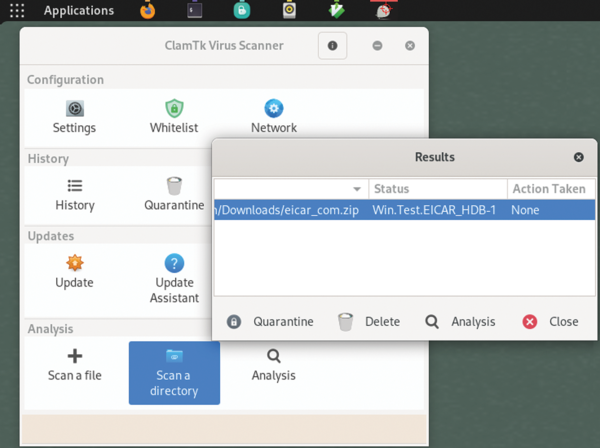 Figure 1: The ClamTk virus scanner graphical interface is minimalistic but includes the most important functions.
Obtaining the Latest Signatures
The freshclam command in the previous code accesses predefined signature servers, retrieves the latest changes and stores them in the local database. However, this process is not the only way to source virus patterns. Providers such as URLhaus and Sanesecurity offer additional signatures. If you don't want to check the various providers manually, you can use the somewhat outdated ClamAV Unofficial Signature Updater [2] package or the Fangfrisch [3] tool, which specialize in this task. Fangfrisch retrieves the community signatures and feeds them to freshclam, where they ultimately reach ClamAV.
Python's package installer, pip, installs the service on your Linux computer. The configuration file in Listing 1 tells Fangfrisch in which provider ocean to fish. Freshclam is then notified of the new pattern source:
cat <<EOF >> /etc/freshclam.conf
DatabaseCustomURL file:///var/lib/fangfrisch/db.sqlite
EOF
freshclam
Listing 1
Fangfrisch Config File
pip install fangfrisch
wget --output-document=fangfrisch.conf https://raw.githubusercontent.com/rseichter/fangfrisch/master/docs/example.conf
mkdir --mode=0770 --parents /var/lib/fangfrisch
chgrp virusgroup /var/lib/fangfrisch
fangfrisch --conf fangfrisch.conf initdb
fangfrisch --conf fangfrisch.conf refresh
Not all providers of antivirus (AV) signatures are free. SecuriteInfo, for example, charges an annual fee for its services. The free basic account releases the signatures after a delay.
Real-Time Virus Scanning
With a database primed with virus patterns, ClamAV can even check your data in real time. This feature is known as on-access scanning, and the name says it all. ClamAV has to give its approval before a file can be accessed locally. If the file fails the check, it cannot be opened.
You can implement real-time protection in two ways: with the clamonacc scanner and the ClamFS filesystem. Both tools work closely with the clamd service, which stores the virus definitions and checks everything sent by clamonacc and ClamFS.
The clamonacc scanner liaises with the kernel and waits for information about desired file access. The two services communicate over a Unix socket or a TCP/IP connection. Two points are crucial for configuration: Be sure to exclude the ClamAV user from the scan to avoid endless loops, and only scan selected areas – not everything below the root (/) directory.
Both services use the same configuration file, /etc/clamd.d/scan.conf. The following settings tell ClamAV to monitor the users' home directories and prevent access if a virus is suspected:
LocalSocket /run/clamd.scan/clamd.sock
OnAccessExcludeUname clamscan/
OnAccessIncludePath /home
OnAccessPrevention yes
Now restart both services; clamd will need a few seconds to load all the AV signatures into memory:
systemctl restart clamd@scan
systemctl restart clamonacc
ClamFS is a userspace filesystem and works slightly differently from clamonacc. All access to the filesystem mounted by ClamFS must first pass through the virus scanner, which must give its approval.
The configuration (in XML format) requires the socket to clamd, a source directory (root), and a directory in which the source directory with AV protection is to be mounted in the filesystem (mountpoint). With a minimal configuration file (demo.xml),
<clamfs>
  <clamd socket="/run/clamd.scan/clamd.sock" />
  <filesystem root="/store/upload" />
  <filesystem mountpoint="/var/www/upload/" />
</clamfs>
ClamAV protects access to files in the mountpoint directory, which is verified by entering
clamfs demo.xml
However, this virus protection does not apply to the root folder. Of course, a final test is essential. Working as a regular Linux user, download the EICAR test file:
wget --output-document=~/eicar.txt https://secure.eicar.org/eicar.com.txt
The download should work without any problems and save the file in your home directory. Leave it in your home directory for clamonacc, or drop it into /var/www/upload for ClamFS.
ClamAV or ClamFS only becomes active when you try to access the file, preventing the read operation with a simple Operation not permitted message. At the same time, an entry is logged in the journal indicating that the EICAR signature has been detected. This behavior differs from that of other virus scanners that immediately delete or quarantine everything at the slightest suspicion.
Because ClamAV is available in most repositories, basic protection can be set up and enabled with just a few commands to your distribution's package manager. However, decades of malware development have also lead to other malicious programs – such as rootkits.

Read this article on our new ADMIN website
https://www.admin-it.io/harden-your-linux-servers-to-stop-malware/
Buy this article as PDF
(incl. VAT)
Buy ADMIN Magazine
Related content
-
OpenSMTPD makes mail server configuration easy
 The OpenBSD origins of the OpenSMTPD mail transfer agent makes SMTP easier to implement and manage and more secure.
 -
Look for file changes and kick off actions with Watchman
 Watchman watches files and directories for changes and triggers actions when specific changes are noted.
 -
Virus scanner and content filter with AD authentication
 You might want to reap the benefits of Active Directory's single sign-on for your virus scanning and content filtering. If you also use Squid to handle user access to the Internet, you have a front-row seat for "When worlds collide."
 -
Hardening mail servers, clients, and connections
 If you don't want to hand over your mail to a corporation, you have to operate your own mail server. Securing it sensibly involves some effort.
 -
A free anti-spam tool for Exchange environments
 Anti-Spam SMTP Proxy gives companies who deploy their own email server a free, but extremely powerful, anti-spam solution.
Subscribe to our ADMIN Newsletters
Subscribe to our Linux Newsletters
Find Linux and Open Source Jobs
Most Popular
Focus On Self-Hosting
• Running Your Own Matrix Server with Synapse
• Reliable Network Storage with TrueNAS Community Edition
• Self-Hosted File Syncing with Seafile
• Wiring the Modern Stack with Node-RED
• Self-Hosted Collaboration with Forgejo
• Self-Hosted PaaS with Coolify
• Build and Host Docker Images
• Self-Hosted Pritunl VPN Server with MFA
Support Our Work
ADMIN content is made possible with support from readers like you. Please consider contributing when you've found an article to be beneficial.
