



Photo by Chris Briggs on Unsplash
Read this article on our new ADMIN website
https://www.admin-it.io/automating-migration-to-openeuler/
Automating Migration to openEuler
The Fast Migration Path
Want more info on openEuler? Download this free focus guide.
For years, CentOS was the distribution of choice for system administrators that needed to run a Red Hat Enterprise Linux (RHEL) compatible system, but could not afford a full support contract with Red Hat. CentOS, a fully compatible clone built from RHEL sources, functioned as a drop-in replacement for RHEL. CentOS promised an enterprise-grade Linux distribution that was available for anyone regardless of their budget.
Red Hat eventually became a sponsor for CentOS in 2014 [1], in a movement the community found controversial at the time. The sponsorship agreement was, according to LWN.net [2], a de facto acquisition of CentOS by Red Hat, since Red Hat took ownership of the CentOS trademarks and the CentOS governing board consisted of a majority of Red Hat employees.
In 2020, Red Hat unilaterally discontinued CentOS development, setting end-of-life (EOL) dates for the active versions much earlier than the community expected. According to Red Hat, CentOS users had no need to worry, because they could use the new CentOS Stream instead. Sadly, CentOS Stream is CentOS in name only. While the original CentOS was a RHEL drop-in replacement, CentOS Stream is an upstream development version of Red Hat, which made serious users wary of migrating.
The last CentOS supported release, CentOS 7, reached EOL on June 30, 2024. If you are still using CentOS today, you are running an unsupported operating system. The good news is that many alternatives have arisen in response to CentOS' demise, so system administrators have plenty of migration options.
One such option, openEuler from the OpenAtom foundation, offers an Enterprise Linux-like system for servers and cloud environments. It boasts a number of unique utilities, such as iSulad, a lightweight container runtime daemon; A-Tune, an AI-powered performance tuning tool for servers; and the x2openEuler migration tool. In this article, I explain how to use x2openEuler to migrate a small fleet of CentOS 7 servers to openEuler.
Your Migration Plan
Traditionally, upgrading systems from the RHEL family involved recreating your services on the new operating system, redeploying them from scratch, and discarding the old installations. For complex services with tight dependencies that cannot easily be carried over from your old CentOS to the new openEuler, this route might still be required. However, the vast majority of applications can be upgraded through different means.
The ideal, modern way of carrying out a migration is via in-place upgrades. When performing an in-place upgrade, you access each server that you want to migrate, replace the operating system that is running under your applications, and keep your production services pretty much untouched. The advantage of this approach is that it is fast, requires less effort, and lets you reuse your old service configuration.
As a rule of thumb, if the platform your production services run on is available in openEuler's repositories, an in-place migration is the way to go. For example, if your application runs on a modern OpenJDK, Perl, or Python environment, chances are an in-place migration will work free of fuss. To see if the platform your service runs on is available, check Repology [3] to verify that openEuler has the packages you need.
I strongly advise backing up your servers before you attempt to upgrade them. While the migration suite has a rollback functionality, you should not count on your migration system to safeguard your data. Ensure you have a sound backup before you proceed.
In-place migrations require the servers to reboot at certain points, therefore you should be prepared for service interruption during the process.
Your Migration Suite
The x2openEuler upgrade management tool needs to be installed on a machine in your network (preferably a server), be configured by an administrator, and then be instructed to perform a number of operations on your server fleet. x2openEuler operates by opening SSH sessions from the control machine to connect to your target servers. This design makes x2openEuler a fine option for migrating small- and medium-sized server fleets, because the administrator can install x2openEuler on a single control node, provide it with the all the target servers' addresses and SSH credentials, and have it migrate them all automatically. Servers can also be migrated in groups if you don't want to switch all your infrastructure in one go – you can also choose to migrate in small increments instead.
To install x2openEuler, grab it from the openEuler download page [4]. x2openEuler is available as an RPM package for the x86_64 and AArch64 architectures. If your goal is to migrate an old server fleet composed of CentOS 7 systems, it's safe to assume you will be installing x2openEuler on a CentOS 7 control node. I recommend running x2openEuler from an instance devoted solely to this task that you can discard after the migration is complete. In order to install x2openEuler, just upload the RPM package to the machine and install it with yum:
# yum install ./x2openEuler-core*.rpm
The installation process pulls a surprising number of dependencies with it, including the MariaDB database (as well as other databases). You should set a root password for your database to make the initialization of x2openEuler smoother. Just start the database service with
# systemctl start mariadb
Using the mysql command, launch a database prompt and set your desired password for the database root user. The root user here is the root user within the database context only – these actions don't modify your system root access credentials! See Listing 1 for the command sequence to set your database root password. Your password must feature a combination of lowercase, uppercase, and special characters; otherwise, it will be rejected.
Listing 1
Setting the MariaDB Root Password
SET PASSWORD FOR 'root'@'localhost' = PASSWORD('your_password_here');
FLUSH PRIVILEGES;
QUIT;
Next, you need to initialize x2openEuler itself. Within your terminal session, move to /usr/local/x2openEuler/portal/service/ and get started using the script service_init.sh. You will be asked a number of questions regarding your setup (Figure 1); feel free to use common-sense answers.
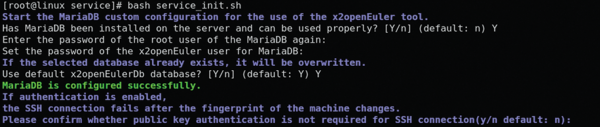 Figure 1: The x2openEuler initialization process.
The initialization script will perform a number of tasks in order to enable and launch the service, including the generation of a self-signed TLS certificate for x2openEuler's web interface. At the end of the process, the server will be running, and you will be able to access the web interface by pointing a web browser to https://$yourserver:18082/x2openEuler/#/login (where $yourserver is the machine's IP address). Because x2openEuler uses a self-signed certificate, you should expect your web browser to throw a warning (Figure 2) before it lets you access the web interface (Figure 3).
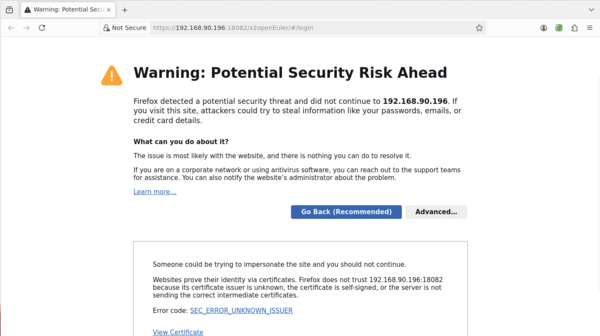 Figure 2: The migration suite uses a self-signed certificate. As a result, the web browser will throw a warning the first time you access it.
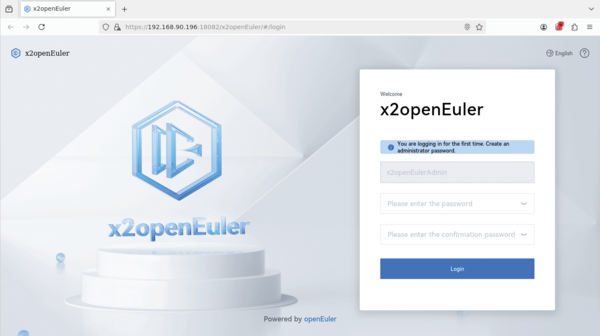 Figure 3: You must create an administrator user in order to log in for the first time. The web interface supports both the Chinese and English languages, which you can change from a menu at the top right of the page.
Also worth mentioning, the x2openEuler service will be vulnerable until an administrator logs in for the first time. Therefore, I recommwend keeping the machine that runs the service behind a firewall with no connection to outside of your organization.
The Migration Targets
x2openEuler is a surprisingly complete tool. If you are operating within a serious environment, your first stop will probably be Web Server Certificates (accessible from the gear on the top-right corner of the administration dashboard). From here, you can replace the default self-signed certificate with one that is widely recognized by your organization's web browsers. Additional users can be added via the User Management section, in case you need to grant access to your coworkers.
Task management is x2openEuler's main feature (Figure 4). When you open the task management interface, you'll be presented with many things to do. If the only thing you need for the moment is to upgrade your server fleet, you can cut to the chase and hit New Task to create a new Upgrade task.
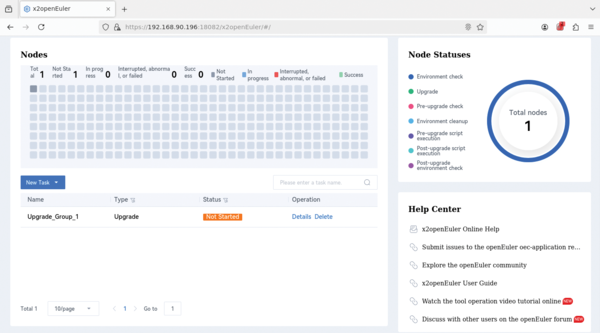 Figure 4: The task manager is the core of x2openEuler. Use the New Task menu to create a new Upgrade task.
Within the task creation section, you may add as many target servers as you like. You may either add them in a batch by uploading a Microsoft Excel file (a template file is provided) or you can add servers one by one. x2openEuler will manage the target servers over an SSH connection, and both password- and keyfile-based authentication are supported (Figure 5).
 Figure 5: Servers can be added to your upgrade task one by one. If this method is too slow, you can also import a list via a Microsoft Excel file.
From the same menu where the target servers are defined, you can also configure a list of packages you want to be installed on the migrated system later, run custom scripts at different phases of the process, and perform a number of advanced actions.
After you have added all the servers you want to migrate, hitting Ok at the bottom of the task page will start the migration task. As a first step, it will begin performing preliminary environment tests. You will be taken to a status page that will show a global report of the ongoing testing. From here, you can check individual servers for an in-depth detailed view of their status (Figure 6).
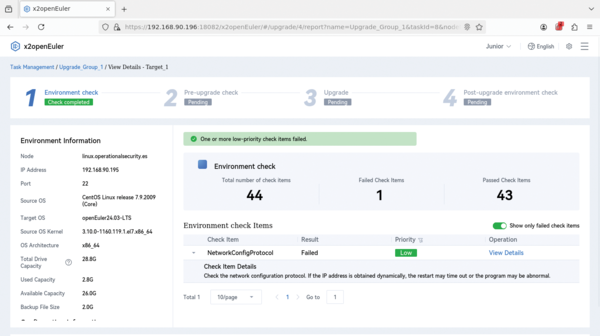 Figure 6: The detailed status for one of the servers: This migration task shows a minor failure because x2openEuler thinks this server might be using a dynamic IP address.
The whole migration cycle for each server consists of four phases: an Environment check , a Pre-upgrade check , the actual Upgrade , and the Post-upgrade environment check . You can trigger these for each server from the Task Management tab or by calling a batch action that includes all the targeted servers (Figure 7).
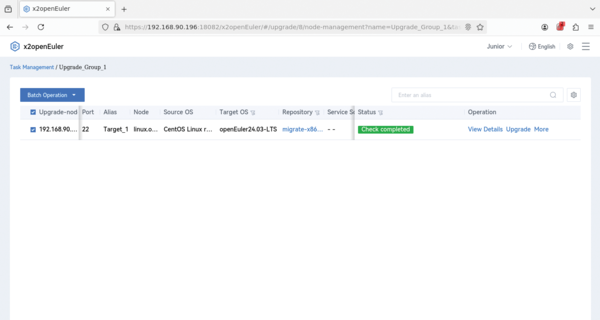 Figure 7: A task with a single target server: You can trigger the Upgrade phase by clicking on Upgrade. If a task contains more than one server, you can select Batch Operation to upgrade them all at once.
Once the Upgrade phase is complete, you are given a final chance to rollback each server to the previous state. x2openEuler has the capability to rollback to the pre-migration stage, and you can go back using the Rollback button on the bottom right of the screen. If you are satisfied with the state of the server after the migration, you can move on to running the post-upgrade checks.
Conclusion
Migrating away from an obsolete CentOS installation doesn't have to be hard – it can actually be a quick process. You should expect a small server to be fully migrated in little more than an hour. If you're looking for an Enterprise Linux alternative that isn't focused on 1:1 compatibility with IBM's offering and that is actively developing their own cloud and server solutions, openEuler is worth considering, if only because their migration and upgrade tools are so powerful and convenient.
This is not to say that x2openEuler cannot be improved. Something that surprised me a bit, for example, was that users can't share migration tasks. x2openEuler users can only create tasks for themselves and can only execute their own tasks. While not a deal breaker, I think openEuler is missing the opportunity to make x2openEuler a true collaborative suite with granular permissions – useful, for example, if you want a junior system administrator to create the migration tasks and run the preliminary checks, but want a senior sys admin to trigger the actual upgrade.
This article was made possible by support from openEuler by OpenAtom Foundation through Linux New Media's Topic Subsidy Program (https://www.linuxnewmedia.com/Topic_Subsidy).
Infos
- "CentOS Project joins forces with Red Hat": https://lists.centos.org/pipermail/centos-announce/2014-January/020100.html
- "CentOS and Red Hat team up": https://lwn.net/Articles/579551/
- Repology: https://repology.org
- x2openEuler download: https://www.openeuler.org/en/migration/download/
The Author

Rubén Llorente is a mechanical engineer whose job is to ensure that the security measures of the IT infrastructure of a small clinic are both legally compliant and safe. He is also an OpenBSD enthusiast.

Read this article on our new ADMIN website
https://www.admin-it.io/automating-migration-to-openeuler/
Buy this article as PDF
(incl. VAT)
Buy ADMIN Magazine
Related content
- Huawei Releases CentOS-Based openEuler as Open Source
-
Intelligent Stack

openEuler prepares for the AI future with a complete software stack tailored for artificial intelligence.
-
Migrating CentOS to Rocky Linux with migrate2rocky
 CentOS users need to find a replacement soon. If you use CentOS 8 and you're looking for safer ground, the migrate2rocky script will automatically migrate your system to Rocky Linux – an enterprise RHEL derivative created by CentOS co-founder Greg Kurtzer.
 -
AlmaLinux’s ELevate Migration Tool

Now that CentOS 7 has reached end of life, users need to migrate to a free enterprise Linux alternative. AlmaLinux’s ELevate migration tool can help ease the transition.
- AlmaLinux is Officially Available
Subscribe to our ADMIN Newsletters
Subscribe to our Linux Newsletters
Find Linux and Open Source Jobs
Most Popular
Focus On Self-Hosting
• Reliable Network Storage with TrueNAS Community Edition
• Self-Hosted File Syncing with Seafile
• Wiring the Modern Stack with Node-RED
• Self-Hosted Collaboration with Forgejo
• Self-Hosted PaaS with Coolify
• Build and Host Docker Images
• Self-Hosted Pritunl VPN Server with MFA
Support Our Work
ADMIN content is made possible with support from readers like you. Please consider contributing when you've found an article to be beneficial.
