


HPC Edge Home Lab
How many people have a home lab? Raise your hand. How many people have an HPC home lab? Raise your hand. I kept my hand up for both, and I’m sure I’m not the only one. My HPC home lab is a hodgepodge cluster of various node types, but currently they are all x86. In the past I had a Raspberry Pi 2 cluster with four nodes and a cluster with a Cluster HAT interface.
Raspberry Pi (RPi) clusters are a lot of fun and not very expensive. The Cluster HAT cluster was cool, but I felt limited by the amount of memory on the Pi Zeros at the time, which was only 512MB. The Raspberry Pi Foundation has continued to evolve both the Pi and the Pi Zero architecture to the Raspberry Pi 5, Compute Module 5, and RPi Zero 2 W. Other companies make Raspberry-like systems that are sized about the same and priced approximately the same but that use different components, such as more cores, more performance, more features, or perhaps a lower price.
When the artificial intelligence (AI) wave crashed down on the computing world in about 2025, memory companies stopped making as much memory for the non-AI world and focused almost entirely on AI. The same is true for solid-state drives (SSDs) and even CPUs. Everything is focused on AI because that is where the growth and the money are located, and the amounts are huge. The Raspberry Pi’s price started going up until a 16GB RPi 5 reached the range of a low-end laptop – around $300. Table 1 shows prices as of May 15, 2026.
Table 1: Approximate RPi Prices (May 15, 2026)
| Component | Price |
| Pi 5, 16GB | $300 |
| Pi 5, 8GB | $190 |
| Pi 5, 4GB | $100 |
| Compute Module 5, 16GB | $500 |
| Compute Module 5, 8GB | $200 |
| Compute Module 5, 4GB | $100 |
| Pi 4, 8GB | $165 |
| Pi 4, 4GB | $100 |
| Compute Module 4, 8GB | $200 |
| Compute Module 4, 4GB | $100 |
Note that pretty much any model with 4GB of memory is around $100. Anything with 8GB of memory is around $200. Anything with 16GB is either $300 or $500.
An undertone to the price increases is the Raspberry Pi Foundation’s abandonment of their original target market of makers and people who want to learn and experiment. Now, the target markets are the companies that use them in various commercial applications. I’m not condemning the Raspberry Pi Foundation: They need to make money and are indeed allowed to make money.
People have turned away from the Raspberry Pi for applications around HPC because the price and performance is now not that great. Granted, many people don’t care that much about performance in a home lab HPC cluster, because they are using their own money and want to get reasonable performance at a low cost. Plus, The Raspberry Pi community is still very large, so a lot of hardware and software is available and you have a number of places where you can get help.
Raspberry Pis in home lab HPC clusters seemed to be pretty much dead for the foreseeable future; however, a friend very recently pointed out that it’s not dead.
HPC at the Edge
My friend just finished her Bachelor of Science degree in Environmental Geosciences and is starting on her Master of Science degree. Her fieldwork involves gathering samples to be post-processed in the lab, which involves a great deal of image processing. She has two research locations thousands of miles apart in different countries.
We started talking about building laptops, and she was looking for something like a Raspberry Pi in some sort of case – maybe something like a clamshell – that is self-contained with the possibility of being powered by solar power. The goal is portability and power savings, to the point that solar is a real option (note again her first degree). She was looking for something to do some light processing but that could also serve as a mountpoint for external media (e.g., SD cards or SSDs) that contain her large collection of research images.
After chatting some more, we talked about the possibility of using the system for heavier processing (primarily image processing) yet be solar powered. With a little more research, I found some very cool cameras with lenses that could be used in the field or could be used to create digital microscopes. Although solar power is still paramount, having the ability to plug into a wall socket might be useful.
To me, this scenario sounds like edge computing, and I think it easily falls into the category of home lab HPC cluster edge computing – that is, bringing efficient, cost-effective computing to the edge and combining it with scientific instruments, with the possibility of cluster computing (more on that). Maybe the Raspberry Pi is not dead after all despite the best efforts of the memory chip industry and the Raspberry Foundation itself. To the bat cave!
I quickly found that the generic term for a clam shell design is a “cyberdeck.” You can use almost anything you like as a case to carry around your deck (Figure 1). (Several attempts were made to contact the owner of the website to obtain permission to use the image, but no contact was successful. The project was from seven years ago, so they might have moved on.) When you want to use it, you set it down and open it up; inside is a monitor with a keyboard, single-board computer (SBC), some sort of battery, and electronics to convert the solar power into something the SBC can use. A trackpad or mouse is a consideration as well, especially if you plan to use a GUI, which adds additional power draw.
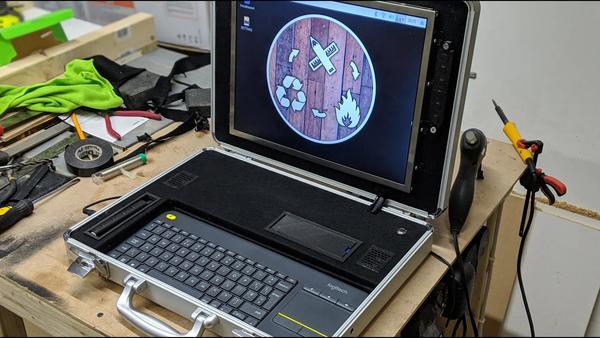 Figure 1: Briefcase deck for a Raspberry Pi (by makefailrepeat).
For a workable deck in my friend’s case, you could put solar cells next to the monitor inside the deck or to pull them out of the deck and set them beside it. Many campers and backpackers use flexible, portable arrays with USB ports. However, you don’t want to spend too much time setting up the deck or putting it away and you don’t want it to add a lot of weight.
The initial idea was to use a Raspberry Pi Zero 2 W; it only uses about 3W under maximum load, which she thought would be perfect for her initial target (no attached instruments at this point). The specs for the RPi Zero 2 W are:
- 1GHz quad-core 64-bit Arm Cortex-A53 CPU
- 512MB SDRAM
- 2.4GHz 802.11b/g/n wireless LAN
- Bluetooth 4.2, Bluetooth Low Energy (BLE), onboard antenna
- Mini HDMI port and micro-USB On-The-Go (OTG) port
- microSD card slot
- CSI-2 camera connector
- HAT-compatible 40-pin header footprint (unpopulated)
- H.264, MPEG-4 decode (1080p30); H.264 encode (1080p30)
- OpenGL ES 1.1, 2.0 graphics
- Micro-USB power
- Composite video and reset pins by solder test points
- 65mm 30mm
As of May 15, the price of an RPi Zero 2 W could be found for $42 (Figure 2). To get one with pre-soldered color-coded headers is only $45. With the GPIO headers pre-soldered, you can add almost any Hardware Attached on Top (HAT) board to add all kinds of features. Just be aware that these HATs draw power and, in some cases, can draw more than the RPi Zero 2 W itself.
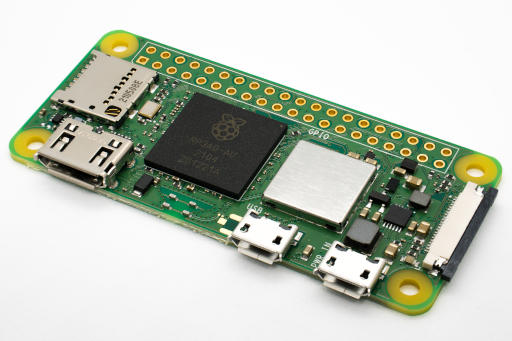 Figure 1: Briefcase deck for a Raspberry Pi (CC BY-SA 4.0 Michael H. Laserlicht).
A great example of a useful HAT is the PiSugar, a specialized rechargeable battery that has a power management module specifically for the Raspberry Pi. Some versions of the PiSugar come with a HAT that accepts an RPi Zero 2 and allows power management and monitoring.
Solar
Several blogs discuss how to use solar energy to power a Raspberry Pi. Pretty much all of them say to power the Zero with a battery and then charge the battery with the solar power. The battery can be a power bank. For example, a 20,000mAh power bank connected to a Raspberry Pi 5 running a web browser with no GUI has lasted seven hours, so an RPi Zero should run much longer.
Other articles say to use solar power to charge the battery of an uninterruptible power supply (UPS) HAT, rather the RPi battery directly. The principle is the same – the solar power keeps the UPS charged.
Finally, a new development is a photovoltaic (PV) HAT called the PV PI. It started as a Kickstarter project and is now in production, although you might have to wait awhile. The PV PI has a laundry list of features. With a HAT like this, you could efficiently use, manage, and monitor an RPi on solar power.
Digital Microscope
If my friend has a desire to add more features to her deck, a digital microscope would definitely help. The samples collected in the field are processed with a microscope of around 100x magnification. Several projects online talk about how to do this with the Raspberry Pi:
Some of these microscopes are digital, and some use optical lenses.
Optical microscope lenses can be found online; for example, seeedstudio sells a 300x microscope with a C mount for only $69.99. (I can’t vouch for the quality because I’ve never tested it, but it sounds great.) Waveshare sells a 100x lens for $14.99 that includes a C Mount. For the work my friend does, 100x is what she uses in the lab, so for $14.99 she can get started. If she wants more precision, she can get the 300x lens for about $70.00.
Cluster HAT for Low-Power HPC
For something more in my field, the Cluster HAT allows you to plug up to four RPi Zeros into it, giving you a mini-cluster that works quite well. I wrote about such a setup a few years ago. I don’t think you can use an RPi Zero as the management server, so you would have to use the classic Raspberry Pi layout. The good news is the 64-bit version of the Raspberry Pi 5, so you can address more than 4GB of memory. The Cluster HAT cost about $38 when I checked on May 15, 2026.
A serious consideration is that the standard Cluster HAT v2.5 is officially not compatible with the RPi Zero 2 W because of the higher power requirements (up to 1.1A per RPi Zero 2 W ). Some people got it to work, but they had to make some modifications. The recommendation is to use an RPi Zero W, which was about $15 without headers at print time. You don’t have to use the wireless version if you don’t need it. The RPi Zero only has a single core processor but has 512MB of memory.
Summary
I gave up on the Raspberry Pi for building a home lab HPC cluster because of poor price and performance; also, I had a difficult time finding them. The price has gone up for all SBCs, so the RPi is not unique. However, HPC has so many facets I neglected to consider. One of those is the possibility of edge HPC.
Edge HPC is generally data center servers moved to the physical location they are needed. They can be administered by the central data center cluster and have access to those resources, albeit at a slower speed. Your HPC edge home labs do not have to use big servers when very low power SBCs such as the Raspberry Pi Zero family are available. The price and performance might not be what you want for HPC, but the ability to build something that can be used in the field and does not require electrical lines or lugging around a laptop with limited power time is amazing.
A classic definition of HPC is computing power greater than your laptop or desktop. I still like that definition, and I often use it. With the HPC edge home lab concept, you have virtually infinite computer power compared with the status quo, which is none. In my opinion, this is worthy of being called HPC.

Subscribe to our ADMIN Newsletters
Subscribe to our Linux Newsletters
Find Linux and Open Source Jobs
Most Popular
Support Our Work
ADMIN content is made possible with support from readers like you. Please consider contributing when you've found an article to be beneficial.
