



Virtualization with KVM
All for One
Whether you want to lock up your web server, test security functions, put a really powerful server to better use, or just try out a new distribution, virtual machines can be very useful. The Kernel-based Virtual Machine (KVM) [1] is a fairly recent project now being promoted by Red Hat, and it's another candidate for the job of launching and managing your virtual machines. Although KVM is frequently overlooked in the wake of VirtualBox and VMware, it offers an impressive feature scope, is included by nearly every distribution, and is totally free. The virtualization functions in Red Hat Enterprise Linux are based on it.
Building Blocks
KVM comprises individual modules that handle different tasks. To start, Qemu [2] emulates the hardware of one or multiple computers. Operating systems can coexist peacefully on the virtual machines that Qemu provides without fighting over the physical network interface (Figure 1).
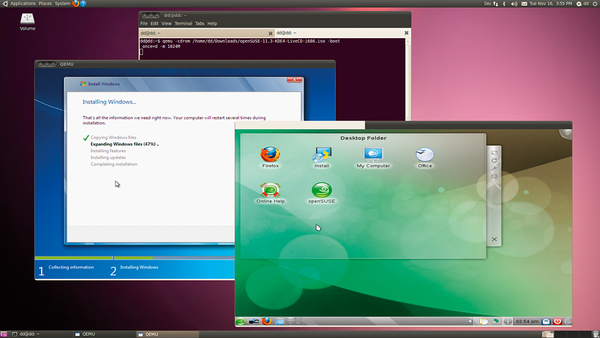 Figure 1: Thanks to KVM, Windows 7 and openSUSE 11.3 will run peacefully side by side on Ubuntu 10.04 .
Of course, simulating computer components is heavy on CPU cycles. To improve the execution speed of
...

Buy this article as PDF
(incl. VAT)
Buy ADMIN Magazine
Related content
-
Virtualization with KVM
KVM continues to gain popularity in the world of Linux – so much so, that it has become Red Hat and Ubuntu's preferred virtualization solution. In contrast to Xen, setting up KVM involves just a couple of steps, and the guest operating systems can run without special patches.
-
Secure Your KVM Virtual Machines
 A common misconception posits that software cannot cause mischief if you lock the system away in a virtual machine, because even if an intruder compromises the web server on the virtual machine, it will only damage the guest. If you believe this, you are in for a heap of hurt.
 -
Virsh Libvert Tool
With the command-line tool virsh, a part of the libvirt library, you can query virtual machines to discover their state of health, launch or shut down virtual machines, and perform other tasks – all of which can be conveniently scripted.
-
Remotely controllingvirtual machines with virsh
 With the command-line tool virsh, a part of the libvirt library, you can query virtual machines to discover their state of health, launch or shut down virtual machines, and perform other tasks – all of which can be conveniently scripted.
 -
Controlling virtual machines with VNC and Spice
 Administrators on Linux virtual machines tend to use VNC to transfer the graphical system to Virtual Machine Manager or a VNC client. One alternative is Spice: If the guest system is running the QXL driver, you can look forward to fast graphics and audio pass through.
Subscribe to our ADMIN Newsletters
Subscribe to our Linux Newsletters
Find Linux and Open Source Jobs
Most Popular
Focus On Self-Hosting
• Reliable Network Storage with TrueNAS Community Edition
• Self-Hosted File Syncing with Seafile
• Wiring the Modern Stack with Node-RED
• Self-Hosted Collaboration with Forgejo
• Self-Hosted PaaS with Coolify
• Build and Host Docker Images
• Self-Hosted Pritunl VPN Server with MFA
Support Our Work
ADMIN content is made possible with support from readers like you. Please consider contributing when you've found an article to be beneficial.
