


© Giuseppe Ramos, 123RF.com
Creating and evaluating kernel crash dumps
Crash Test
A dump of the operating system kernel as a means of problem analysis is nothing new in the Unix world. However, this topic has been sadly neglected on Linux for a long time. The first attempts were made in 1999 with the Linux Kernel Crash Dump (LKCD) project [1]. This approach originally initiated by SGI was successful in that it made its way into the SUSE Enterprise distribution [2]; however, the problem of writing a dump to an MD RAID or transferring larger kernel images ultimately proved unfixable.
Further attempts with Netdump (Red Hat) or Diskdump [3] in 2002 and 2004 also had only moderate success. Meanwhile, an approach that can be used reliably in production environments comes in the form of kexec and kdump [4]-[7]. A core issue and the biggest challenge in writing kernel dumps is: Who should do it? The obvious answer is surely: the kernel itself. However, this approach, which the LKCD project pursued, involves some risks.
How far can you trust a kernel that just crashed? Are the kernel structures and data intact? Are the drivers still correctly initialized so that the hard drive or the NFS share is accessible? These are exactly the problems that LKCD encountered.
It would be preferable to use an entity outside of the kernel to save the kernel dumps. With the growing proliferation of virtualization, a hypervisor is an obvious candidate for this, and you can use VMware, Xen, or KVM to save a dump of the Linux kernel – but I'll get to that later.
If Linux is running directly on the metal, the hypervisor approach is worthless, which is where kdump – or, more precisely, kexec – enters the game. The kexec tool is a kind of kernel-to-kernel bootloader, and the current kernel can use it to load and run a new kernel. The BIOS plays no part in this, and it is up to the new kernel to decide whether to leave the content of memory untouched or to delete certain entries.
This new kernel, known as the crash or dump kernel, starts a part of the remaining Linux system and saves the dump. For kexec to work, admins need three things: a 2.6.13 kernel or newer, a kernel configured for kexec, and the corresponding userland tools (Figure 1).
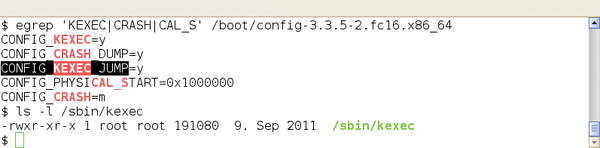 Figure 1: Dependencies for kdump/kexec must be met both on the kernel side and in userland.
Kernel Loads Kernel
Booting a new kernel from the context of a running kernel sounds easier than it is. Before version 2.6.26, the Linux kernel could only boot from a single specified memory address, and this was, of course, already occupied by the current kernel. Additionally, the memory area of the new kernel requires protection from data being overwritten by continuous direct requests to main memory (DMA).
Finally, the new kernel needs to access certain information from the time of the crash and, thus, needs to know where the old operating system kernel resides in memory. Fortunately, the administrator does not need to worry about this seemingly hopeless mission. This job is handled by the kexec command and the kexec_load system call. The former loads the new kernel into a reserved memory area and is responsible for execution in collaboration with the system call.
The specific configuration of the kexec/kdump duo is a little different for each Linux distribution, so I'll describe the approach on a more generic level on the basis of Red Hat's and SUSE's enterprise distributions (RHEL 6.2 and SLES 11 SP2). Admins have the choice between a completely manual configuration with rpm and vi or emacs or the use of the manufacturer's system tools. In the case of SLES, you need to use the yast2-kdump module; for RHEL, use system-config-kdump.
To begin, you need to install the tools for booting the crash kernel and writing the dumps. The appropriate package is usually called kexec-tools or something similar. You might need to install the crash kernel. In older distributions, a separate package exists for this. Here, kexec loads a new binary file.
Kernel to Crash
Today, distributors take a different approach: The normal kernel has all the required features and can also serve as a crash kernel. This is the case for the current versions of RHEL and SLES, for which loading another kernel package is not necessary.
The next step is the configuration of kexec and kdump. The former is responsible for loading and running the crash kernel. For this to happen, the tool needs to know which kernel to load, where it is located, and whether any additional kernel options are necessary. The kdump configuration determines the settings for writing the kernel dump. These include the storage location, what information to include, optional compression, or splitting the dump. For your first experiments, it is advisable to start with the default settings.
For the kexec/kdump method to work, the crash kernel must already be loaded at the time of the problem. This process is handled by the kdump startup script, but only if a protected memory area is also present. To let the original kernel know this, you need to specify the boot loader option crashkernel=XM[ @YM], where X is the size of the reserved area in megabytes and Y specifies the start address. If you omit the second parameter or set it to 0M, the system automatically selects an appropriate location. A subsequent restart enables this change.
Test Crash
If you are not convinced, you can check /proc/iomem to see that the protected memory space is marked (Listing 1). Then, if everything works correctly, the kdump startup script can load the crash kernel into memory. Typically, you want to add this step to the regular boot process, but for initial testing, a manual start is fine.
Listing 1
Preparations for the Kernel Dump
[root@rhel ~]# grep -i crash /proc/iomem
  03000000-0affffff : Crash kernel
[root@rhel ~]# grep crash /proc/cmdline
ro root=/dev/mapper/VolGroup00-LogVol00 rd_NO_LUKS KEYBOARDTYPE=pc KEYTABLE=de-latin1-nodeadkeys rd_NO_MD quiet SYSFONT=latarcyrheb-sun16 rhgb rd_LVM_LV=VolGroup00/LogVol01 rd_LVM_LV=VolGroup00/LogVol00 LANG=de_DE.UTF-8 rd_NO_DM crashkernel=128M
[root@rhel ~]# /etc/init.d/kdump status
 Kdump is operational
[root@rhel ~]# which kexec
/sbin/kexec
[root@rhel ~]# which kdump
/sbin/kdump
[root@rhel ~]#
sles:~ # grep -i crash /proc/iomem
  27000000-2effffff  : Crash kernel
sles:~ # grep crash /proc/cmdline
root=/dev/disk/by-uuid/10a83ffe-5a9f-48a2-b8cb-551c2cc6b42d resume=/dev/sda3 splash=silent text showopts crashkernel=128
sles:~ # /etc/init.d/boot.kdump status
kdump kernel loaded
                             running
sles:~ # which kexec
/sbin/kexec
sles:~ # which kdump
/sbin/kdump
sles:~ #
At this point, you need to test the configured setup – that is, you need to trigger a kernel crash artificially, which should then automatically start a dump write. To do so, use
echo 1 > /proc/sys/kernel/sysrq
to enable the "Magic SysRequest Keys." Under normal circumstances, this has already happened if you used the distribution tools to set up the kernel dump.
Next, type
echo c > /proc/sysrq-trigger
to trigger a kernel panic. If everything works, the system starts the crash kernel, which in turn triggers kdump or makedumpfile (Figure 2).
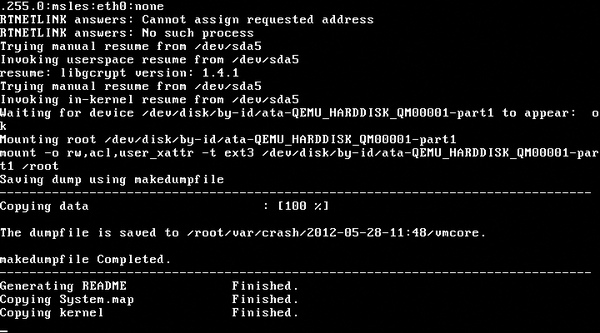 Figure 2: The crash kernel in action.
The system writes each dump to a separate directory named according to the creation date. If the system crashes multiple times, this prevents information you have already saved from being overwritten.
Another note for those using SUSE: You can also trigger a kernel panic by loading the crasher.ko module. Incidentally, this module comes courtesy of Btrfs developer Chris Mason, when he was still working for SUSE [8].

Buy this article as PDF
(incl. VAT)
Buy ADMIN Magazine
Subscribe to our ADMIN Newsletters
Subscribe to our Linux Newsletters
Find Linux and Open Source Jobs
Most Popular
Focus On Self-Hosting
• Running Your Own Matrix Server with Synapse
• Reliable Network Storage with TrueNAS Community Edition
• Self-Hosted File Syncing with Seafile
• Wiring the Modern Stack with Node-RED
• Self-Hosted Collaboration with Forgejo
• Self-Hosted PaaS with Coolify
• Build and Host Docker Images
• Self-Hosted Pritunl VPN Server with MFA
Support Our Work
ADMIN content is made possible with support from readers like you. Please consider contributing when you've found an article to be beneficial.