


« Previous 1 2 3 4 Next »
How Kanban helps improve IT processes
JugglingProjects
Kanban
The Kanban method is another agile approach for modeling workflow processes. It is enjoying increasing popularity, especially in the area of IT, because it is easy to understand, easy to implement, and easily adapted to individual needs.
Kanban [3] is a term put together from the Japanese words "kan" (signal) and "ban" (card). It is the name of a principle that Taiichi Ohno used to organize the production processes at Toyota in 1947. He effectively oriented his concept on the central goals of lean manufacturing – namely, to reduce processing time, increase productivity, and create satisfaction and confidence.
Based on the insight that no method ever reaches perfection, the principle of continual improvement ("kaizen") also plays an important part in Kanban.
Pull and WIP
The core of the Kanban method is the pull system, in which the various stations in the process fill up their free capacity without external influence. At Toyota, signal cards (i.e., "Kanban") were used for this purpose, with which a station signaled that they had capacity available for processing the product of the previous station. The number of cards available corresponded to the total capacity of the respective station, so an overload could be ruled out. Thus the system introduced a work-in-progress (WIP) limit that was the decisive factor for the success of the Kanban principle.
An example that graphically demonstrates the pull system can be found in the Imperial Gardens in Tokyo. Upon entrance, each visitor is given a card with a request to return the card upon leaving the gardens. Entrance to the gardens is free, but it is only allowed as long as free cards are available. Because the cards are limited to a reasonable number, there can never be more visitors in the gardens than would allow for a pleasant stay.
Kanban has become known as an organizational method in the field of IT, above all, through David J. Anderson [4] and his book "Kanban: Successful Evolutionary Change for Your Technology Business. " Anderson names the following core practices that characterize the Kanban method:
- Visualizing: The individual jobs in a project and their relationship to the steps of the process are made visible for everyone.
- Limiting work in progress: The pull system, together with a limit on the number of simultaneous tasks, prevents a station (e.g., the QS team in an IT context) from becoming overloaded.
- Managing flow: Informed decisions can be made on the basis of important metrics – for example, the processing time for a certain task, the number of unfinished tasks at a station, or the amount of time a task remains at a particular station.
- Making policies explicit: Agreements are formulated not only for the tasks at each station but for the criteria that must be met for the task to be considered complete and how the transitions between stations are to take place.
- Implementing feedback loops: Daily stand-up meetings on the team and colleague level, as well as cross-team operations reviews, ensure that everyone involved has influence on the continued improvement of the processes.
- Collaborative improvement, evolving experimentally: Scientific models, like the "theory of constraints," for example, and specific experiments help gain insights from which targeted measures for improving the processes can be derived.
Kanban in Practice
The nice thing about the Kanban principle is that only two things are needed to put it into practice: The explicit permission to introduce WIP limits and a board.
The board, whether a whiteboard, bulletin board, or virtual board in the form of a Kanban application, serves to visualize the workflow. On the Kanban board, each process step is represented by a column. Figure 1 shows a very simple example for such a Kanban board. A typical development project could be modeled with columns called "Backlog," "Analysis," "Development," "Test," "Change Preparation," "Production," and "Done." To the other extreme, very large projects might even use multiple, hierarchically staggered boards, whereby one reflects the overall status and others are used to manage individual parts of the project.
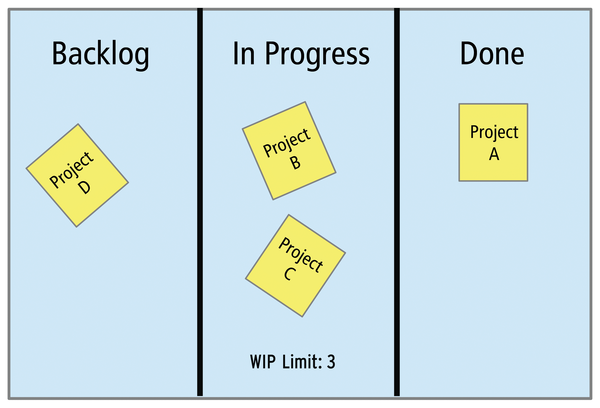 Figure 1: On the Kanban board, each process step is represented by its own column. The projects move from left to right.
« Previous 1 2 3 4 Next »

Buy this article as PDF
(incl. VAT)
Buy ADMIN Magazine
Related content
-
Gleaning Agile Methodology for Infrastructure Projects
 I remember when this whole agile methodology (Agile) thing hit several years ago. Project managers began spouting crazy new terms such as sprints, scrum, waterfall, and stand-ups.
-
Manage projects in SMEs with OpenProject
 OpenProject supplies sensible, comprehensive project management for SMEs with few financial inputs.
-
Automated health checks
 The open source Dradis framework helps you create plans for carrying out team pentests and facilitates the task of standardizing reports from different tools to create summary output.
-
Help Desk with FreeScout
 The free version of FreeScout offers all the features of a powerful and flexible help desk environment and can be adapted to your requirements with commercial add-ons.
-
GitLab for DevOps teams
 We show you how one company uses GitLab CI as a platform for continuous integration and deployment processes.
Subscribe to our ADMIN Newsletters
Subscribe to our Linux Newsletters
Find Linux and Open Source Jobs
Most Popular
Focus On Self-Hosting
• Running Your Own Matrix Server with Synapse
• Reliable Network Storage with TrueNAS Community Edition
• Self-Hosted File Syncing with Seafile
• Wiring the Modern Stack with Node-RED
• Self-Hosted Collaboration with Forgejo
• Self-Hosted PaaS with Coolify
• Build and Host Docker Images
• Self-Hosted Pritunl VPN Server with MFA
Support Our Work
ADMIN content is made possible with support from readers like you. Please consider contributing when you've found an article to be beneficial.