Linux small business servers compared
Out of the Box
Tailor-Made
A click on Install shows an overview of the packages or package groups selected for installation, which then must be confirmed by clicking OK before Zentyal begins with the installation. This first step takes a bit of time, but it is convenient because admins can assemble a custom-configured small business server.
Most of the preconfigured packages are practical and can be used as-is with no additional configuration. The exceptions are configuration of network interfaces and the like. User input is needed to select the kind of server because, besides the standalone server scenario, Zentyal also offers one for role-based multiserver operation that lets a Zentyal server serve as a (backup) domain controller in an Active Directory domain, for example (Figure 1).
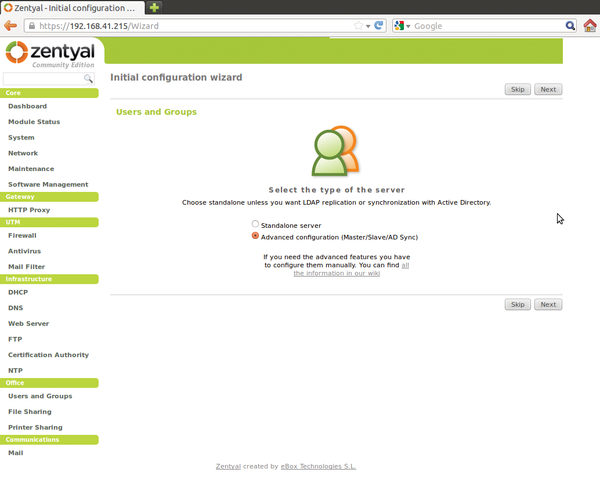 Figure 1: Zentyal manages users itself or integrates them from LDAP or Active Directory.
During MTA configuration, administrators can also set the mail domain that is to be used. Finally, as would be expected, you may register a subscription at the end of the package installation. As mentioned previously, the subscriptions not only include vendor support, but also make advanced features available, such as configuring a backup to the Zentyal cloud, using a zentyal.me subdomain for addressing the server directly, or monitoring the most important operating parameters remotely.
After saving the changes, a click on Go to the Dashboard brings you back to the overview page of the configuration interface. The wealth of information could be intimidating at first, but it is easy to understand. A click on security updates under the General Information area will start the first update of the Ubuntu foundation. The functions of the web interface are largely intuitive and quite attractive and usable, reaching a level comparable to Webmin. Moreover, it is completely Ajax-free, always requiring a complete reload of individual pages. The package groups seen during installation are reflected in the UTM, Gateway, Infrastructure, Office, and Communications sections of the navigation panel on the left side.
Network configuration falls under the heading Core, and a click on Dashboard at the top of this group takes you to the overview (Figure 2). On the Dashboard page, Module Status displays the services managed by the Zentyal server. Modules that have not been started can be activated with Core | Module Status , and other components are added under Core | Software Management .
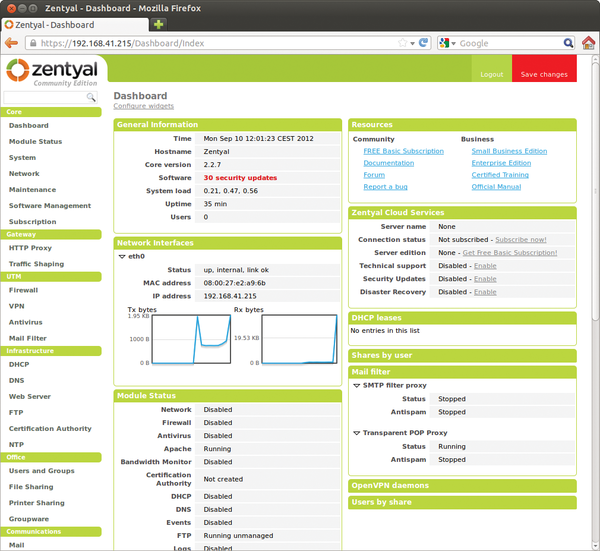 Figure 2: The dashboard shows an overview of the current status of the server and running services, and lets you control the services from here, too.
Infrastructure, Office, and Communications
The Zarafa installation is the quite recent version 7.08-351-78. Any further configuration of the groupware requires that a mail stack be activated and configured. The mail server configuration is found under the Communication section. Here, even configuring an SMTP relay with authentication over the web interface is possible.
To save the mail configuration, the email module must first be installed and activated with Dashboard | Module Status , and Zentyal kindly reminds you of this. However, this setup will only work if the component Users and Groups is present, because Zarafa obtains the mail account quotas from the user dialog.
Once these preparations have been completed, admins can further configure Zarafa under Office | Groupware . When this is done, Zarafa's excellent web interface can be accessed under the address http://<Zentyal-Server>/webaccess (Figure 3).
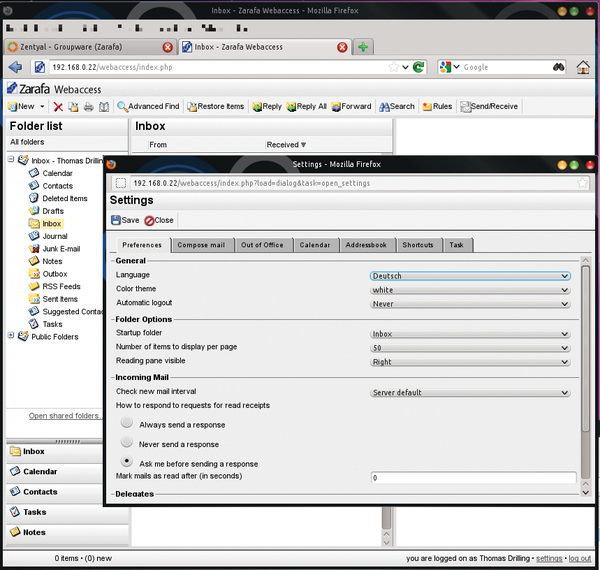 Figure 3: The language for Zarafa Webaccess can be chosen under the settings for Zarafas web client.
ClearOS
In 2009, ClearOS was still distributed under the name "ClarkConnect." Originally designed as a gateway and router distribution, the range of functionality grew, now giving ClearOS the status of a small business server. Only shortly before the deadline for this issue, the brand new version 6.3 was released, which is also available in combination with free or commercial Zarafa editions. ClearOS is based on CentOS 6.3 and is available in several commercial (ClearOS Professional) and Community versions [6], either as ISO images for installation or as virtual appliances.
ClearFoundation markets the commercial versions in the form of subscriptions per year and server. They are available as Lite, Basic, Standard and Premium packages, differing in support level and number of pre-installed "Apps." Worth mentioning here are, for example, the Active Directory Connector [7], and Google Apps Synchronization or Account Synchronization (master/slave). The differences are explained in the ClearCenter Store [8]. The Zarafa combination is also available in a commercial version [9].

Buy this article as PDF
(incl. VAT)
Buy ADMIN Magazine
Related content
-
Linux infrastructure servers for small and midsize businesses
 Specialized Linux distributions are available for small and midsize businesses that promise economical and easy management of server applications and entire IT infrastructures. We looked at four of the best known candidates: ClearOS, NethServer, Zentyal, and Univention Corporate Server.
-
openSUSE LEAP 42.1 and ClearOS 7.2
The openSUSE community offers the "first Linux hybrid distro," which combines source from SUSE Linux Enterprise (SLE) with community contributions in an effort to provide a balance between innovation and maturity. ClearOS, also known as the Next-Generation Small Business Server, is an IT solution for homes, small to medium-sized businesses, and distributed environments.
-
ClearOS 7 Community Edition and Kali Linux
ClearOS provides a simple and easy-to-use platform for all layers of the IT environment. Offensive Security bills Kali Linux 2017.1 as their “most
advanced penetration testing distribution, ever”. -
Server distributions for small businesses tested
 Six all-in-one Linux server distributions and a NAS system for small businesses and workgroups feature comprehensive feature sets, simple administration, and services. Are these distributions worthwhile?
-
Zentyal Server 3.5
 Some users may struggle when setting up various services, such as web servers, email servers, firewalls, and the like. Zentyal simplifies configuration of all those things, thanks to its intuitive user interface.
Subscribe to our ADMIN Newsletters
Subscribe to our Linux Newsletters
Find Linux and Open Source Jobs
Most Popular
Focus On Self-Hosting
• Running Your Own Matrix Server with Synapse
• Reliable Network Storage with TrueNAS Community Edition
• Self-Hosted File Syncing with Seafile
• Wiring the Modern Stack with Node-RED
• Self-Hosted Collaboration with Forgejo
• Self-Hosted PaaS with Coolify
• Build and Host Docker Images
• Self-Hosted Pritunl VPN Server with MFA
Support Our Work
ADMIN content is made possible with support from readers like you. Please consider contributing when you've found an article to be beneficial.