Linux small business servers compared
Out of the Box
Resara Server
Next up is the Resara Server, available since March 2011 as version 1.0. However, while writing this article, Resara announced that the company would close for personal and financial reasons [10]. The Resara Server remains interesting, however, because the company intends to make the complete code for all Resara products, including the commercial Resara Server and the Enterprise version, available to the community within the next five months.
For this reason, I have included version 1.1.2 of the Resara Community Edition, available since April of this year, in the comparison. The differences between the Resara Community Edition and the commercial variants, "Resara Server" and "Resara Server Enterprise," are listed on the download page [10], although the primary benefit of the paid support is no longer available.
The commercial version also offered multiserver replication, CSV import/update, and server config backup. The Community Edition is license under the GPLv2 and the BSD licenses and is available as either a 1.6GB large ISO images or as VirtualBox OVA image. Version 1.1.2 of the Admin Console is also available on the download page in variations for Windows (EXE, ZIP), Mac OS X, and Linux (32 and 64 bit). In contrast to the other products in this comparison, Resara offers no web-based administration. However, the Admin Console package is only needed if the admin intends to administer the Resara Server from another machine in the network because an Admin Console for the local server is included in the server ISOs.
Inside Resara
The Resara Server is also based on Ubuntu version 10.04 LTS, like Zentyal. The installation process does not require the admin to do any more than complete the guided or manual partitioning, set up a user account, and choose the language and keyboard layout. After installation, Resara boots up an ordinary Ubuntu System with an icon on the desktop to start Resara's Admin Console. A wizard for further configuration of the small business server also starts automatically after the first boot (Figure 8).
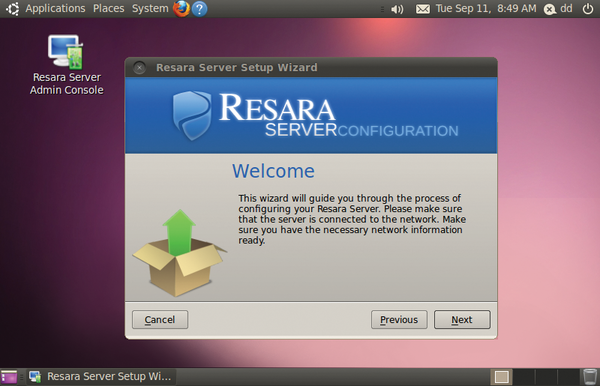 Figure 8: Resara boots up an ordinary Ubuntu desktop after the basic installation and starts the configuration wizard for the small business server.
The first step concerns network configuration; however, it adopts the data from the basic foundation Ubuntu configuration. After configuring the time zone, the admin must specify the host and domain names. The administrator's password defined in the next step is only valid for the Resara server, whereas the Ubuntu system is accessed as usual with the username specified during installation of the foundation system.
Afterward, the wizard offers to make Resara the DHCP server, asking the admin to specify the desired IP range. Subsequently, the wizard completes the Samba configuration without further user input.
Samba Central
The Admin Console (Figure 9) serves mainly to configure Samba, DHCP, and DNS and manage user accounts. On the Server tab, Samba can be stopped or restarted. That's it. Resara is mainly focused on Windows file sharing.
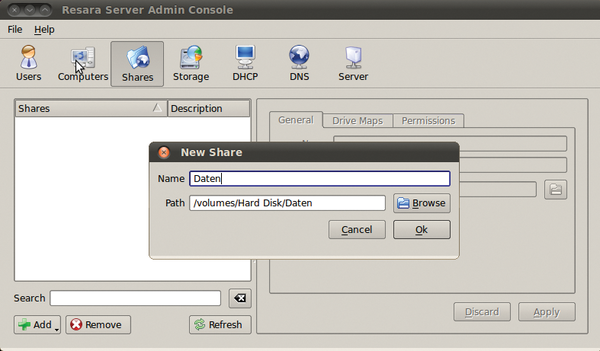 Figure 9: The Resara Server is the only server in the test that offers no web interface. It can only be administered with a native tool.
Thanks to Samba 4, Resara can provide a real Active Directory-compatible Windows domain that supports all AD user/computer policies, as well as Microsoft Management Tools. The Admin Console provides three predefined groups: Domain Admins, Domain Users, and Domain Guests, to which new users must be added before they can log in to a Windows domain.
Resara keeps all other details of the Samba/AD configuration hidden from the users. Experienced users will search in vain for the Heimdal (Kerberos) and OpenLDAP services in the context of AD; both are part of the Samba 4 implementation.

Buy this article as PDF
(incl. VAT)
Buy ADMIN Magazine
Related content
-
Linux infrastructure servers for small and midsize businesses
 Specialized Linux distributions are available for small and midsize businesses that promise economical and easy management of server applications and entire IT infrastructures. We looked at four of the best known candidates: ClearOS, NethServer, Zentyal, and Univention Corporate Server.
-
openSUSE LEAP 42.1 and ClearOS 7.2
The openSUSE community offers the "first Linux hybrid distro," which combines source from SUSE Linux Enterprise (SLE) with community contributions in an effort to provide a balance between innovation and maturity. ClearOS, also known as the Next-Generation Small Business Server, is an IT solution for homes, small to medium-sized businesses, and distributed environments.
-
ClearOS 7 Community Edition and Kali Linux
ClearOS provides a simple and easy-to-use platform for all layers of the IT environment. Offensive Security bills Kali Linux 2017.1 as their “most
advanced penetration testing distribution, ever”. -
Server distributions for small businesses tested
 Six all-in-one Linux server distributions and a NAS system for small businesses and workgroups feature comprehensive feature sets, simple administration, and services. Are these distributions worthwhile?
-
Zentyal Server 3.5
 Some users may struggle when setting up various services, such as web servers, email servers, firewalls, and the like. Zentyal simplifies configuration of all those things, thanks to its intuitive user interface.
Subscribe to our ADMIN Newsletters
Subscribe to our Linux Newsletters
Find Linux and Open Source Jobs
Most Popular
Focus On Self-Hosting
• Running Your Own Matrix Server with Synapse
• Reliable Network Storage with TrueNAS Community Edition
• Self-Hosted File Syncing with Seafile
• Wiring the Modern Stack with Node-RED
• Self-Hosted Collaboration with Forgejo
• Self-Hosted PaaS with Coolify
• Build and Host Docker Images
• Self-Hosted Pritunl VPN Server with MFA
Support Our Work
ADMIN content is made possible with support from readers like you. Please consider contributing when you've found an article to be beneficial.