



Time flies, but it can still be measured
Time Out
Run time is a most convenient, simple benchmark, and it is very often the metric for which you will be asked to optimize – making things faster being the default objective in our world.
As it turns out, you will hardly ever need an external timekeeping device; the internal system facilities are more than adequate for anything happening in user space.
At its most basic, the omnipresent time Bash built-in command provides a breakdown of where a program's share of CPU was spent and how much time elapsed during a given task:
$ time ps -axjf > /dev/null
real    0m0.029s
user    0m0.005s
sys     0m0.019s
The process listing took about 3/100 of a second to execute in the real world and was allocated 5/1,000 of a second of CPU time in kernel mode (i.e., executing system calls) and about 2/100 of a second in user space. That the sum of kernel time and user time rarely corresponds to real time elapsed should not surprise you because you know that the process examined was not the only one being scheduled on the CPU. What might surprise you is that the execution time of multithreaded processes can exceed wall clock time, in the case of multicore processors. For example, in Listing 1, execution time is nearly doubled compared with wall clock time for the stress [1] benchmark, but time travel was not required – merely a dual-core Intel Core 2 processor.
Listing 1
Stress Test Execution Time
$ /usr/bin/time stress --cpu 2 -t 1
stress: info: [10050] dispatching hogs: 2 cpu, 0 io, 0 vm, 0 hdd
stress: info: [10050] successful run completed in 1s
        1.00 real         1.81 user         0.00 sys
Attentive readers will have noticed another change in the shell command, switching to the standalone program /usr/bin/time as opposed to the Bash built-in I usually use. The reason for this choice is that this program includes a process's children execution time correctly, even when Ctrl+C is used, which is not always the case for the built-in version.
Standalone versions of time include additional trimmings. Starting with the BSD version used in Mac OS X [2], an option to print the contents of a process's rusage structure [3] is provided, providing additional insight into the lifespan of a process (Listing 2).
Listing 2
Mac OS X time
$ /usr/bin/time -l ls > /dev/null
        0.01 real         0.00 user         0.00 sys
    528384  maximum resident set size
         0  average shared memory size
         0  average unshared data size
         0  average unshared stack size
       141  page reclaims
         0  page faults
         0  swaps
         4  block input operations
         4  block output operations
         0  messages sent
         0  messages received
         0  signals received
         4  voluntary context switches
         6  involuntary context switches
These metrics are fairly self-explanatory, but I have included details in the "rusage Structure" box. My Ubuntu 12.04 system also includes a standalone executable alongside the Bash built-in: GNU Time 1.7 [4]. The GNU version of time is similarly capable of supplying additional details on a process, as defined by a format specifier you can set explicitly at calling time or through the TIME environment variable. I find this most useful to examine page faults, but very different metrics like socket operations are also tracked (Listing 3). The full set of supported format specifiers (adapted from the man page) is detailed in Table 1.
Table 1
Format Specifiers in GNU Time v1.7
| Specifier | Function |
|---|---|
C
|
Image name and command line arguments (argv)
|
D
|
Average size of the process's unshared data area (KB) |
E
|
Wall clock time used by the process ([hours:]minutes:seconds) |
F
|
Number of major page faults (requiring I/O) incurred |
I
|
Number of filesystem inputs |
K
|
Average total (data+stack+text) memory use of the process (KB) |
M
|
Maximum resident set size of the process (KB) |
O
|
Number of filesystem outputs by the process |
P
|
Percentage of the CPU this job received ([user+system]/running time) |
R
|
Number of minor page faults (not requiring I/O, resolved in RAM) |
S
|
Kernel-mode CPU seconds allocated to the process |
U
|
User-mode CPU seconds allocated to the process |
W
|
Number of times the process was swapped out of main memory |
X
|
Average amount of shared text in the process (KB) |
Z
|
System's page size (bytes) – this is a system constant |
c
|
Number of times the process was context-switched involuntarily (time slice expired) |
e
|
Wall clock time used by the process (seconds) |
k
|
Number of signals delivered to the process |
p
|
Average unshared stack size of the process |
r
|
Number of socket messages received |
s
|
Number of socket messages sent |
t
|
Average resident set size of the process (KB) |
w
|
Number of times the program was context-switched voluntarily |
x
|
Exit status of the command |
Listing 3
Page Faults
$ /usr/bin/time gcc test.c -o test
0.03user 0.01system 0:00.07elapsed 70%CPU (0avgtext+0avgdata 25088maxresident)k
424inputs+32outputs (0major+4412minor)pagefaults 0swaps
rusage Structure
The OS X kernel system call getrusage(2) (the (2) indicates that the syscall is in section 2 of the manual, per man page convention) provides access to a lone process's metrics, or to metrics including its children, in the following format.
struct rusage {
   struct timeval ru_utime; /* user time used */
   struct timeval ru_stime; /* system time used */
   long ru_maxrss;          /* integral max resident set size */
   long ru_ixrss;           /* integral shared text memory size */
   long ru_idrss;           /* integral unshared data size */
   long ru_isrss;           /* integral unshared stack size */
   long ru_minflt;          /* page reclaims */
   long ru_majflt;          /* page faults */
   long ru_nswap;           /* swaps */
   long ru_inblock;         /* block input operations */
   long ru_oublock;         /* block output operations */
   long ru_msgsnd;          /* messages sent */
   long ru_msgrcv;          /* messages received */
   long ru_nsignals;        /* signals received */
   long ru_nvcsw;           /* voluntary context switches */
   long ru_nivcsw;          /* involuntary context switches */
     };
Resuming focus on measuring run time, observe that, even under controlled conditions, context-switching, caches, system load fluctuations, and a myriad of other factors can easily result in larger variations in the measured results than one would like to see.
The judge command [5] is meant to compare execution times and analyze the results, conveniently providing a statistical analysis in a single-step command (Figure 1). Judge repeatedly executes the two commands given, discarding the initial runs to eliminate caching effects. Once data has been gathered, judge uses the statistical package from SciPy [6] to determine whether the comparison results are not substantial (<1% difference), statistically not significant (the difference is small compared with the variation in the sampled results), or substantially significant.
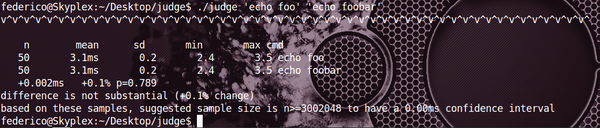 Figure 1: Judge executes two programs repeatedly, then provides a statistical analysis of the significance of the results.
The pre-packaged solution comes with caveats: The program can be dominated by startup time, or the hot-cache case might not be what you want to measure; however, judge is written in Python and is easily modified to suit your needs. It is an ideal tool for a simple unit test designed to spot performance regression.
Infos
- Amos Waterland – stress: http://weather.ou.edu/~apw/projects/stress/
- OS X man page for time: https://developer.apple.com/library/mac/#documentation/Darwin/Reference/ManPages/man1/time.1.html
- OS X man page for getrusage: http://developer.apple.com/library/mac/#documentation/Darwin/Reference/ManPages/man2/getrusage.2.html
- GNU time v1.7 man page: http://linux.die.net/man/1/time
- Martin Pool – judge: http://judge.readthedocs.org/en/latest/
- SciPy: http://www.scipy.org

Buy this article as PDF
(incl. VAT)
Buy ADMIN Magazine
Related content
-
Favorite benchmarking tools
 We take a look at three benchmarking tool favorites: time, hyperfine, and bench.
 -
Totally Stressed
StressLinux helps you optimize your hardware and eke out more performance from individual components.
-
Law of Averages – Load Averaging
Load averaging can be a source of confusion for admins. We provide a look at some basic considerations.
-
One metric to rule them all
 The load averaging can be a source of confusion for admins. This month, we provide a look at some basic considerations.
 -
Monitoring Storage with iostat

One tool you can use to monitor the performance of storage devices is iostat . In this article, we talk a bit about iostat, introduce a Python script that takes iostat data and creates an HTML report with charts, and look at a simple example of using iostat to examine storage device behavior while running IOzone.
Subscribe to our ADMIN Newsletters
Subscribe to our Linux Newsletters
Find Linux and Open Source Jobs
Most Popular
Focus On Self-Hosting
• Running Your Own Matrix Server with Synapse
• Reliable Network Storage with TrueNAS Community Edition
• Self-Hosted File Syncing with Seafile
• Wiring the Modern Stack with Node-RED
• Self-Hosted Collaboration with Forgejo
• Self-Hosted PaaS with Coolify
• Build and Host Docker Images
• Self-Hosted Pritunl VPN Server with MFA
Support Our Work
ADMIN content is made possible with support from readers like you. Please consider contributing when you've found an article to be beneficial.
