


« Previous 1 2 3 Next »
Read this article on our new ADMIN website
https://www.admin-it.io/harden-your-linux-servers-to-stop-malware/
Harden your Linux servers to stop malware
Keep It Clean!
Fear Not Rootkits
Rootkits are small pieces of software that hide on a system and conceal processes or files. For example, a rootkit can modify the ps command so that it hides certain entries from the process list. In its simplest form, this rootkit can be constructed with an alias:
alias ps='_ps() { ps $1 | grep --invert-match virus; }; _ps'The alias command filters the output and removes any line containing the word virus
. In the background, the virus process continues to run unnoticed and wreaks havoc. The ps rootkit is not very effective, because it can be easily circumvented with commands such as top or by looking in the /proc filesystem.
However, clever rootkits nest themselves into the kernel and conceal the existence of the virus process there, which is where Rootkit Hunter [4] comes in handy, searching the Linux computer for some 80 different rootkits and anomalies in the existing system commands. To install rkhunter on your system, enter the command
dnf install rkhunter
rkhunter --update
rkhunter --check --skip-keypress
In this example, rkhunter finds the Opyum kit component. A glance at the logfile immediately reveals that it is the /bin/i file. Unfortunately, the mere existence of this file is enough to trigger an alarm for rkhunter, even though it is only a soft link to /bin/grep in this case.
Rkhunter does not have real-time protection, but it does have a cron function: When
rkhunter --cronjob
is called, the tool does not prompt for input or display colors, and it sends the output to the logfile. The last 20 lines contain a summary, and the Possible rootkits line tells you whether the system is infected.
Middle Ground: Linux Malware Detect
Linux Malware Detect (LMD) [5] is a kind of middle ground between rootkits and antivirus scanners. The project collects information from various intrusion detection systems and uses it to build a signature database. The software is not available as a ready-to-run package in any repository, so you will need to use the tarball from GitHub to install, and because LMD comprises only Bash and Perl scripts, you do not need a compiler:
dnf install ed perl inotify-tools
git clone https://github.com/rfxn/linux-malware-detect.git
cd linux-malware-detect/
./install.sh
systemctl enable --now maldet
The systemctl command starts monitoring mode, which keeps an eye on logged-in users. You can check the filesystem by typing
maldet --scan-all /
After launching, the scan process assigns itself the lowest CPU and I/O priority in order to not slow down the system. The process is surprisingly fast, because LMD only checks files that do not belong to the root user. If you want to check all files, you can set scan_ignore_root="0" in the conf.maldet configuration file to check the entire database.
When maldet needs to scan large areas of the filesystem, it is noticeably slow. To speed up the process, LMD can cooperate with ClamAV by transferring its signatures to FreshClam and telling the clamscan process or the clamd server to check the files. The settings you need are well documented in the configuration file, but the AV scan is only sped up if the clamd server has sufficient CPU power and RAM. Figure 2 shows that LMD detected malware in the web server directory. By default, it just displays an alert with instructions on how to quarantine the file.
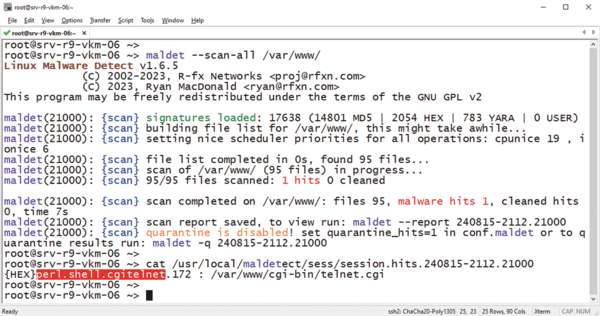 Figure 2: When Linux Malware Detect detects malware, it immediately prompts you to quarantine the file.
Commercial Solution: ServerProtect
In addition to all of the open source software, Trend Micro offers the ServerProtect for Linux product, which is an AV scanner with real-time protection. Users wanting to try out the tool can use a free one-month license. A web server is automatically included for configuration, and it can be used without too much of a learning curve. All of the tool's actions can be triggered from the web user interface and the command line.
A scheduled scan periodically checks selected folders, and a manual scan kicks in when needed. For real-time scanning, Trend Micro provides a kernel module that is precompiled for Red Hat and SUSE distributions. Because the prebuilt modules tend to use older kernels, you will need to compile for more recent Linux versions. In principle, it will work with any kernel, but in practice, you might get stuck. Either the distribution is not recognized or dubious compiler errors block the path to the kernel module, and with Secure Boot enabled, the kernel also expects a cryptographic signature from the module before the real-time scan can begin.
If you manage to create a working kernel module, your reward is a real-time scanner. For everyone else, you still have the scheduled and manual scans (Figure 3). Signature updates are straightforward and run smoothly in the background. However, ServerProtect's documentation reveals an outdated impression. The installation steps use the chkconfig and initd commands, which many Linux distributions replaced with systemd more than a decade ago, and information about kernel module signatures is nowhere to be found.
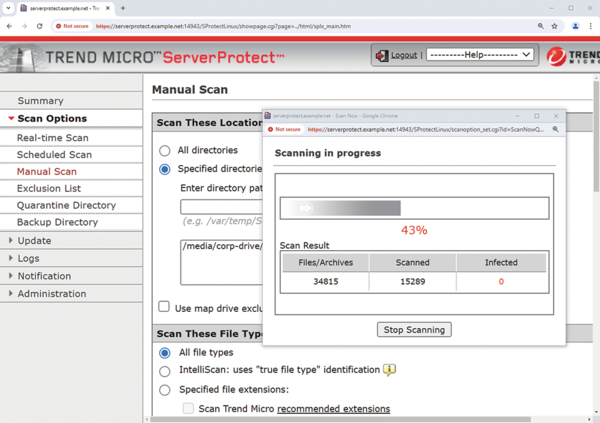 Figure 3: Trend Micro ServerProtect is aimed at commercial customers and can be conveniently configured in a web GUI.
The target audience is clearly not individual desktop computers, but servers. If you want to organize your server farm's virus protection centrally, you can manage the ServerProtect instances with a Control Manager agent or an Apex Central agent. Ironically, these software products are only available for Windows.
Trend Micro charges a hefty price for its protection but offers solid virus defense with a convenient website for configuration. The manufacturer is cautious about costs and leaves pricing to its partners.
« Previous 1 2 3 Next »

Read this article on our new ADMIN website
https://www.admin-it.io/harden-your-linux-servers-to-stop-malware/
Buy this article as PDF
(incl. VAT)
Buy ADMIN Magazine
Related content
-
OpenSMTPD makes mail server configuration easy
 The OpenBSD origins of the OpenSMTPD mail transfer agent makes SMTP easier to implement and manage and more secure.
 -
Look for file changes and kick off actions with Watchman
 Watchman watches files and directories for changes and triggers actions when specific changes are noted.
 -
Virus scanner and content filter with AD authentication
 You might want to reap the benefits of Active Directory's single sign-on for your virus scanning and content filtering. If you also use Squid to handle user access to the Internet, you have a front-row seat for "When worlds collide."
 -
Hardening mail servers, clients, and connections
 If you don't want to hand over your mail to a corporation, you have to operate your own mail server. Securing it sensibly involves some effort.
 -
A free anti-spam tool for Exchange environments
 Anti-Spam SMTP Proxy gives companies who deploy their own email server a free, but extremely powerful, anti-spam solution.
Subscribe to our ADMIN Newsletters
Subscribe to our Linux Newsletters
Find Linux and Open Source Jobs
Most Popular
Focus On Self-Hosting
• Running Your Own Matrix Server with Synapse
• Reliable Network Storage with TrueNAS Community Edition
• Self-Hosted File Syncing with Seafile
• Wiring the Modern Stack with Node-RED
• Self-Hosted Collaboration with Forgejo
• Self-Hosted PaaS with Coolify
• Build and Host Docker Images
• Self-Hosted Pritunl VPN Server with MFA
Support Our Work
ADMIN content is made possible with support from readers like you. Please consider contributing when you've found an article to be beneficial.
