


« Previous 1 2 3 4 Next »
Configuring IPv6 in Windows with NetShell
IPv6 on Board
The Windows input template for the network interface is fine for a basic IPv6 configuration (Figure 1). You can define values such as the IPv6 address(es), prefix (typically "/64"), default gateway(s), and DNS server. However, IPv6 offers several other features that are not controllable via the standard configuration dialog. Also, the overview you get when you press Details is very rudimentary (Figure 2). If you want to delve deeper into your IPv6 configuration, the tool you'll need is NetShell.
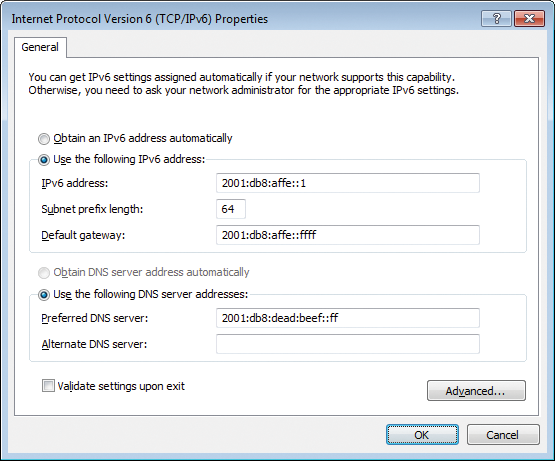 Figure 1: The default input mask for IPv6 provides only the basic settings.
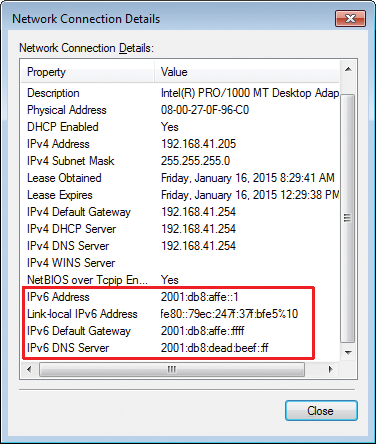 Figure 2: The connection details for IPv6 reveal only the bare minimum.
...

Buy this article as PDF
(incl. VAT)
Buy ADMIN Magazine
Related content
-
Configuring Windows with NetShell
 Windows networks can be configured from a graphical interface, but if you want to explore all the functions, try using NetShell at the command line to configure TCP/IP stack parameters and network services.
 -
Advanced Security in Windows Firewall
Windows Firewall with Advanced Security was introduced in Vista/Windows Server 2008. Compared with the old Windows Firewall, it offers many new features and possibilities.
-
Advanced security in Windows Firewall
 Windows Firewall with Advanced Security was introduced in Vista/Windows Server 2008. Compared with the old Windows Firewall, it offers many new features and possibilities.
 -
Setting up and managing IPv6 on Windows Server 2016
 Windows Server 2016 automatically prefers IPv6 addresses, if available, but the manual configuration steps differ from IPv4 and necessitate new tools. Here's how to approach IPv6 in your daily admin work.
 -
Neglected IPv6 features endanger the LAN
 IPv6 is establishing itself in everyday IT life, and all modern operating systems from Windows, through Mac OS X, to Linux have it on board; but if you let IPv6 introduce itself into your environment, you could be in for some unpleasant surprises.
Subscribe to our ADMIN Newsletters
Subscribe to our Linux Newsletters
Find Linux and Open Source Jobs
Most Popular
Focus On Self-Hosting
• Reliable Network Storage with TrueNAS Community Edition
• Self-Hosted File Syncing with Seafile
• Wiring the Modern Stack with Node-RED
• Self-Hosted Collaboration with Forgejo
• Self-Hosted PaaS with Coolify
• Build and Host Docker Images
• Self-Hosted Pritunl VPN Server with MFA
Support Our Work
ADMIN content is made possible with support from readers like you. Please consider contributing when you've found an article to be beneficial.
