



Lead Image © Christos Georghiou, 123RF.com
Verifying TLS Certificates
Checking the Box
Most websites deliver their content in encrypted form, as indicated by HTTPS at the start of the URL. The web browser only accepts data from the requested server after it has verified its identity by a valid certificate. After that, the web content appears in the browser and you can start browsing. If it discovers security issues, the browser issues a warning. You can get a certificate warning for many reasons: an expiry date in the past, a self-signed certificate, an unknown issuer, or a missing intermediate certificate.
If the web browser does not give you a clear explanation of the cause, or if you are interested in the certificate chain, the certigo [1] command-line tool can be a big help. The utility accesses the web server like a browser, reports on the certificates it receives, and provides further information about the type of encryption. Figure 1 shows how certigo checks a website and confirms with green highlighting that all the certificates are valid and no intermediate certificates are missing.
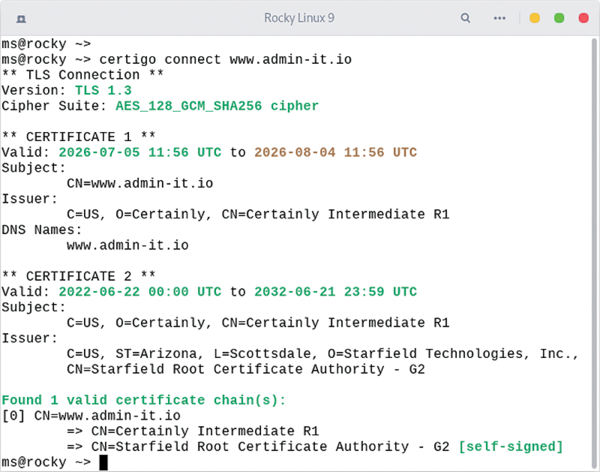 Figure 1: The certigo utility checks the entire chain – from the server certificate to the certificate authority – and color codes the results.
...

Buy this article as PDF
(incl. VAT)
Buy ADMIN Magazine
Related content
-
Windows security with public key infrastructures
 A rarely used feature for improving security in Windows environments relies on certificates issued for various applications, services, and procedures that is based on a public key infrastructure.
 -
Getting a free TLS certificate from Let's Encrypt
 A free TLS certificate from Let's Encrypt means you can add encryption to your network for no cost, so you don't have any more excuses for failing to encrypt.
 -
Certificate security
 Use public key pinning to map certificates to specific domains.
 -
Obtain certificates with acme.sh
 We take a close look at acme.sh, a lightweight client for the ACME protocol that facilitates digital certificates for secure TLS communication channels.
 -
Secure your data channel with stunnel
 Stunnel provides a TLS wrapper with extensive configuration options to secure your data over insecure wireless networks.
Subscribe to our ADMIN Newsletters
Subscribe to our Linux Newsletters
Find Linux and Open Source Jobs
Most Popular
Focus On Self-Hosting
• Reliable Network Storage with TrueNAS Community Edition
• Self-Hosted File Syncing with Seafile
• Wiring the Modern Stack with Node-RED
• Self-Hosted Collaboration with Forgejo
• Self-Hosted PaaS with Coolify
• Build and Host Docker Images
• Self-Hosted Pritunl VPN Server with MFA
Support Our Work
ADMIN content is made possible with support from readers like you. Please consider contributing when you've found an article to be beneficial.
