Lead Image © Kirill Makarov, 123RF.com

Lead Image © Kirill Makarov, 123RF.com

Comparing system rescue distros

First Aid Kit

Article from ADMIN 87/2025
By
Rescue systems play a particularly important role for desktops because they cannot simply be reinstalled on the fly. We look at venerable but outdated Knoppix and three still in development: Grml, SystemRescue, and Finnix.

The heyday of rescue systems for Linux and other computers is over: Popular solutions such as Rescatux have been orphaned or their development has at least been paused for several years. Knoppix isn't doing too much at the moment either, although version 9.1 from January 2021 is still available [1] and was featured in the June 2021 Linux Magazine [2]. Developer Klaus Knopper is now very busy as a lecturer and Vice President for Digitalization at the Kaiserslautern University of Applied Sciences.

At least three genuine rescue systems still exist and are under active development: Grml, SystemRescue, and Finnix. In this article, I take a closer look at the trio and also at the veteran Knoppix.

Knoppix

Anyone who has spent a few years in IT is guaranteed to have some kind of memories of Knoppix (Figure 1), which was considered for many years the best choice for trying out the free Linux operating system. The system was largely developed and maintained by Klaus Knopper and enjoyed massive fame because of its inventor, especially within the German-speaking Linux community. Knopper has long been a respected keynote speaker at conferences and trade fairs such as LinuxTag. What's more, in the distribution's heyday, numerous administrators used Knoppix to repair systems (e.g., damaged in the course of updates). In this respect, Knoppix has always been regarded as a powerful rescue system.
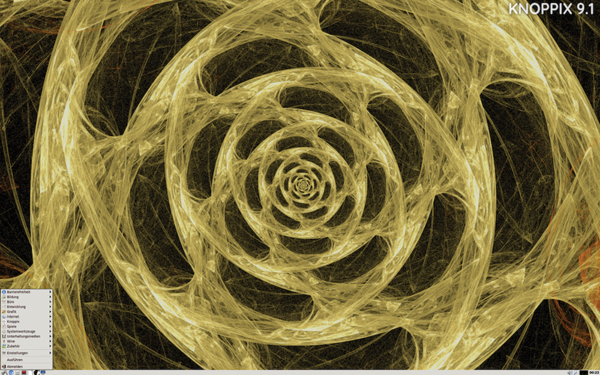
Figure 1: Knoppix is regarded as the pioneer of Live Linux CDs and developed into a rescue system later, but its development has now been largely discontinued.

In the meantime, however, the former buzz surrounding Knoppix has died down. The last Knoppix version, dated 2022, was an exclusive supplement to the German Linux-Magazin ; in fact, it is not even available for download from the official Knoppix website. However, another reason explains why the relevance of Knoppix and, more fundamentally, rescue systems has dwindled. Where data center administrators used to turn to Knoppix to help a system get back on its feet, lifecycle management solutions and automation now rule the day.

The push toward containerization by the major vendors, such as Red Hat and Canonical, has also meant that systems now require significantly less support. Distribution upgrades from one major version of a system to the next used to be a nerve-wracking task. Today, upgrades mainly involve updating central operating system tools, with the applications updated as containers. Systemd does the rest to ensure that classic sources of error, such as changes to the network configuration of systems, no longer automatically mean a disaster. Therefore, in data centers in particular, the need for rescue systems that can be carried around on a USB storage medium has dropped massively in recent years.

Of course, rescue systems are still needed, especially on desktops, but the rules of the game are different. Users don't want to delete their everyday work device completely in the event of problems, set it up again, and then restore the valuable data afterward with a backup. Even on desktops, serious system failures are far rarer today than they were in the past because components such as the Linux kernel and parts of the basic system are now far more robust than before and because the developers of typical desktop components now also integrate rollback options into their tools in the event of a failure.

Another reason for the decline of rescue systems is that every popular desktop distribution comes with a Live image of itself that allows you to boot and modify an existing system. Every Ubuntu CD, for example, can be booted to a Live desktop, as can current images of openSUSE or Fedora Core. That said, the risk of seeing an error message instead of the usual splash screen after restarting your Linux system has by no means been ousted from desktops today and is far greater there than on servers, simply because desktops usually see more frequent updates, which implicitly increases the risk of something breaking. Therefore, people who use Linux on the desktop still need a system like Knoppix, but the only available version is outdated, so the question of a suitable alternative arises. If you search the web for up-to-date Linux rescue systems, you always come across the same candidates: Grml, SystemRescue (previously known as SystemRescueCd), and Finnix are the three remaining major options.

Grml

Grml [3] is something of a veteran among rescue systems (Figure 2). The distribution has been around since 2005, and its lead maintainer is still Austrian Michael Prokop, who is also a Debian developer. Little wonder, then, that the Grml substructure consists of Debian GNU/Linux, which was not always the case. In the early days, Grml was based on Knoppix, and only later did Prokop change the substructure. Grml development has also slowed down considerably; the current Grml version dates back to February 2024, which means it is still up to date and can be used on current systems, particularly because it uses kernel 6.6.

Figure 2: Grml is a genuine Linux rescue system that offers a GUI but does not force you to use it. Command-line mode is just as easy to use. © Grml/Michael Prokop

Incidentally, the system gets its name from the onomatopoeic description of the noise that administrators make when they set off to rescue a system with Grml, for which the distribution is perfectly equipped. Although desktop environments such as KDE and Gnome are missing, Grml comes with the far leaner alternatives Openbox and Fluxbox. Although you can use a graphical user interface (GUI) in Grml, it will typically be used as a terminal multiplexer (i.e., to display many terminals simultaneously).

The GUI is not mandatory. If you prefer to work with the plain vanilla console, you can easily do so in Grml. The many configuration and repair tools included in Grml will be of most interest to users. When it comes to filesystem repair, for example, Grml comes with a full kit of tools that help you inspect and repair all popular Linux filesystems, as well as the logical volume manager (LVM). Software RAID configurations are also easy to inspect and restore with Grml if a repair is at all technically possible.

In particular, the modes offered by Grml for its operation have improved in recent years. Originally, the choice of software offered by Grml was primarily driven by the desire to save space, which applied to both the data carrier on which Grml would be written and to the volume of data that Grml would load onto running systems in the absence of local disk storage. The original idea was that Grml should fit on a normal CD and work without complaint on older systems low on RAM.

However, both restrictions have now been removed. Servers or even desktops with a CD drive are becoming increasingly rare, and many admins no longer have a CD burner to create the matching media. Also, even a fairly spartan laptop rarely comes with less than 8GB of RAM today, which easily is enough to run even a larger Grml image. Nevertheless, Michael Prokop is not wasteful with RAM on the target systems; in fact, Grml still has a very small footprint. You no longer have to worry about CD-ROMs either: grml2usb has been around for years, so it is possible to write an executable Grml installation to a standard USB storage device in next to no time. If you want to do yourself a favor, grab a USB storage device with USB 3.0, which has long been standard.

As icing on the cake, Grml has an option to install a complete Debian system on a target system with debootstrap. This component is the same ultimately used by the Debian installer itself. All told, Grml is targeted more at server admins, but it also allows experienced desktop users to restore a system after encountering an issue. Essential tools such as chroot are included. Grml is up to date and comes with a modern kernel, as well, which makes it far easier to identify contemporary hardware.

SystemRescue

SystemRescue [4] is also a real veteran in the rescue distribution business (Figure 3). The previous name, SystemRescueCd, used up to 2020, indicated the type of target medium for which the distribution was initially designed: Like Grml, SystemRescue was intended to be stored on a CD that you would take to the data center to carry out emergency work. However, CDs would fall short today because the average image size of a SystemRescue installation is now at least 800MB. Instead, the system now comes as an ISO image that can be written to an USB storage device, and like Grml, the SystemRescue makers offer their own tool to do so.

Figure 3: SystemRescue was previously designed for use on CDs and comes with an Xfce GUI. The distribution offers all kinds of practical rescue tools such as ddrescue. © SystemRescue

Another parallel between SystemRescue and Grml is a GUI: SystemRescue uses the more convenient Xfce. The current version of the distribution is 11.02 dating from August 29, 2024; it also has Linux version 6.6.47 on board, which should be recent enough for any typical hardware setup. Under the hood, SystemRescue is based on Arch Linux with the Pacman package manager. SystemRescue also offers a permanent installation mode, but in this case, you end up with SystemRescue on your hard drive instead of a genuine Debian in Grml's case that naturally also works well without Grml.

SystemRescue comes with a versatile selection of tools. Desktop software for quick research is included in the form of Firefox 128.1.0, although Chromium is missing. "Small but powerful" is the motto, but SystemRescue also has a few highlights, undoubtedly including a complete toolchain for all popular Linux filesystems, as well as tools for repairing multiple device (MD)RAID drives or LVM volumes. Vim is included in the current version 9.1, making it easy to edit configuration files. Common programming languages such as Python and Perl are also on board, making SystemRescue a useful platform for rolling out your own repair tools.

A Samba service can be run in SystemRescue, and like Grml, GNU Parted and the matching GUI GParted are present for partitioning disks. Backup tools such as ddrescue can read at least parts of a block device, even if other parts are defective. The highlight is the NTFS-3G driver, which can be used to patch Windows systems, if needed, clearly showing that SystemRescue does not only target Linux users, although Windows users who have never experienced a Linux command line might be a little out of their depth. SystemRescue is not an accessible general-purpose system but is clearly aimed at experienced sys admins with a Linux background who know what they are doing. If it is not possible to rescue a Windows system on the fly, SystemRescue can at least back up the system data so that it can subsequently be restored on another Windows computer. Common debugging tools such as ping and traceroute round out the offering.

SystemRescue is therefore aimed not only at admins who want to repair a specific system but also addresses those situations in which you need a working system with a working shell on a specific network. Because of this flexibility, many companies that use SystemRescue resort to a hack and make the system available as a standard option in a netboot procedure. In this way, SystemRescue is available on every system that boots off the network, along with the Memtest memory tester, which the distribution also has on board.

Whether administrators choose Grml or SystemRescue is primarily a question of personal preference. If you have a history with Debian or Ubuntu, you will intuitively find Grml easier to use, but if you are more at home in the Arch world, you will find SystemRescue a convincing alternative.

Buy this article as PDF

Express-Checkout as PDF
Price $2.95
(incl. VAT)

Buy ADMIN Magazine

SINGLE ISSUES
 
SUBSCRIPTIONS
 
TABLET & SMARTPHONE APPS
Get it on Google Play

US / Canada

Get it on Google Play

UK / Australia

Related content

comments powered by Disqus
Subscribe to our ADMIN Newsletters
Subscribe to our Linux Newsletters
Find Linux and Open Source Jobs


Support Our Work

ADMIN content is made possible with support from readers like you. Please consider contributing when you've found an article to be beneficial.

Learn More”>
	</a>

<hr>		    
			</div>
		    		</div>

		<div class=