



© Federico Caputo, 123RF.com
Server virtualization with VirtualBox
To Each Its Own
Oracle's free VirtualBox virtualization solution is intended for use on the desktop. Management of virtual machines is via a GUI that only works locally and cannot be used on the network. Although a command-line option is available, it offers very few of the comforts to which you've become accustomed. With the tools presented in this article, users can control VirtualBox VMs on the server remotely and conveniently.
Why VirtualBox?
VirtualBox offers a number of advantages compared with other virtualization solutions. For example, the program is available free for the major platforms (e.g., Windows, Linux, Mac OS X, and Solaris), and it supports a wide number of guest systems, including exotics such as DOS/WIN 3.1 and OS/2.
Installing VirtualBox is easy on any platform because it usually only involves running a setup program or installing a package on the system. VirtualBox does not place heavy demands on the hardware; it does not require Intel VTX/AMD-V or a special Linux kernel, although it still offers great performance, thanks to its own guest extensions. In the VirtualBox Remote Desktop Protocol (VRDP, Figure 1), VirtualBox also has a built-in graphical interface to all the virtual machines: an RDP client is sufficient to access the VMs on the network regardless of the guest operating system.
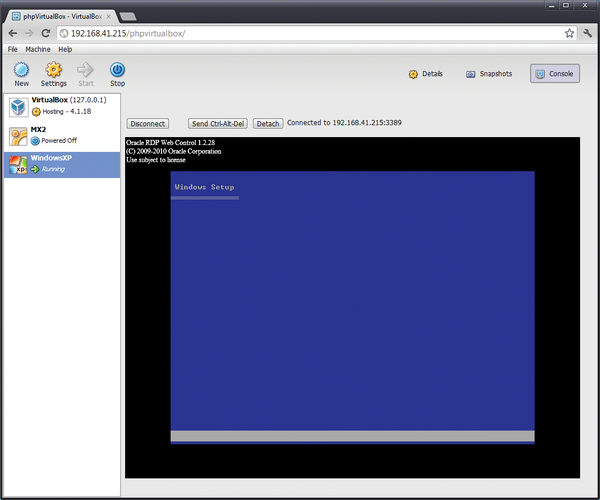 Figure 1: Thanks to VRDP support, you can access the virtual machine consoles in your browser with phpVirtualBox.
Free or Not Free?
Up to version 4.0 of VirtualBox, both a commercial and an open source edition (OSE) existed. The OSE often was available in the various Linux distro repositories, so users could easily install via their package repositories. As of version 4.0, Oracle has now merged these two versions in a binary, which you can download from the VirtualBox website [1]. For Linux users, Oracle continues to provide repositories for various Linux distributions [2]. The non-free components, such as support for USB 2.0 devices, the VRDP server, and PXE boot for Intel network cards, were outsourced into the Extension Pack. Non-free here means Oracle has not released the source code. The Extension Pack is still available free of charge.
Headless Servers
For operations on devices without a graphical user interface, VirtualBox can launch virtual machines in Headless Mode. VMs launched in this way automatically have VRDP support, so that network access to the system running on the virtual machine is possible with an RDP client.
I installed VirtualBox on an Ubuntu LTS 10.04.4 (Lucid Lynx) server, 64-bit version. The host needs to be running a 64-bit kernel to create 64-bit VMs. The quickest way to install is to add the VirtualBox package source to your sources.list file
sudo sh -c 'echo "# VirtualBox repository Ubuntu 10.04LTS Lucid deb http://download.virtualbox.org/virtualbox/debian lucid contrib" >> /etc/apt/sources.list'
and then add the GPG key to your keychain:
sudo apt-key adv --recv-keys --keyserver keyserver.ubuntu.com 98AB5139
Now, update the package list and install the current 4.1 version of VirtualBox:
apt-get update && apt-get install virtualbox-4.1
For VRDP support, you still need the matching Extension Pack for your VirtualBox version. To be on the safe side, you will want to enter
vboxmanage -v
to check the version. Then download and install the Extension Pack [3]. For my server, the procedure is shown in Listing 1. VirtualBox should now be running on your server.
Listing 1
Installing the Extension Pack
$ vboxmanage -v
4.1.12r77245
$ wget http://download.virtualbox.org/virtualbox/4.1.12/Oracle_VM_Virtualbox_Extension_Pack-4.1.12-77245.vbox-extpack
$ sudo vboxmanage extpack install Oracle_VM_Virtualbox_Extension_Pack-4.1.12-77245.vbox-extpack

Buy this article as PDF
(incl. VAT)
Buy ADMIN Magazine
Related content
-
Server Virtualization with VirtualBox
VirtualBox is a popular virtualization choice on the desktop. In this article, we show how you can also run VirtualBox on a Linux server – with all the comforts of a graphical user interface.
-
phpVirtualBox and RemoteBox compared
 Oracle's VirtualBox runs as an application on a host operating system, but the phpVirtualBox web interface and the native Perl/Gtk interface, RemoteBox, both make VirtualBox remotely manageable with a little effort.
 - VirtualBox 6.1.34 Is Now Available with Support for Linux Kernel 5.17
Subscribe to our ADMIN Newsletters
Subscribe to our Linux Newsletters
Find Linux and Open Source Jobs
Most Popular
Focus On Self-Hosting
• Reliable Network Storage with TrueNAS Community Edition
• Self-Hosted File Syncing with Seafile
• Wiring the Modern Stack with Node-RED
• Self-Hosted Collaboration with Forgejo
• Self-Hosted PaaS with Coolify
• Build and Host Docker Images
• Self-Hosted Pritunl VPN Server with MFA
Support Our Work
ADMIN content is made possible with support from readers like you. Please consider contributing when you've found an article to be beneficial.
