


« Previous 1 2 3 Next »
Managing computers with Rex
King of Computers
Verbose
Rex is quite chatty and writes each of its actions to the terminal. To help you keep track, the following statement tells Rex additionally to write all the messages to a file,
logging to_file => "rex.log";
or to the syslog:
logging to_syslog => "local0";
You need to add one of the two lines to the Rexfile before the first task. A word of caution: In both cases, only the messages generated by Rex itself end up in the logfiles. The returned uptime is only written on the terminal – that is, on the standard output device (Figure 2). The Rexfile, extended with all of the features discussed here, is given in Listing 2.
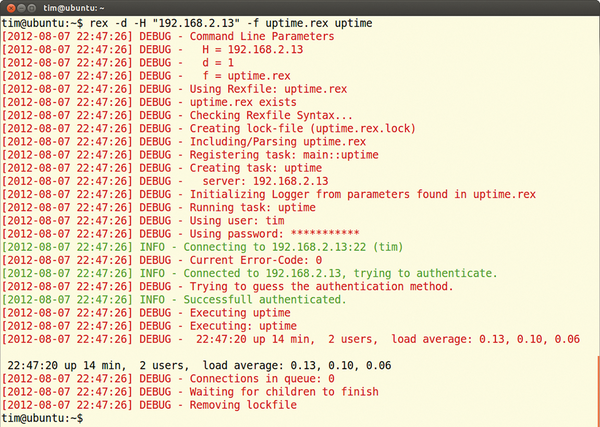 Figure 2: rex logs all of its actions on request, as shown here in the syslog. However, this does not include the output from the executed programs. Depending on the scope of the task, rex can swamp the syslog.
Listing 2
Extended Rexfile for uptime
01 user "hans";
02 password "123456";
03
04 group "intranet" => "192.168.2.12", "192.168.2.13";
05 group "accounting" => "192.168.2.14", "192.168.2.15";
06
07 logging to_file => "rex.log";
08
09 desc "Uptime estimate";
10 task "uptime", group => ["intranet", "accounting"], sub {
11    say run 'uptime';
12 };
Package Service
Listing 3 defines two tasks. The first, apacheinstall, installs the Apache web server on all servers (install package) and starts it ( service ... "start"). It makes no difference which Linux distribution is running on the target system and which package manager it uses. Rex detects the system and automatically installs the package with the correct commands.
Listing 3
Rexfile for Setting Up Apache
01 user "root";
02
03 Desc "Apache installation";
04 task "apacheinstall", sub {
05
06    install package => "apache2";
07    service "apache2" => "start";
08
09 };
10
11 Desc "Upload and sync configuration";
12 task "apache", sub {
13
14    apacheinstall();
15
16    file "/etc/apache2/httpd.conf",
17         source => "/templates/httpd.conf",
18         on_change => sub { service httpd => "reload"; };
19
20 };
Note that, on all your target systems, the package with the web server must be titled apache2. If one package manager calls the package apache-2, this will lead to an error message. In heterogeneous network environments, you will thus typically need to define multiple tasks for different distributions or operating systems.
Checks Advisable
The second task in Listing 3, apache, enables the previously defined apacheinstall task. Thus, it ensures that the web server is properly installed in each case. It then copies the /templates/httpd.conf file to /etc/apache2/httpd.conf on each server. If the configuration file has changed in the meantime (and really only then), Rex automatically restarts Apache on the server. This is ensured by on_change.
Armed with this pair of tasks, the command line is quite simple:
rex -H "marvin" apache -p root_password
This command installs the Apache web server on the computer marvin and also injects the customized configuration file, /templates/httpd.conf. On the same principle, you can keep the configurations of all other computers on the network up to date.
In Listing 3, Perl aficionados should feel like they are on home ground. And, in fact, a Rexfile is simply a Perl script. Each task is a function you can call in other tasks – which explains the call to apacheinstall() in Listing 3. If you are not familiar with the Perl scripting language, you will find a quick introduction on the Rex homepage [3]. The information there is fine for writing Rexfiles, so you don't have to become a Perl guru (Figure 3).
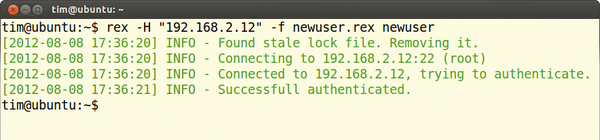 Figure 3: To troubleshoot errors in your own Rexfile, you can switch rex to debug mode with the -d parameter. This option tells the tool to log each and every action meticulously.
« Previous 1 2 3 Next »

Buy this article as PDF
(incl. VAT)
Buy ADMIN Magazine
Related content
-
Rex

Just as subjects must obey their king, all the computers and servers in an organization should follow the administrator’s commands. With Rex, you don’t even need to leave your admin throne.
Subscribe to our ADMIN Newsletters
Subscribe to our Linux Newsletters
Find Linux and Open Source Jobs
Most Popular
Focus On Self-Hosting
• Running Your Own Matrix Server with Synapse
• Reliable Network Storage with TrueNAS Community Edition
• Self-Hosted File Syncing with Seafile
• Wiring the Modern Stack with Node-RED
• Self-Hosted Collaboration with Forgejo
• Self-Hosted PaaS with Coolify
• Build and Host Docker Images
• Self-Hosted Pritunl VPN Server with MFA
Support Our Work
ADMIN content is made possible with support from readers like you. Please consider contributing when you've found an article to be beneficial.