


« Previous 1 2 3
Managing computers with Rex
King of Computers
Personnel File
Along with the actions already presented, Rex includes many more. You can use them to, among other things, tinker with the network settings, kill running processes, and even access the Amazon Cloud. The developers have grouped thematically related functions in Perl modules, some of which are included by default. This includes, for example, the file upload in file from Listing 3. Others, such as the user management features, first must be added manually.
Listing 4 shows an example. To start, it binds the module Rex::Commands::User and reveals (for simplicity's sake) the login credentials for the root user. Next, it creates a new user called Klaus on all of the remote machines (Figures 4 and 5). To do this, it only needs to write the required information in a hash. For example, the line:
home => '/home/klaus',
Listing 4
Creating a New User Account
01 use Rex: :commands: :User;
02
03 user "root";
04 password "123456";
05
06 Desc "Create user";
07 task "newuser", sub {
08         create_user 'klaus' => {
09         home => '/home/klaus',
10         comment => 'Account for Klaus',
11         password => '123456',
12    };
13 };
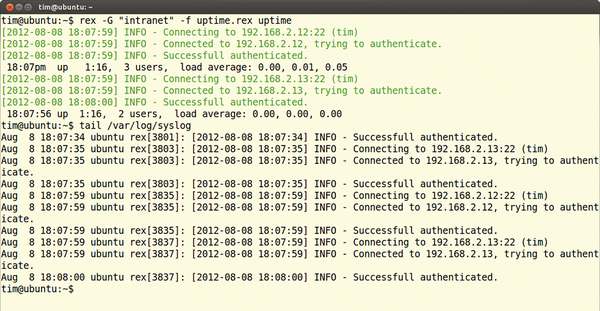 Figure 4: rex creates a user by calling the appropriate task from Listing 4, as …
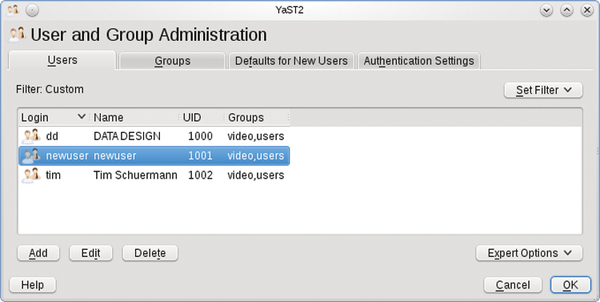 Figure 5: … user management on the client goes to prove.
shows the name of the future home directory. In addition to the hash entries shown in Listing 4, there are others, including:
expire => '2012-11-30',
You should be able to define the validity period for the account in this way, but in the Rex version current at the time of going to press, this action reproducibly threw a fault.
Here, create_user creates a new user, and delete_user deletes an account:
delete_user "klaus", {
   delete_home => 1,
};
The delete_home => 1 line additionally dumps the home directory into a black hole.
Annexed
The task in Listing 4 is tied to the user Klaus and is therefore anything but flexible. A more convenient approach would be to pass in the username when calling the task:
rex -H "marvin" newuser --username=klaus
Again, this is no problem, as Listing 5 shows. The my ($params) = @_ line first grabs all additional parameters passed into rex in $params. The value of the username parameter is then stored in $params->{'username'}.
Listing 5
Evaluating Parameters
01 user "root";
02 password "123456";
03
04 Desc "Create user";
05 task "newuser", sub {
06
07         my ($params) = @_;
08         run "useradd -m " . $params->{'username'};
09
10 };
Listing 5 meaningfully passes this into the useradd command, which in turn creates the appropriate user account. In a similar style, you can add arbitrary additional parameters and queries. Incidentally, it is mandatory for these parameters to follow the task name in the call to rex (as in the example above).
Just as with useradd, some commands need to be root on the remote machine. To do this, the administrator can log in as root, as shown in the listings. However, some distributions, such as Ubuntu, disable the root user account.
To handle this, rex can, on request, issue each command as a sudo. You only need to add -s to the rex command line and pass in the required password with -S,
rex -H "marvin" -s -S 123456 newuser --username=klaus
as shown here.
Conclusions
If you are fluent in Perl, Rex gives you a powerful and extremely flexible remote administration tool. The learning curve for the system is easily negotiated, and the remote machines only need an SSH server. Annoyingly, when writing tasks, you continually trip up over minor shortcomings, such as the non-functioning expire in user administration.
The documentation consists essentially of a still sparsely populated wiki [4] and a few how-tos [5]. However, Perl speakers should quickly feel at home and can plunge right into the function references [6].
Infos
- Rex: http://rexify.org/
- Official Rex repositories: http://rexify.org/get/index.html
- Quick introduction to Perl: http://rexify.org/howtos/perl.html
- Rex wiki: http://rexify.org/api/index.html
- Rex how-tos: http://rexify.org/howtos/index.html
- Rex API reference: http://rexify.org/api/index.html
« Previous 1 2 3

Buy this article as PDF
(incl. VAT)
Buy ADMIN Magazine
Related content
-
Rex

Just as subjects must obey their king, all the computers and servers in an organization should follow the administrator’s commands. With Rex, you don’t even need to leave your admin throne.
Subscribe to our ADMIN Newsletters
Subscribe to our Linux Newsletters
Find Linux and Open Source Jobs
Most Popular
Focus On Self-Hosting
• Running Your Own Matrix Server with Synapse
• Reliable Network Storage with TrueNAS Community Edition
• Self-Hosted File Syncing with Seafile
• Wiring the Modern Stack with Node-RED
• Self-Hosted Collaboration with Forgejo
• Self-Hosted PaaS with Coolify
• Build and Host Docker Images
• Self-Hosted Pritunl VPN Server with MFA
Support Our Work
ADMIN content is made possible with support from readers like you. Please consider contributing when you've found an article to be beneficial.