


« Previous 1 2 3
Managing virtual infrastructures with oVirt 3.1
New Host
Data Center
In the navigation area on the left, starting with the Default data center, you can see the administrable resources of the virtualized infrastructure, consisting of data centers, clusters, storage, and disks, as well as hosts, pools, templates, and VMs (Figure 2). A complex role and authorization schema allows the administrator to delegate administrative tasks. The entry point for this is the "Configure" link at the top left (Figure 3).
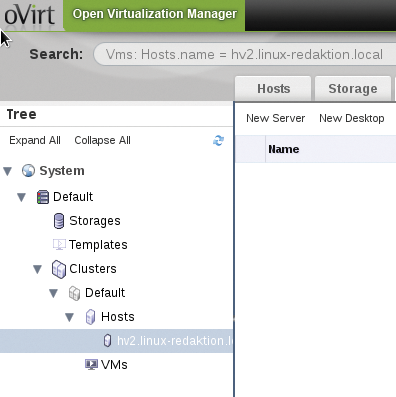 Figure 2: The structure of a virtual environment in oVirt.
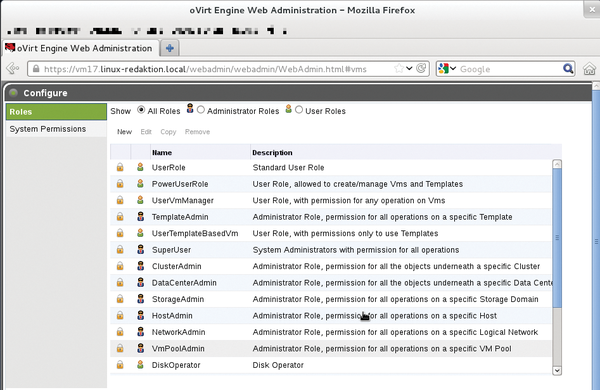 Figure 3: oVirt has a sophisticated roles and authorizations model.
A virtual host can be created with a click on New in the Hosts tab, even if creating hosts only makes sense when the appropriate conditions, such as storage for the virtual disk, ISOs, and so on, are met.
Configuring the Firewall
In addition to the IP address (or FQDN name) of the hosts, the dialog expects a symbolic name and a password. The host must also be accessible via SSH.
If the hypervisor used is a freshly installed Fedora 17 system, as in the example, you will not be able to add this host in oVirt because of the SSH connection setup. If you don't know the appropriate iptables rule off the top of your head, you first need to disable iptables as root on the hypervisor like this:
systemctl stop iptables.service
Many dialogs in oVirt start with a click on Guide Me , a wizard that lets you, for example, connect to an existing ISO library or storage (Figure 4).
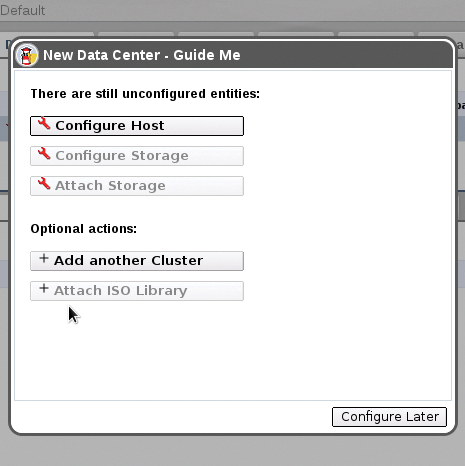 Figure 4: The oVirt developers also provide a wizard.
To create a virtual machine, you need to check the target host in the desired cluster in the navigation frame on the left-hand side; in the right-hand panel, enable the Virtual Machines tab and click on New Server or New Desktop .
Conclusions
Thanks to oVirt, the Red Hat Enterprise Virtualization solution makes up ground on the well-established solutions by VMware, Citrix, and Microsoft's System Center 2012. Because of the open license, it also supports self-built but professional solutions for the management of virtual environments. Unfortunately, oVirt is not even officially used in RHEV 3, at least not in terms of the admin front end. However, with Fedora 17, you can already see how Red Hat envisions a future without .NET and Active Directory. The next RHEV version will finally do without a Windows administration computer.
Infos
- RHEV 3.0: http://www.redhat.com/promo/rhev3/
- RHEV requirements: http://www.redhat.com/promo/rhev3/tryrhev.html
- oVirt: http://www.ovirt.org
- Release notes oVirt 3.1: http://wiki.ovirt.org/wiki/OVirt_3.1_release_notes
- oVirt Installation Guide: http://www.ovirt.org/w/images/a/a9/OVirt-3.0-Installation_Guide-en-US.pdf
« Previous 1 2 3

Buy this article as PDF
(incl. VAT)
Buy ADMIN Magazine
Related content
-
Managing Virtual Infrastructures
Version 3.1 of the oVirt management platform for virtual infrastructures has recently become available. On Fedora 17, the new release is easy to install and deploy.
-
Open Source VDI solution with RHEV and oVirt
 Red Hat introduces a management system for KVM-based virtualization based on Red Hat Enterprise Virtualization and open source project oVirt. Now, solutions for desktop virtualization can be implemented without using proprietary software.
-
Live migration of virtual machines with KVM
 Live migration of virtual machines is necessary when you need to achieve high-availability setups and load distribution.
-
Alternative virtualization solutions when OpenStack is too much
 OpenStack is considered the industry standard for building private clouds, but the solution is still far too complex and too difficult to maintain and operate for many applications. What causes OpenStack projects to fail, and what alternatives do administrators have?
-
Fedora 18 for Admins
Fedora is a trend-setting distribution that sets the pace for future developments of Red Hat Enterprise Linux. Administrators, regardless of whether they use Fedora, are well advised to look at the newest innovations of the Fedora distribution.
Subscribe to our ADMIN Newsletters
Subscribe to our Linux Newsletters
Find Linux and Open Source Jobs
Most Popular
Focus On Self-Hosting
• Running Your Own Matrix Server with Synapse
• Reliable Network Storage with TrueNAS Community Edition
• Self-Hosted File Syncing with Seafile
• Wiring the Modern Stack with Node-RED
• Self-Hosted Collaboration with Forgejo
• Self-Hosted PaaS with Coolify
• Build and Host Docker Images
• Self-Hosted Pritunl VPN Server with MFA
Support Our Work
ADMIN content is made possible with support from readers like you. Please consider contributing when you've found an article to be beneficial.