« Previous 1 2 3 4 Next »
Dynamic routing in Linux with Quagga
Zebra Scout
Quagga Architecture
Quagga includes several daemons [9]: One service exists for each routing protocol (in the case of OSPF, one each for OSPF and OSPFv6), and the admin must configure these services individually. The various routing daemons are managed by a master daemon – still known as Zebra for historical reasons. Every daemon has its own configuration file and can be configured on a separate port. The Zebra control daemon controls and coordinates the whole thing.
Configuring the individual daemons at the command line is very reminiscent of Cisco's IOS. When you connect to one of the services, you first need to authenticate with the enable command. To make changes to the configuration, you then issue the conf term command to switch to configuration mode. After entering parameters (e.g., hierarchical configuration blocks for an interface or router definition) with the help of commands like interface eth0, you can type exit to quit configuration mode.
Till Reboot Do Us Part
The configuration file, typically /etc/quagga/zebra.conf, stores the authentication data, details of the logfiles for the daemons, the interfaces that Quagga manages (including IP addresses, although this can be handled in the host configuration), and any static routes. Note that if you stop the Zebra service, any IP addresses you configured only survive until the next reboot.
Only the Zebra process itself communicates with the kernel and manipulates the operating system's routing table. On Linux, you can use configuration parameters to tell the daemon to manipulate a routing table other than the default and thus only use the routes learned by Zebra for policy routing (ip rule …), leaving packets that are not governed by the Linux policies untouched.
Separate daemons exist for OSPF, OSPF6, RIP, RIPng, BGP, and IS-IS; they are identifiable because their names are the same as the respective protocol names with a d appended. Each is addressable and configurable on its own port; Table 1 shows the assignments. If you value security, you should only address these services on the local interface (as localhost), because the plaintext connection is easy to sniff, including the access passwords.
Table 1
Quagga Service Ports
| Service | Port |
|---|---|
| Zebra communication | 2600 |
| Zebra administration | 2601 |
| RIP | 2602 |
| RIPng | 2603 |
| OSPF | 2604 |
| BGP | 2605 |
| OPSF6 | 2606 |
| OSPF-API | 2607 |
| IS-IS | 2608 |
Quagga with OSPF: A Simple Example
Listings 1, 2, and 3 depict the Quagga, OSPF, and BGP configuration files for a Linux system that exchanges routes with Cisco devices. Figure 1 shows the simple network setup. The Dynamips [10] software simulates the virtual Cisco routers.
Listing 1
zebra.conf for OSPF
01 !
02 hostname linuxrouter
03 password 8 7kdoaul4.iSTg
04 enable password 8 ZDF339a.20a3E
05 log file /var/log/quagga/zebra.log
06 service password-encryption
07 !
08 interface eth0
09  multicast
10  ipv6 nd suppress-ra
11 !
12 interface eth1
13  ip address 10.55.55.1/24
14  ipv6 nd suppress-ra
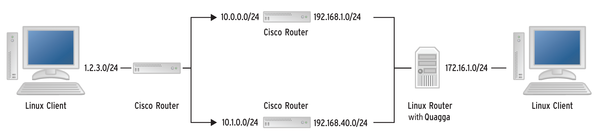 Figure 1: The sample network consists of two Linux clients, three software-simulated Cisco routers, and the Linux server with Quagga.
In the example network, two paths lead from the 1.2.3.0/24 network on the left to the 172.16.1.0/24 network on the right. Because Dynamips cannot cope with two routers on the same LAN segment of the host computer, I had to configure two different LAN segments. The configuration with just one segment differs only in terms of the network addresses.
Zebra sets the IP address for the Quagga router's eth1 interface. Otherwise, it is sufficient to enable multicast on the interfaces that speak OSPF; in the example, this is only eth0. The ipv6 nd supress-ra setting ensures that zebra does not send routing advertisements without the admin explicitly enabling this functionality. The relevant part of the configuration is found in ospfd.conf (Listing 2).
Listing 2
ospfd.conf
01 !
02 hostname ospfd
03 password zebra
04 enable password secret
05 !
06 interface eth0
07  ip ospf message-digest-key 1 md5 hallo123
08 interface eth3
09  ip ospf message-digest-key 1 md5 hallo123
10 !
11 !
12 router ospf
13  redistribute connected
14  network 172.16.1.0/24 area 0.0.0.0
15  network 172.17.0.0/16 area 0.0.0.0
16  network 192,168.1.0/24 area 0.0.0.0
17  network 192,168.2.0/24 area 0.0.0.0
18  network 192,168.40.0/24 area 0.0.0.0
19  area 0.0.0.0 authentication message-digest
The instructions below the interfaces set the password that authenticates the multicast packets. The OSPF routing process definition first specifies which of the router's known routes it should distribute via OSPF. The redistribute connected statement distributes all routes on the computer's interfaces, including those that do not use OSPF. The redistribute kernel statement distributes routes that the operating system has received manually, and redistribute static distributes routes from the zebra.conf file.
The admin must assign interfaces to OSPF areas. It is sufficient for one router to know the assignments. The syntax here differs from IOS when it comes to stating network blocks: A.B.C.D/<X> instead of the Cisco syntax with an inverted netmask – that is, 192.168.1.0 0.0.0.255 and 0.0.0.0 for the area instead of just 0 . The last statement stipulates that only authenticated information is allowed in area 0.
Entering the sh ip route command at the Zebra prompt shows you the learned and internal routes; a O at the start indicates that the router learned the route via OSPF. At the Linux prompt, proto zebra shows that the route found its way to the kernel from Zebra. However, it does not tell you which routing protocol taught Zebra the route.
If a link fails without the router noticing – for example, because the Ethernet link is down – it then takes three OSPF Hello intervals for the networks to be connected again. Figures 2 and 3 show a ping and the resulting downtime. However, if a router can tell the rest of the array that one branch is not working (e.g., a switch has failed or a cable has become unplugged), then the downtime is not measurable. Because the link failure in this case tells the router that an error has occurred, you cannot use ping to measure the downtime (Figure 4).
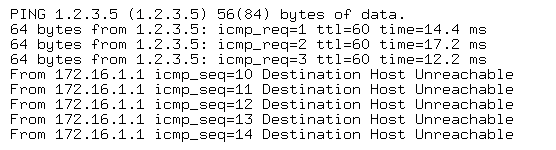 Figure 2: The connection breaks down; it takes a while for the Quagga router to notice …
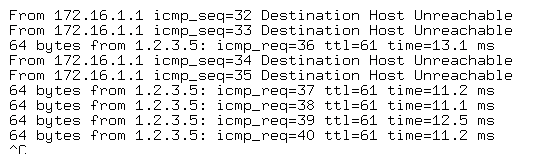 Figure 3: … but after 36 packets, it has already changed the route.
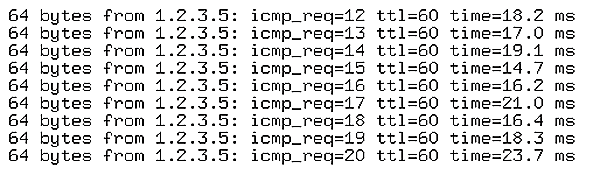 Figure 4: The downtime is not measurable if the Quagga router notices the link failure and can react immediately.
You can reduce the downtime by increasing the OSPF message frequency, but it is important to find the right balance for each scenario.
« Previous 1 2 3 4 Next »

Buy this article as PDF
(incl. VAT)
Buy ADMIN Magazine
Related content
-
Routing with Quagga

Cisco and Juniper have implemented routing protocols to help your router find the optimum path. On Linux, you can use software like Quagga, with its Zebra daemon, to help automate this process.
-
Flexible software routing with open source FRR
 The FRR open routing stack can be integrated into many networks because it supports a large number of routing protocols, though its strong dependence on the underlying kernel means it requires some manual configuration.
-
Open source multipoint VPN with VyOS
 The VyOS Linux distribution puts network routing, firewall, and VPN functionality together and presents a fully working dynamic multipoint VPN router as an alternative or addition to a Cisco DMVPN mesh.
-
Creating a redundant array of inexpensive links
 The Fault Tolerant Router daemon uses multipath routing among multiple Internet connections to keep you connected, even when some connections go down.
Subscribe to our ADMIN Newsletters
Subscribe to our Linux Newsletters
Find Linux and Open Source Jobs
Most Popular
Focus On Self-Hosting
• Running Your Own Matrix Server with Synapse
• Reliable Network Storage with TrueNAS Community Edition
• Self-Hosted File Syncing with Seafile
• Wiring the Modern Stack with Node-RED
• Self-Hosted Collaboration with Forgejo
• Self-Hosted PaaS with Coolify
• Build and Host Docker Images
• Self-Hosted Pritunl VPN Server with MFA
Support Our Work
ADMIN content is made possible with support from readers like you. Please consider contributing when you've found an article to be beneficial.