« Previous 1 2 3 4 Next »
Dynamic routing in Linux with Quagga
Zebra Scout
BGP Routing for Autonomous Systems
BGP controls the connection between autonomous systems that are identified by their numbers. In the example, all of the routers on the left side belong to AS 64515, and the Linux router belongs to AS 64513. Listing 3 shows the unspectacular configuration in the bgpd.conf file. After setting the hostname and the login and privileged mode passwords, router defines the BGP router and your own AS number. The router ID that follows is one of the router's interface addresses. The redistribute statements specify which routes the server should distribute to partners via BGP. This is followed by the definitions of the two partners, at least with the AS at the other end, and the password to authenticate this connection.
Listing 3
bgpd.conf
01 !
02 hostname bgpd
03 password zebra
04 enable password zebra
05 log stdout
06 !
07 router bgp 64513
08  bgp router-id 192.168.1.253
09  redistribute kernel
10  redistribute connected
11  neighbor 192.168.1.200 remote-as 64515
12  neighbor 192.168.1.200 password test123
13  neighbor 192.168.40.253 remote-as 64515
14  neighbor 192.168.40.253 password test123
The routers immediately try to open the connections and exchange routes. Failover is already supported. However, in the event of a router failure, recovery can take a little longer in this simple configuration (Figures 5 and 6).
 Figure 5: In the simple BGP example from Listing 3, …
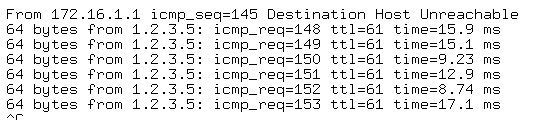 Figure 6: … it takes no fewer than 145 seconds for a failover to occur.
Maps for the Scouts: Routemaps
Routemaps are used to control which protocol a service uses to distribute which routing information. Additionally, administrators can manipulate values, such as the preferred routes. This means that you can use routemaps to implement specifications such as "export all routes you learned via OSPF to BGP, except for those that point to networks below 172.16.0.0/16" or "export all routes learned via BGP to OSPF, but with a lower preference."
Thus, in the case of overlaps, the routes learned locally via OSPF on the LAN will take priority. The router would not use the slower or more expensive external route unless no other route was possible. The models are extensible: In complex environments, routemaps with many rules can very quickly lead to constructions that are so extensive that cautious admins will not touch them unless absolutely necessary.
Administrators need to enter routemaps in the configuration files for the routing process that they want to influence. If you are importing from BGP to OSPF, this file would be ospfd.conf. For example, if you want to prevent all routes below 172.17.1.0/24
being exported from BGP to OSPF, the lines in Listing 4 will do the trick.
Listing 4
ospfd_routemap.conf
01 !
02 router ospf
03  redistribute connected
04  redistribute bgp route-map bgp-to-ospf
05 [...]
06
07 ip prefix-list into-ospf seq 5 permit 172.17.1.0/24 le 32
08 ip prefix-list into-ospf seq 10 deny 0.0.0.0/0 le 32
09 !
10 route-map bgp-to-ospf deny 5
11  match ip address into-ospf
12 !
13 route-map bgp-to-ospf permit 10
Within the OSPF configuration, the statement that redistributes the BGP routes in route-map bgp-to-ospf creates the reference to the bgp-to-ospf routemap.
Not Always Logical
Because this example filters the routes according to an IP prefix, you first need to define the prefix. To do so, forget everything you know about logic. It is helpful to imagine every instance of permit as being true, and every instance of deny as being false. IP prefix lists also have a name and a sequence; the system processes them top down, just like Netfilter firewall rules, for example. Lines 7 and 8 in Listing 4 state that the IP prefix 172.17.1.0/24
belongs to the list, but all addresses from 0.0.0.0
to 255.255.255.255
do not. The notation le 32 states the maximum bit count for the area, beginning with a starting value (in this case, 0.0.0.0
).
The definition of the routemap follows. Line 10 prevents any non-specified routes from being distributed (deny). Line 11 specifies the condition under which this entry is applied and refers to the IP prefix list. Expressed as a model, if the IP address matches the prefix list named into-OSPF, then this rule applies. In this routemap, the last line of the configuration allows all routes because it is not linked to a condition.
This simple example shows how confusing things can be with many prefix lists and dual logic. To find your way around a complex scenario, you need to be a really good scout.
The configuration for IPv6 is not too different from IPv4. Where the configuration contains ip, Quagga simply replaces this with ipv6. Again, the configuration differs from Cisco, which uses ip6. The configuration for OSPFv6 uses a file of its own and addresses a separate daemon. In BGP, the daemon is the same as for IPv4. You can even distribute IPv4 routes to an IPv6 peer, and vice versa. In the first case, you simply define an IPv6 address as the neighbor.
The IPv6 peer is enabled by the
address-family ipv6
neighbor w.x.y.z activate
commands. Now the peer receives all the routes (IPv4 and IPv6). If you only want to distribute IPv6 routes, you need to build your own routemap to do so. The first term in the map is a permit that allows all IPv6 addresses, and the second term is a deny for all IPv4 addresses:
ipv6 access-list allv6 permit any
access-list nov4 deny any
The seemingly logical no activate neighbor x.x.x.x in the IPv4 test configuration resulted in Quagga not distributing any routes at all to its partners in the test configuration.
« Previous 1 2 3 4 Next »

Buy this article as PDF
(incl. VAT)
Buy ADMIN Magazine
Related content
-
Routing with Quagga

Cisco and Juniper have implemented routing protocols to help your router find the optimum path. On Linux, you can use software like Quagga, with its Zebra daemon, to help automate this process.
-
Flexible software routing with open source FRR
 The FRR open routing stack can be integrated into many networks because it supports a large number of routing protocols, though its strong dependence on the underlying kernel means it requires some manual configuration.
-
Open source multipoint VPN with VyOS
 The VyOS Linux distribution puts network routing, firewall, and VPN functionality together and presents a fully working dynamic multipoint VPN router as an alternative or addition to a Cisco DMVPN mesh.
-
Creating a redundant array of inexpensive links
 The Fault Tolerant Router daemon uses multipath routing among multiple Internet connections to keep you connected, even when some connections go down.
Subscribe to our ADMIN Newsletters
Subscribe to our Linux Newsletters
Find Linux and Open Source Jobs
Most Popular
Focus On Self-Hosting
• Running Your Own Matrix Server with Synapse
• Reliable Network Storage with TrueNAS Community Edition
• Self-Hosted File Syncing with Seafile
• Wiring the Modern Stack with Node-RED
• Self-Hosted Collaboration with Forgejo
• Self-Hosted PaaS with Coolify
• Build and Host Docker Images
• Self-Hosted Pritunl VPN Server with MFA
Support Our Work
ADMIN content is made possible with support from readers like you. Please consider contributing when you've found an article to be beneficial.