


« Previous 1 2 3
Identifying and using software licenses
Small Print
Assistance
Choosing the right license is not always easy, which has prompted several projects and has led to the Free Software Foundation [29], GitHub [30], and Wikipedia [31] going to the trouble of offering online guides (Figure 3). They compare the objectives of the various free licenses [32] and describe their use cases [33]. The FSFE also offers its support in verifying license compliance in the form of legal advice from a legal expert [34].
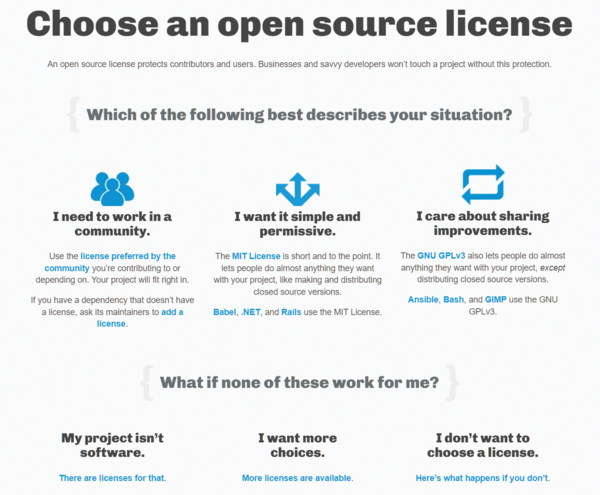 Figure 3: Online guides help you choose the right license for your software project. © GitHub Inc.
These options help you keep track and make it easier to find your way through the legal jungle when it comes to individual projects. In the case of multiple licensing, as shown in the example in Listing 3, or of different licenses for the files and components, GitHub will not work. It cannot handle this kind of case cleanly (i.e., thus far you can only store single-license projects there; see the "Creating a License File on GitHub" box).
Creating a License File on GitHub
GitHub can help you create an open source license for a repository in a number of steps (see also the "Including License Logos" box). First, go to the main page of your repository, select Create new file , and enter LICENSE or LICENSE.md as the file name. Next, click on the Choose a license template button to the right of the file name field. A selection field for the appropriate open source license opens. If the selected license requires additional information, you will be presented a prompt for that purpose. After specifying a commit message such as Add license , a click on Commit new file will complete the process.
If a LICENSE file already exists in the repository, GitHub uses the Licensee Ruby Gem [48] to match it with a short list of open source licenses. If GitHub cannot recognize the license in the repository, it might contain multiple licenses or be too complex. You then need to check whether you can simplify the licensing structure (e.g., by outsourcing the complexity to the README file).
Conversely, GitHub offers to search for repositories with specific licenses or license families. An overview of the keywords used by GitHub relating to licenses can be found in Searching GitHub by license type .
Including License Logos
To make it easier for potential users to recognize the license under which you publish a work, you can add a catchy license shield (badge). The Shields.io [49] project takes this step off your hands and offers both ready-made and individually generated license shields (Figure 4), which you then only need to add to the documentation for your project.
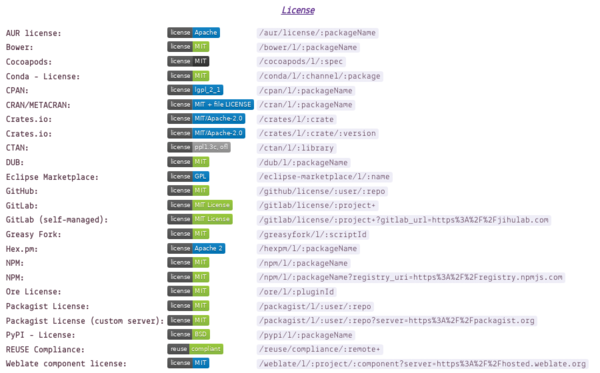 Figure 4: Some examples of the license shields generated by Shields.io. © Shields.io
Conclusions
In this article, I looked at the various software licenses, discussed their use, and pointed out the pitfalls that need to be taken into account. I also introduced you to the methods and tools you can use to identify the license of any software you use. In a follow-up article, I will discuss how to add one or more licenses to your own Python package and document it. I look at procedures and tools that have proven their value in everyday life and show you how to integrate them into your development workflow.
Acknowledgments
The author thanks Veit Schiele, Axel Beckert, and Gerold Rupprecht for their suggestions during the preparation of this article.
Infos
- Free Software Foundation: https://www.fsf.org/
- OSI approved licenses: https://opensource.org/licenses
- Software licenses: https://en.wikipedia.org/wiki/Software_license#Free_and_open-source_software_licenses
- European Union Public License: https://joinup.ec.europa.eu/collection/eupl/introduction-eupl-licence
- "Matrix of EUPL compatible open source licences": https://joinup.ec.europa.eu/collection/eupl/matrix-eupl-compatible-open-source-licences
- Unlicense: https://choosealicense.com/licenses/unlicense/
- The Creative Commons license and software: https://creativecommons.org/faq/#can-i-apply-a-creative-commons-license-to-software
- Open Knowledge Foundation: https://okfn.org
- Open Data Commons: https://opendatacommons.org
- Open Source Hardware Association: https://oshwa.org
- CC0: https://creativecommons.org/share-your-work/public-domain/cc0/
- Välimäki, Mikko. 2005. The Rise of Open Source Licensing: A Challenge to the Use of Intellectual Property in the Software Industry , PhD dissertation, Helsinki University of Technology, Helsinki, Finland, May 2005, pg. 119. Turre Publishing, 2005: https://commons.wikimedia.org/w/index.php?curid=45969489
- Liccheck: https://github.com/dhatim/python-license-check
- REUSE: https://reuse.software
- Python cryptography module: https://github.com/pyca/cryptography
- SPDX: https://spdx.dev
- License information exchange: https://jupyter-tutorial.readthedocs.io/en/latest/dashboards/index.html
- reuse tool: https://github.com/fsfe/reuse-tool
- Comparing reuse with other solutions: https://reuse.software/comparison/
- ScanCode: https://github.com/nexB/scancode-toolkit
- ClearlyDefined:https://clearlydefined.io
- FOSSology: https://www.fossology.org
- OpenChain: https://www.openchainproject.org
- Debian reuse package: https://packages.debian.org/bookworm/reuse
- SPDX license list:https://spdx.org/licenses/
- "Free Software, Open Source, FOSS, FLOSS – same but different" by Björn Schießle, FSFE, December 8, 2012: https://fsfe.org/freesoftware/comparison.en.html
- Server Side Public License: https://en.wikipedia.org/wiki/Server_Side_Public_License
- License disputes: https://gpl-violations.org
- "How to Choose a License for Your Own Work": https://www.gnu.org/licenses/license-recommendations.html
- Choose a License: https://choosealicense.com
- "Comparison of free and open-source software licenses": https://en.wikipedia.org/wiki/Comparison_of_free_and_open-source_software_licenses
- License overview: https://www.gnu.org/licenses
- License comparison: https://choosealicense.com/appendix/
- Checking for license compliance: https://mastodon.social/@fsfe/110723128814901660
- DL-DE->BY-2.0: https://www.govdata.de/dl-de/by-2-0 (in German)
- DL-DE->Zero-2.0: https://www.govdata.de/dl-de/zero-2-0 (in German)
- Community Data License Agreement: https://cdla.dev
- Free Art License: https://artlibre.org/licence/lal/en/
- GNU Free Documentation License: https://www.gnu.org/licenses/fdl-1.3.txt
- FreeBSD Documentation License: https://www.freebsd.org/copyright/freebsd-doc-license/
- Open Publication License: https://opencontent.org/openpub/
- SIL Open Font License:https://opensource.org/licenses/OFL-1.1
- GNU General Public License 3.0: https://www.gnu.org/licenses/gpl-3.0
- License for EC fonts: https://mirrors.ctan.org/fonts/ec/src/copyrite.txt
- Arphic Public License: https://spdx.org/licenses/Arphic-1999
- IPA Font License: https://spdx.org/licenses/IPA.html
- CERN Open Hardware Licence version 2 – Permissive: https://ohwr.org/project/cernohl/-/wikis/Documents/CERN-OHL-version-2
- Licensee: https://github.com/licensee/licensee
- Shields.io: https://shields.io
- Hofmann, Frank, and Axel Beckert. Debian-Paketmanagement-Buch [Debian Package Management Book ]: https://dpmb.org/index.en.html (in German)
« Previous 1 2 3

Buy this article as PDF
(incl. VAT)
Buy ADMIN Magazine
Related content
- SPDX Version 3 Released
-
User licensing in Microsoft networks
 When you buy a Microsoft server license, you don't get client access licenses by default. Client licenses are part of the equation when calculating costs, and admins must come to terms with the many rules that apply.
 - Microsoft, GitHub, and OpenAI Face Copyright Lawsuit
-
How Linux and Beowulf Drove Desktop Supercomputing

Open source software and tools, the Beowulf Project, and communities change d the face of high-performance computing.
-
Chef users faced with a license change might find solace in a new open source distribution, Cinc.
 For the past two years, Chef software used commercially has required a separate license. Cinc enters the scene as a free and completely compatible Chef distribution that makes it a genuine alternative.
Subscribe to our ADMIN Newsletters
Subscribe to our Linux Newsletters
Find Linux and Open Source Jobs
Most Popular
Support Our Work
ADMIN content is made possible with support from readers like you. Please consider contributing when you've found an article to be beneficial.
