


« Previous 1 2
Comparing system rescue distros
First Aid Kit
Finnix Linux
Finnix Linux [5] is something of a paradox in itself (Figure 4). The distribution dates back to 1999, and yet even many die-hard Linux admins have never heard of it. Anyone thinking that Finnix comes from Finland is also wrong. Instead, the product is named after its main developer Ryan Finnie, whose core motivation, as for Knoppix, Grml, SystemRescue, and various other distributions, was to create a rescue system for broken Linux installations.
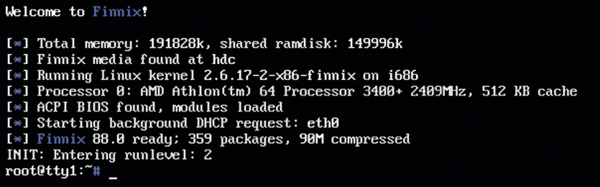 Figure 4: Unlike Grml and SystemRescue, Finnix takes a purist approach by not including a GUI with the system. The subsequent additional work is rewarded with a lean 480MB footprint for the entire operating system image. © Finnix/Ryan Finnie
However, it is up to the observer to decide to what extent this history of origins is coherent, because Finnix was initially based on Red Hat Linux 6.0. Knoppix later served as the basis of the system, until Ryan Finnie finally made the switch to Debian GNU/Linux, primarily using packages from the testing branch of the Debian distribution since then. Finnix has never forgotten its origins: The principle that Finnix has to be as lean as possible still applies today, with a basic Finnix system weighing in at just 400MB, making Finnix the only distribution in this comparison that would still easily fit on a normal CD. Of course, the Finnix developers also offer options for installing the system on a USB stick and running it from there.
When it comes to hardware, Finnix is equally frugal. Less than 1GB of RAM is required to use the system in a meaningful way, so that even ancient computers can be revived with Finnix. The developers themselves even state that the minimum requirement is only 32MiB but add the remark that Finnix could certainly use more RAM if available.
Of the test subjects in the comparison, Finnix is also the most up-to-date system. The last Finnix release was somewhat longer ago than that of SystemRescue, but because Finnix uses Debian's testing branch, a current Linux kernel 6.8 is available, as well as a more modern toolchain for the basic system. Finnix also offers the best support in terms of target platforms. In contrast to SystemRescue, for example, Finnix supports 32-bit Intel CPUs without any restrictions, and Finnix can also be used on PowerPC systems, but only up to and including Finnix 111. Additionally, the Finnix developers provide the finnix-live-build tool that can also build Finnix ISO images for other architectures, with the ARM and ARM64 architectures playing a major role. Finnix for ARM64 can certainly be an attractive option for those who manage Mac systems with Apple's M processor, because it can basically run on these chips. However, the Finnix people wisely refrain from making any promises with regard to any form of usability.
This purism in terms of distribution size or supported platform takes its toll on the practical side. Because Finnix lacks a GUI, on the one hand, it is easier to maintain the distribution because the developers can avoid problems with Xorg, Wayland, and other desktops. On the other hand, the approach also ensures that Finnix only targets experienced professional admins who know how to call up and use the terminals on their Finnix system.
In terms of the tools required for system recovery and restoration, however, Finnix does not leave any gaps. Most filesystems can be checked and repaired with Finnix, as can encrypted drives with cryptsetup, MDRAID drives under Linux, or LVM volumes. The distribution also includes a backup tool for copying data from a local disk to another location, should you ultimately want to reinstall a system. Of course, Finnix also includes tools for copying a finished Finnix image to a CD or USB storage device. Although Finnix would easily fit on a regular CD with 480MB, most admins today are more likely to use a USB storage device or make Finnix available as a system in a netboot environment.
Live Environments
Even if Knoppix is no longer maintained as regularly as it once was, various ideas from Klaus Knopper live on in the entire community, as the Live CD images that all modern desktop distributions have in their portfolio today bear witness. Knopper's idea of pressing an entire Linux system onto a CD and making it bootable was a major success. Although the idea of bootable Live systems had already been conceived by resourceful minds before Knopper, he made the idea so popular that it gradually spread to the entire Linux world.
Some veteran Linux users will remember the regular discussions about installing Knoppix on a hard disk because of its ease of use. Knoppix was not originally conceived as a plain vanilla rescue system, but was primarily intended to make Linux accessible without needing to install. When others saw that the idea worked, they followed suit. Canonical, for example, offered ISO images of Ubuntu at a relatively early stage that booted directly into a Live system from which the installation of the operating system could then be launched. If this approach reminds you of Grml, you are quite right – Grml is also one of the pioneers in this respect.
Today, the world of Live environments is quite confusing, primarily because every self-respecting distribution has one. For example, if you download the latest ISO images of Ubuntu 24.04, you can either burn them to a DVD or write them to a USB storage device and boot your computer directly from there. UnionFS and its various offshoots and successors make this possible: Linux, when booted from the storage device, behaves in the same way as would a permanently installed Linux (Figure 5). Another important factor here is that, strictly speaking, Live Linux today is no longer read-only and no longer needs to keep all of its content in RAM. Unlike the CDs and DVDs of the Knoppix years, USB storage devices are ultimately writable, which is where UnionFS comes into play. Administrators today regularly have a USB storage device at hand that contains a finely tuned rescue system and can be modified.
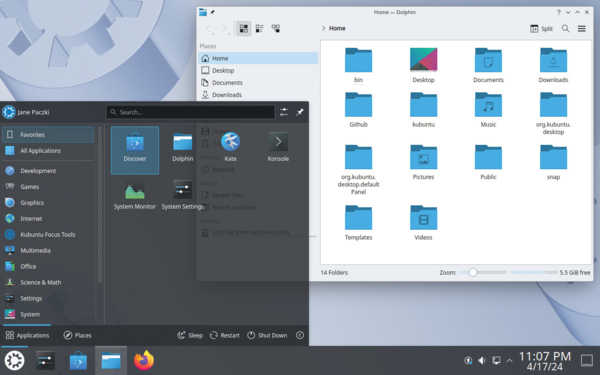 Figure 5: The Live version of Kubuntu 24.04 and the installed version on the hard drive are not different in any major way. However, Kubuntu is not a specialist rescue system. © Canonical
As mentioned earlier, it was only the later Knoppix versions that focused more strongly on system tools that could also be used to make repairs. Unfortunately, the Live systems offered by today's crop of distributions are not particularly well prepared for disaster recovery. Take a look at the current Kubuntu or openSUSE Live images, for example, and you will have a good idea of the focus and functionality of the systems. Standard packages that are usually installed on the system anyway might also include various tools that make it possible to rescue a local system, and some distributors might even offer a Recovery menu item in the bootloader menu of the Live image to let you boot a different or differently configured system from your storage device. At the end of the day, however, correcting errors and rescuing existing systems is not the focus of the Live versions of desktop distributions. Tools such as ddrescue can be installed at a later date – provided you know what you are doing and what to look out for. From this point of view, it is therefore advisable to use one of the specialized distributions such as Grml, SystemRescue, or Finnix for genuine rescue missions.
Conclusions
If you take a look around DistroWatch today, you will quickly see that the heyday of rescue systems for Linux and other computers is over. Popular solutions such as Rescatux are now orphaned, or their development has at least been paused for several years. Not much is happening in the Knoppix camp either, but at least three genuine rescue systems still exist and are under active development: Grml, SystemRescue, and Finnix. Which of these solutions you choose is primarily a matter of personal preference. Any of the three cases won't be a bad choice.
Infos
- Knoppix: http://www.knopper.net/knoppix/index-en.html
- "On the DVD," Linux Magazine , issue 247, June 2021, pg. 6, https://www.linuxpromagazine.com/Issues/2021/247
- Grml: https://grml.org/
- SystemRescue: https://www.system-rescue.org/
- Finnix: https://www.finnix.org/
The Author

Martin Loschwitz is the founder and managing director of True West IT Services GmbH, which offers scalable IT infrastructure based on OpenStack and Kubernetes.
« Previous 1 2

Buy this article as PDF
(incl. VAT)
Buy ADMIN Magazine


US / Canada
UK / Australia
Related content
-
Five special distros for system and network admins
 In heterogeneous environments, admins regularly face system maintenance challenges, but the right choice of distribution on a USB storage device keeps your toolbox in your pocket.
 -
grml – 32 and 64 bits
-
Four rescue systems compared
 Sys admins turn to rescue systems when faced with difficulties. Four alternatives – Grml, Rescatux, Knoppix, and SystemRescueCd – show what they can do.
 -
SystemRescue 9.04 (Live)
 SystemRescue
 -
This Issue’s CD
 SystemRescueCd 4.5.4
Subscribe to our ADMIN Newsletters
Subscribe to our Linux Newsletters
Find Linux and Open Source Jobs
Most Popular
Support Our Work
ADMIN content is made possible with support from readers like you. Please consider contributing when you've found an article to be beneficial.
